← All ideas19 Mar 2019aabranyOpenUser InterfaceaabranyDraiseRetniBewreShimoonThe_Blender_Benderandgenobanjavorbedrossianbestelixbnzsbriecmuldoondaniellapalmedpdpforlifeferranmartinezclarfrederico4digiornotigijcfnavmalltaochabrandpaul10romanvolgushev4565rs2128steinwildthiagocavalcantecarvalhowilBryorujhang
Quality of life improvements - Auto select hierarchy
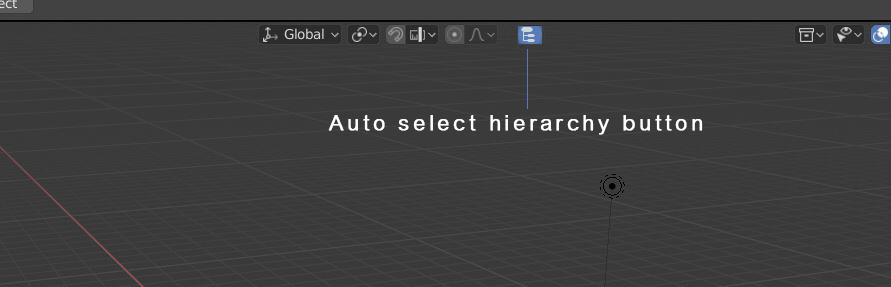
Add auto select hierarchy button in top bar
96.2%
Development Status:
Open
Upvote25Downvote1
a
aabrany
19 Mar 2019
13 Comments
J
Josephbburg
Probably doable with a Python addon. The only difficult part I can foresee is adding the event listener(although it's probably possible to just add it as a hotkey for RMB or LMB)
a
aabranyAuthor
*
@Josephbburg
* Only in the outliner Ctrl+LMB Do This ,this button will speedup the workflow.
b
bismamehar
Auto-select hierarchy" is a great quality of life improvement for 3D modeling and design workflows, especially in programs like Blender. It streamlines the process of selecting parent and child objects within a hierarchy, reducing time spent manually navigating complex structures. This feature is a boon for efficiency, allowing artists and designers to focus more on creativity and less on tedious technical tasks.
l
lsscpp
That is auto select parent+children: nice. You may want also an auto select "whole collection" (asking to myself:
'but then how to behave when clicking an object that is in more than one collection?'
)
a
ammusionist
*
@ Lsscpp
* If this is the "Object Parenting" hierarchy in 3D view then it would be collection agnostic, so that would be fine.
What happens though, if you select an object in the middle of the ancestry? (Like a shoulder on a stick figure) Would this only select descendants of this object (Arm and hand) , or resolve back up to the top object and select the whole hierarchy (Entire figure) ?
a
aabranyAuthor
*
@ammusionist
* This and other problems is part of a poor outliner and selection methods,so i tried to suggest a very small workaround,but it's far from being complet
d
dpdpforlife
This would almost behave like groups in Autocad and 3ds Max.
a
aabranyAuthor
*
@dpdpforlife
* In 3ds Max ,the group button open and close group , this also
can be nice but this button is a shortcut to selecting parent object and all things in hierarchy ,it will speedup the workflow for deleting duplicating and all actions that needed to be applied.
d
dpdpforlife
*
@aabrany
* This is pretty easy to setup where a double click on the parent selects all children.
You can also change the Type from Children to Collection to select every object in a collection. This is how I have my double click set.
a
aabranyAuthor
*
@dpdpforlife
* This will be helpful,but still just in the outliner and not in the viewport ,for artist who want to switch to blender from other 3d package the outliner is a very important tool and it is far from doing a good job
d
dpdpforlife
*
@aabrany
* Agreed that the outliner could do a good job. The shortcut I show above is fore the 3d Viewport.
1
a
aabranyAuthor
Thanks for the help.
s
steinwild
*
@dpdpforlife
* Thanks!! That's brilliant. I need to dig more into the key map possibilities.. Blender is full of surprises.

13 Comments
Probably doable with a Python addon. The only difficult part I can foresee is adding the event listener(although it's probably possible to just add it as a hotkey for RMB or LMB)
* @Josephbburg * Only in the outliner Ctrl+LMB Do This ,this button will speedup the workflow.
Auto-select hierarchy" is a great quality of life improvement for 3D modeling and design workflows, especially in programs like Blender. It streamlines the process of selecting parent and child objects within a hierarchy, reducing time spent manually navigating complex structures. This feature is a boon for efficiency, allowing artists and designers to focus more on creativity and less on tedious technical tasks.
That is auto select parent+children: nice. You may want also an auto select "whole collection" (asking to myself: 'but then how to behave when clicking an object that is in more than one collection?' )
* @ Lsscpp * If this is the "Object Parenting" hierarchy in 3D view then it would be collection agnostic, so that would be fine.
What happens though, if you select an object in the middle of the ancestry? (Like a shoulder on a stick figure) Would this only select descendants of this object (Arm and hand) , or resolve back up to the top object and select the whole hierarchy (Entire figure) ?
* @ammusionist * This and other problems is part of a poor outliner and selection methods,so i tried to suggest a very small workaround,but it's far from being complet
This would almost behave like groups in Autocad and 3ds Max.
* @dpdpforlife * In 3ds Max ,the group button open and close group , this also can be nice but this button is a shortcut to selecting parent object and all things in hierarchy ,it will speedup the workflow for deleting duplicating and all actions that needed to be applied.
* @aabrany * This is pretty easy to setup where a double click on the parent selects all children.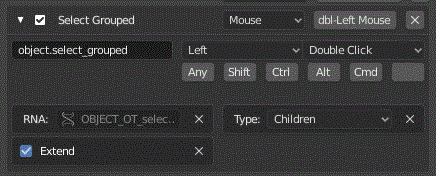
You can also change the Type from Children to Collection to select every object in a collection. This is how I have my double click set.
* @dpdpforlife * This will be helpful,but still just in the outliner and not in the viewport ,for artist who want to switch to blender from other 3d package the outliner is a very important tool and it is far from doing a good job
* @aabrany * Agreed that the outliner could do a good job. The shortcut I show above is fore the 3d Viewport.
Thanks for the help.
* @dpdpforlife * Thanks!! That's brilliant. I need to dig more into the key map possibilities.. Blender is full of surprises.