
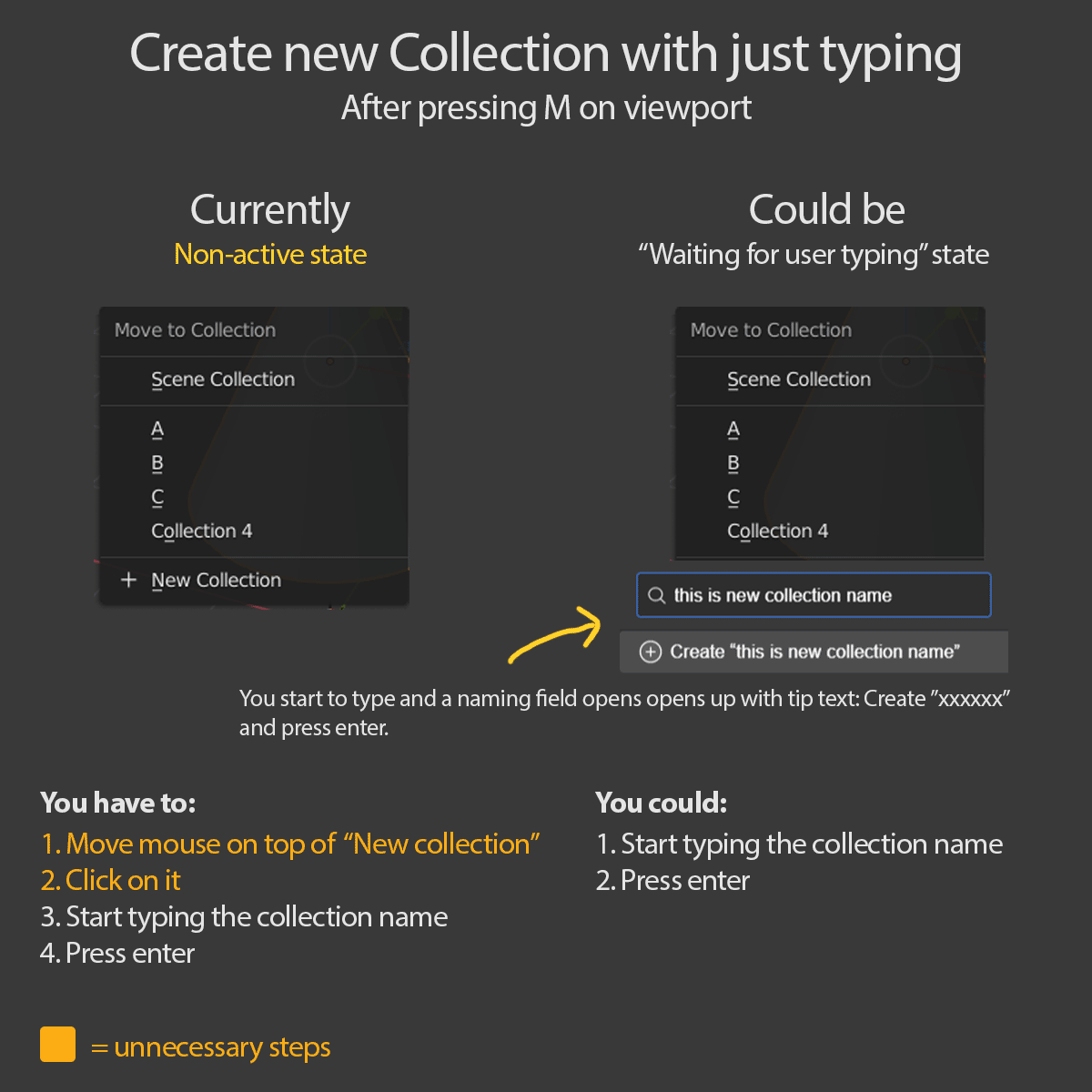
Create new Collection with just typing (after pressing M)
This function is from Eagle.cool screenshot tool which has intuitive, super fast & smooth UX
- Select an object in the viewport
- Press M
- Start typing the collection name
- Press enter.
Collection with new name created without any extra mouse moving or clicking. You start to type and a new "naming field" opens up with tip text: Create ”xxxxxx” and then press enter.
Only conflicts:
if you want to name collection which starts with a number, then you have to first type some letter then backspace it then type the number, since pressing number moves the selected object to the collection which the number is keyed/bind (?) to.
3 Comments
I'm against this: I'd vote for "name the new collection without the need to enter the text field". The step you wrote are wrong: there's one more between 2 and 3, and it is "click on text field", which is the only one I'd remove
* @ Lsscpp * You don't have to click on the text field after clicking "New collection" > the text field is already activated.
What particular part are you against and why?
I agree with keeping as it is. Sometimes I do want to move items to a collection that already exists. There is a shortcut for creating a New Collection - Ctrl + G, but it seems to just put the New Collection in Orphan Data. I'm not sure if that's the intended functionality. Then you still have to enter the name through the tool options.