
Geometry Node output for Values
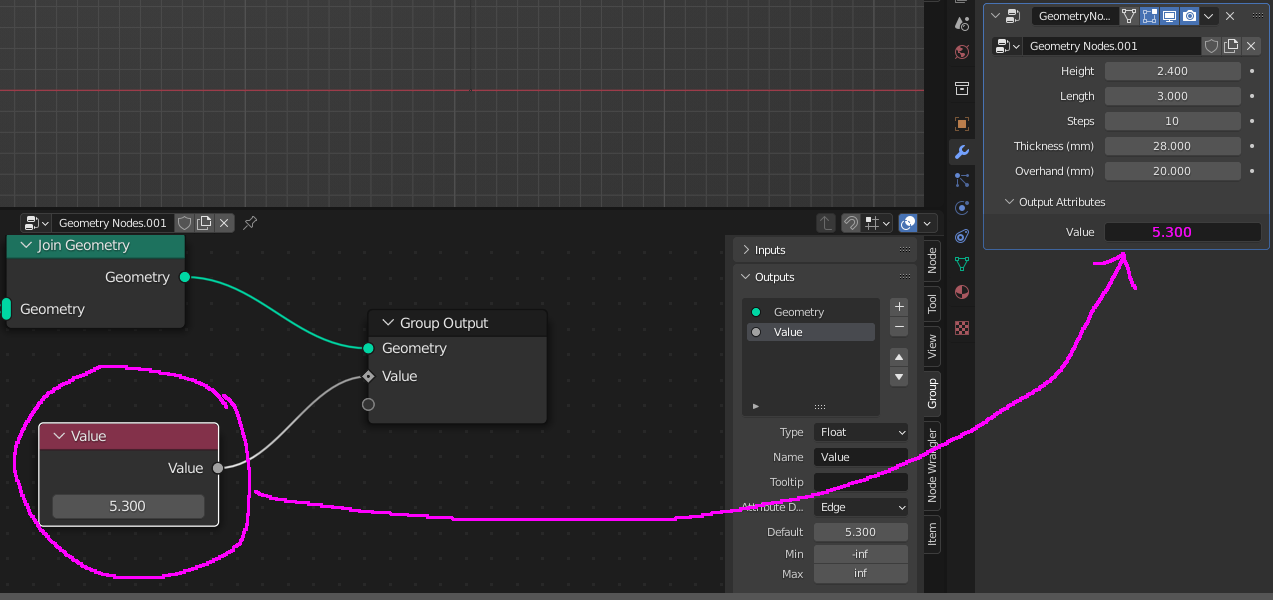
I'd Like to to be able to extract calculated values into the Outputs field of the Geometry node modifier. like the attached photo.
The logic sorts of seems to be there but then it's asking me to define values of an output....
6 Comments
That would be very useful to use calculated values from GN as drivers. I could use it to place an empty to a certain location for example.
That box on the right isn't asking you to define the values for the output. It is asking you to define the attribute that Blender should store the data/values that are output from the geometry node tree.
Here is an example of how you can use the output values to control the color of an object. There are arrows and numbers to help you keep track of the flow of the data through the program.
spent whole day trying to figure out how to get the variable to appear under the modifier stack just to realize it isn't even possible cause i found this page. I'm trying to add a driver to the variable so i can control another object with it but the method you showed I don't see any place to set up a driver cause I'm just viewing it in my output.
x 2 it makes a lot of sense
ok so theres a way to apply a driver, you need to ouput the attribute to all vertex and then you can poaste this one liner to get the driver from geometry nodes : bpy.context.evaluated_depsgraph_get().objects["Cube.001"].data.attributes["test"].data[0].value
replace the object naame and attribute name , not great but works
But if you had an output value then you could drive any property of any object and not just shader editor.