
Layered Material Painting
Note: I posted this and one other feature, but was told to atomize them to individual posts. I hope you all understand why I'm posting this again.
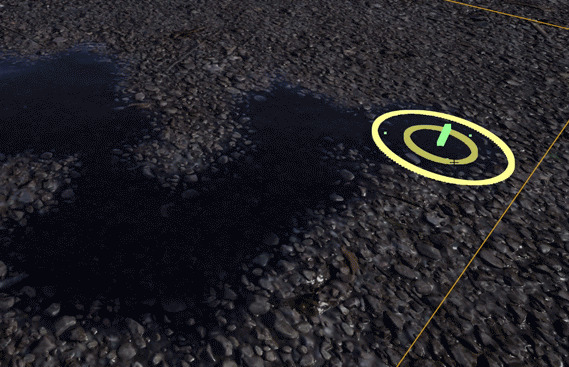
Unreal 4 has a very convenient material node for layering node subtrees in the output of a mesh's material. For that single mesh, one can enter texture painting mode and arbitrarily paint those materials/groups across the surface of the mesh, such as for a landscape.
Texturing a Landscape in UE4 (Unreal Engine 4)

Right now, emulating this is ridiculously difficult in Blender, requiring cascading two-input Mix Shaders each with their own maps as input to the Factor. It also requires switching back and forth between the maps and the final material output, with poor painting performance. In the preceding video, we see that Unreal allows shader groups to be compiled into said layer node, which then exposes all of those layers for direct painting onto the surface, with blending techniques such as Height Lerp.

A layering node in Blender might have, as with Unreal, surface and displacement inputs for each layer, plus maybe a dropdown for the blend type. It could also be dynamically expanding, with either a placeholder node for adding new node trees, or a field to set the number of layer outputs. Then, a set of direct material painting tools could be adding to Texture Paint mode, such that painting materials is as easy and simple as the above GIF.
This would allow much, MUCH simpler handmade terrain creation, as well as freehand organic material application to objects, maybe allowing the bruising of a fruit or rusting of a metal object. Or maybe even more subtle applications, such as layering scratches and weathering into specific places on a leather saddle, for example, by crossing a mixed shader into a separate layer.
8 Comments
I think adding this to both Eevee and Cycles would be amazing.
* @devorecjd * Agreed!
You should be really cautios about using the mix shader nodes for this kind of blending as it is not the same as UE4. It would take me longer to explain why, but if you are really interested in that topic you could check out my master thesis. github.com/Weisl/Master-Thesis-Material-Layering/blob/master/patternLayering_patscheider_2018.pdf Chapter 3 explains the differences between different approaches. The best way to implement a better material layering workflow would be to provide node groups that allow you to easily blend textues and channels before they are plugged into the principled shader.
* @Matthias Patscheider * Poliigon's PBR Mixer is a pre-made node group that blends 2 sets of texture maps ( demo ). Literally just a bunch of RGB Mix nodes - though I think this is incorrect for normal maps ? And it would be nice to have this right out of the box.
I will check out your thesis!
Do you really need it to make layers of shaders? Or to operate like layers of shaders? The power of the Substance tools is that the number of materials doesn't matter because it's all one shader with different properties. So while you might be painting a "rock" and a "puddle," the maps it makes are singular, no masks. I ask just because your method would require textures for all the different materials, including a mask, while the other way there's always the least number of textures possible.
Mind, I noticed this advantage because I tend to build my materials the way you describe, and layer whole materials rather than changing properties. So it's not like I think it's bad or anything. When I saw the whole PBR thing take off, I thought that the ability to have n materials with a constant set of maps was only second to the power of standardization.
This sounds like what i want, All id like to be able to do is to make a few materials in the shader editor (with normal, colour and roughness maps) and then paint them on. this would save soo much time and prevent the issues of using multiple apps
I think in combination with this idea it would be fantastic: blender.community/c/rightclickselect/TTdbbc/
What about mix shader with a simple paint mask?