
Use Cursor orientation for modal control
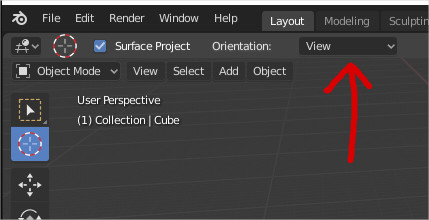
Blender2.8 have a cursor with orientation. So we can place a cursor in a plane and set a custom orientation...

But we only can do this with the active tool, we cannot do with the classic modal tool, we don't have any option to configure that.
So my proposal is that the modal cursor use the value that we have configured in the cursor active tool. So if we want to work with modal cursor and set an orientation we only need to select cursor active tool, change the orientation to any that we want, and then go back to select tool and use the cursor in modal operations without problem.

This behaviour is similar to other tools like pick color in photoshop. That you can call in any moment with a modal hotkey, but it uses the parameters that you configure when use the pick color tool.
4 Comments
It's unclear what you're asking for. Try explaining it without the references to other software. As it is, I can't even guess at what you mean.
* @Josephbburg * Yeah
Blender2.8 have a cursor with orientation. So we can place a cursor in a plane and set a custom orientation...
But we only can do this with the active tool, we cannot do with the classic modal tool, we don't have any option to configure that.
So my proposal is that the modal cursor use the value that we have configured in the cursor active tool. So if we want to work with modal cursor and set an orientation we only need to select cursor active tool, change the orientation to any that we want, and then go back to select tool and use the cursor in modal operations without problem.
This behaviour is similar to other tools like pick color in photoshop. That you can call in any moment with a modal hotkey, but it uses the parameters that you configure when use the pick color tool.
* @Alberto * Thanks for the clarification. I agree, good idea. The 3D cursor is a great idea, I'd love to see it do more and more.
* @Josephbburg * If I'm understanding this request, it's similar to a thought I had.
When I Shift+Right Click I can place the cursor, but it seems like while working this way it's always placing it by View Orientation. Is this just what a user always gets when using Shift+Right click to place the cursor?
I'd like to default to the Grid instead, or be able to change the mode and have it stick while I'm triggering the cursor placement from other tools.
Is this what you're asking for, @Alberto?