
Weld Tool Proposal
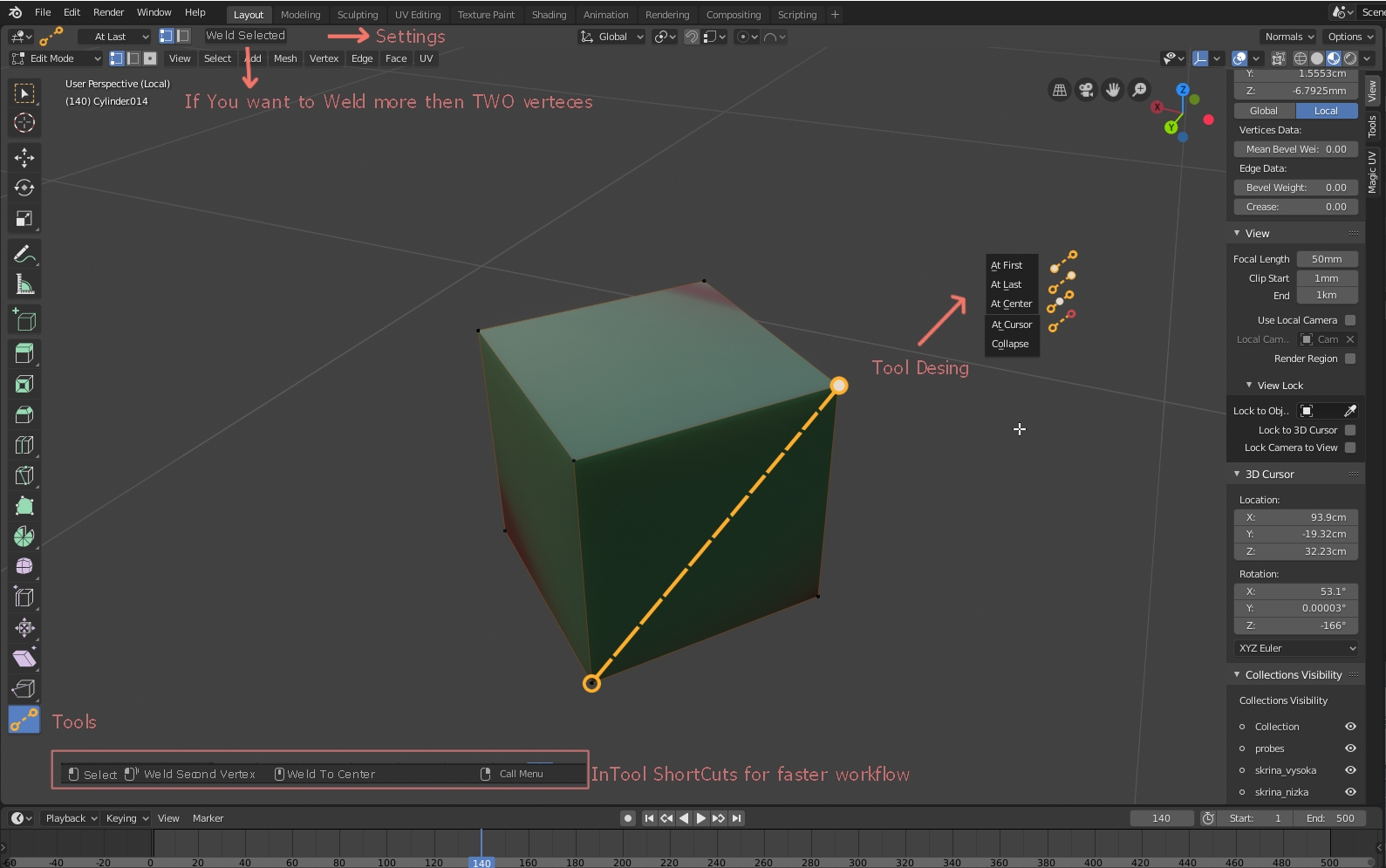
Hello, Welding vertices in Blender is harder. I’m talking about “ALT+M” Shortcut, which is too far on keyboard. In industry, we use welding features a lot (for optimization low poly models). In Maya its SOO Buggy. But as a tool its more user friendly. And Blender could have welding as a tool too.
Maya Target welding tool: youtu.be/ZAMxrlWjsUc Proposal in the image.
For Welding more then two verteces you can just click on them like you normally would and click some button. (in settings) With a tool, you can hold ALT (or some other shortcut key) to weld to At center.
24 Comments
I set up Pie Menu Editor to have this functionality. I missed it from 3ds Max. With Blender, you can turn on automerge editing which is great if you want the multiple selected verts to maintain their distance from each other and only any verts that wind up in the same place merge. This is nice in some instances, but it's also really great to have all of the selected verts merge together with the vert that you snap to.
* @dpdpforlife *
I hope we'll have pie menu for tools in the future (Tool popup is fine now, but with more tools, it will be unreadable) I personally like welding in Maya. Simply because of its visualization of a tool and when you hold MMB, you weld to center.
* @dpdpforlife * I'm glad I'm not the only one here that see Pie Menu Editor as a solution. I could post PME as a option to 70% of the requests here. But people just don't get it.
* @dpdpforlife * With automerge editing, it's easy enough to merely scale all elements to 0, at least that's what I do.
* @Josephbburg * Sure. To make them all weld to a specific vertex, you have to set the pivot point to active element and make sure you pick the target vertex last. It's not super intuitive, but it works.
* @othoap * I know. It's hard to convey to people just how powerful that tool is. I think the name is misleading, because it goes way beyond pie menus. In some ways, it's almost an interactive, artist friendly, scripting interface.
Looks very intuitive and controllable than the 2 step process of confirming what kind you wanna do - per element... so slow.
There's already a way of doing this in Blender, which is IMO better than a separate tool. Simply set snapping to VERTEX, and enable automerge editing. One more click than Maya, perhaps, but fewer clicks overall since it isn't a modal tool.
For edges, there's no need for a weld tool, simply select the edge and press 'x' to call the delete menu. Then press 'c' to select 'collapse edges'. Very fast, works on many at one time. And of course you can always select two vertices and hit 'f' to create an edge between them!
Also, you can press shift-tab to enable/disable snapping, or use the control key in the grab, rotate, or scale tools.
* @Josephbburg * that works but some people can't use two hands
* @Josephbburg * I'm not saying that there are no workarounds (and those options will still be there) but if it would be a tool I can simply click on a tool icon (or shortcut) and do my thing. For automerge - You can't easily merge to CENTER. 1.You have to select two vertices 2. Press "S" 3. Let go of mouse and pres "0" 4. Enter For edges - I find it counterintuitive. (Because its in Delete menu, word "Collapse" means "merge to one vertex" like its in "ALT + M" menu and you need to select vertical edges to merge them horizontally)
I find the idea of Weld Tool as solution for people who are new to Blender WITHOUT sacrificing old techniques.
* @othoap * I definitely agree that Blender should consider handicapped users. However, I don't think it's possible to cater to everyone's needs all the time. This is where the long-ago proposed idea of user interface templates (such as the Blender 101 idea) comes in-- keyboard only features should be made more discoverable in a 'one-hand' template. Then there's always UI forks, like BforArtists. It's a tough thing to dance around. Not everyone can see in color (one of my friends, a very talented artist, is colorblind), but when the Blender devs removed colored icons, everyone threw a fit.
I'm certainly not opposed to the idea of making new tools- the tool system needs to be more fully fleshed out. I just don't want the tools to encourage a slow or inefficient way of working. Ehh, I donno what the solution is. You might have just convinced me to upvote this one.
Maya artists coming to Blender will be confused because they're use to specific tools for everything. 'Weld' is just one such operation. But if they continue to use the same flawed workflow in Blender, they won't get the full benefit of the switch! I really think that both ways of working should be easy to discover. Using a special tool, IMO, is only acceptable for rare operations (such as shear). If I'm doing something frequently, I need access to it all the time, in context with all my other most-used operations.
Apologies for the longwinded response, but one more thing: I believe the Python API for 2.8 includes custom widgets and tool creation (not documented yet, AFAIK). So custom tools will be an easy to implement thing, unless bmesh is somehow incapable of doing the operation. Only then will a change need to be made in c code, by the main devs.
* @no4me * Fair enough. I think it runs the risk of encouraging bad habits, but I think everyone agrees we need a faster way of merging, without sacrificing the precision the current menu gives us. For me, it's easier and faster to remember five keys than two clicks. I lose my momentum when switching. This probably isn't true for everyone!
* @Josephbburg * Yep, agree. I had so many arguments with my colleagues (Maya users) about how Blender should go and those people are just lazy to learn new software.
* @Josephbburg * This is just a proposal. We can discus about everything here.
* @Josephbburg * what are you talking about?, Maya doesn't have a flawed workflow it's the way around, Blender now is in a very odd place with tools that lack basic functionality like the weird knife, loopcut ,edge flow...etc but conflicting with the modal operators.
I actually find Blender more slower in modeling than Maya, because many tools are spread out with the bare minimum functonialty and the many clicks needed each time.
Check this playlist and try to copy with blender then you'll see what i mean. youtube.com/playlist
* @Pascal 0 * [This is the first of two] I've been modelling in Maya a couple years now, it seems you have different preferences for working, because Maya is an order of magnitude slower for me, despite using marking menus and hotkeys continually.
You got the names backwards here. In Maya, there's a Mesh menu, a Mesh Display menu, an Edit Mesh menu, and a Mesh Tools menu. And a Bonus tools menu. And a separate menu for UVs. Add to that all the menus and tools that aren't related to or necessary for modelling- there's always cluttering up your screen. In Blender, I can use hotkeys for all of the modelling operators, and I don't have to deal with tool switching at all. Each operator, if you use menus, is organized into the appropriate menu (vertex, edge, face) and is available in the context menu
wbased on the current selection mode. I simply don't understand where you get "bare minimum functionality" from. What kind of functionality is bare minimum? Why do you have to click many times?The knife tool is weak, I agree, but I think it's a bad habit to use it in most cases, so I don't really care. There's no native "edge flow" tool like the one in Maya, but there's an addon that does that. I can't imagine what problem you have with loop cut. It would be nice to have something like a connect tool in Blender, IIRC there is an addon for that, too.
[continued] And in my first comment I simply missed the most obvious limitations in Maya, the selection and masking features.
<h5>Selection: </h5> In Blender, I have the ability to do many kinds of selection at any time: `alt`-`RMB`:.............. Select edge loop `ctrl`-`alt`-`RMB`:..... Select edge ring `ctrl`-`RMB`:............. Select shortest path `ctrl`-`+`/`-`:.............. Expand/Shrink Selection `Shift`-`ctrl`-`M`:....... Select Mirror `L`............................. Select linked `ctrl`-`L`.................... Select linked (extend) `shift`-`L`.................. Deselect linked Add to that the box select (`B`), circle select (`C`), lasso select (`ctrl`-`LMB`), Select Similar (`Shift`-`G`), select all/none and invert selection (`A`, `alt`-`a`, and `ctrl`-`i`, respectively) and the many other options in the Select menu, (one of my favorites is Select Linked Flat Faces, which I can access at any time with the `Q` key because it is in my quick favorites menu). Notice that everything I've mentioned has a hotkey, and I've excluded a few because it would take me too long (all this markdown is kinda a pain). Most of these also deselect (if the active element is currently selected), although some require a specific key or mouse action to swtich from select to deselect e.g. Circle Select **adds** when `RMB` is used but **subtracts** when `MMB` is used. I like this, because it makes it easy and fast to get exactly the selection I want. Maya has equivalents to several of these, but simply misses many of them. Even its basic selection is inferior, however, because it fails in cases of very-small, closely spaced elements. When trying to edit e.g. a beveled model, or a model that is prepared for subdivision with edge-holding loops, selecting in Maya becomes a pain. Even when my mouse is over the small edge, Maya will highlight and select the larger edge. I never have this problem in Blender (and I don't miss pre-selection highlighting. IMO it's only needed when there's uncertainty in the selection tools, and there isn't). The context-based double click for edge loop selection in Maya is abysmal- it means that the success of selection is dependent on the order of element selection! The same input can do two different things based on the order of events (select all linked or select edge loop or ring). This makes it difficult to select arbitrary sets of vertices, and I often find myself having to undo my selections many times in Maya (at least the undo is fast, most of the time). Maya's weak selection features are especially atrocious in light of its Tool>Selection workflow (as opposed to Blender's Selection>Operation), in which the tool must be used to select and perform operations, rather than merely performing an operation on the current selection (e.g. the Weld Vertices tool in Maya. Blender uses `alt`-`m` to merge the selected vertices, but you can get similar behaviour to Maya's tool by enabling vertex snapping and automerge).
<h5>Masking: </h5>
In Blender, I can easily mask vertices, edges, faces, objects, collections, etc. from selection by hiding them. In context with modelling, hiding is a temporary, view-port only action. They will be visible in the render (Use the mask modifier to hide them in the render). In Maya, hiding mesh components doesn't masks them from selection, nor is it temporary -- they will be hidden in the render and this is sure to cause problems. Being unable to hide things to mask them from selection exacerbate's Maya's selection problems by introducing a particularly vexing workflow problem- that hidden geometry occludes the desired selection! I often use hiding to improve the flexibility of Blender's already flexible tools. Consider this- you're trying to select a few fingers on a character's hand, with the palm up to the elbow. In Blender, I can
alt-RMBthe borders of the selection, that is, the base of the fingers I don't want and the arm past the elbow, and hide them. Then, I can select the interior portion with 'L'. Consider another situation -- I have a region of a mash with an easy to select border, but the interior is not easy to select because it has edge loops that reach into other parts of the mesh. I can select the border withctrl-RMBin a few clicks, hide it, then select the interior withLand un-hide to get the entire selection. Blender's ability to hide components temporarily greatly improves its flexibilty. Another great feature isShift-Hwhich hides everything but the selection, great for isolating components of a mesh for more detailed work. I don't have much to compare to Maya in this regard, since Maya is simply missing this as a feature, and in it's place is something I'd consider an anti-feature.Finally, I want to say that this is a non-exhaustive list. I haven't even mentioned the 3D cursor!I could keep going for pages, but I think I've made my point. Honestly, I think I've gone more than a bit off topic merely in replying to you, but I wanted to explain why I think the way I do.
* @Josephbburg * See every little functionality is an addon and you have to hunt for them and some don't even work in the latest versions of Blender, i get it you people don't like hearing that Maya is better but you should understand that it has more power than Blender could ever have, I hate writing essays to reply to every point but it seems you didn't even take the time to check the videos. Maya also can easily be turned into hotkeys centric ,the difference in Blender is if you try to change few hotkeys then you'll break it or make one part not working properly hence they're trying to make an industry compatible keymap but due how poor mode switching in Blender is i doubt that anyone would use it.
* @Josephbburg * You can check the many requests on this site for Maya modeling tools like this one, display border edges, the Multicut tool,Parametric Modeling, Base point snapping..etc if they weren't good no one would request them, for me Maya cover all the necessary tools for modeling, i got frustrated with blender's lack that now I only use it for other parts of my workflow and lets not forget UV editing ,Retopo, Performance, Rigging and Animation tools.
* @Pascal 0 * Fair enough, agree to disagree. I don't intend to continue this discussion here, you took us off-topic by making the comment about Maya, and I shouldn't have responded in the first place.
delete
* @Josephbburg * Because i hate when Blender users shit on Maya when they actually have never used it or know what's capable of.
or at least similar visual indicators (that circle) like in Maya within Blender automerge editing option when you slide vertices close to eachother.
I think this tool should have shortcut like other tools have. (Extrude for example) "Alt + M" is too far. It could be in RC or "CTRL + V" menu too.
I'm personally overly accustomed to the ALT+M shortcut but I absolutely agree that adding it as a tool could be very beneficial to users who prefer to work that way. I support this idea!