
Extrude Improvements
Hi.
My issue with the current Extrude results is that it misses edge data like Crease, Bevel and Sharp edges on the new generated faces. They arent extended alongside edge loops.
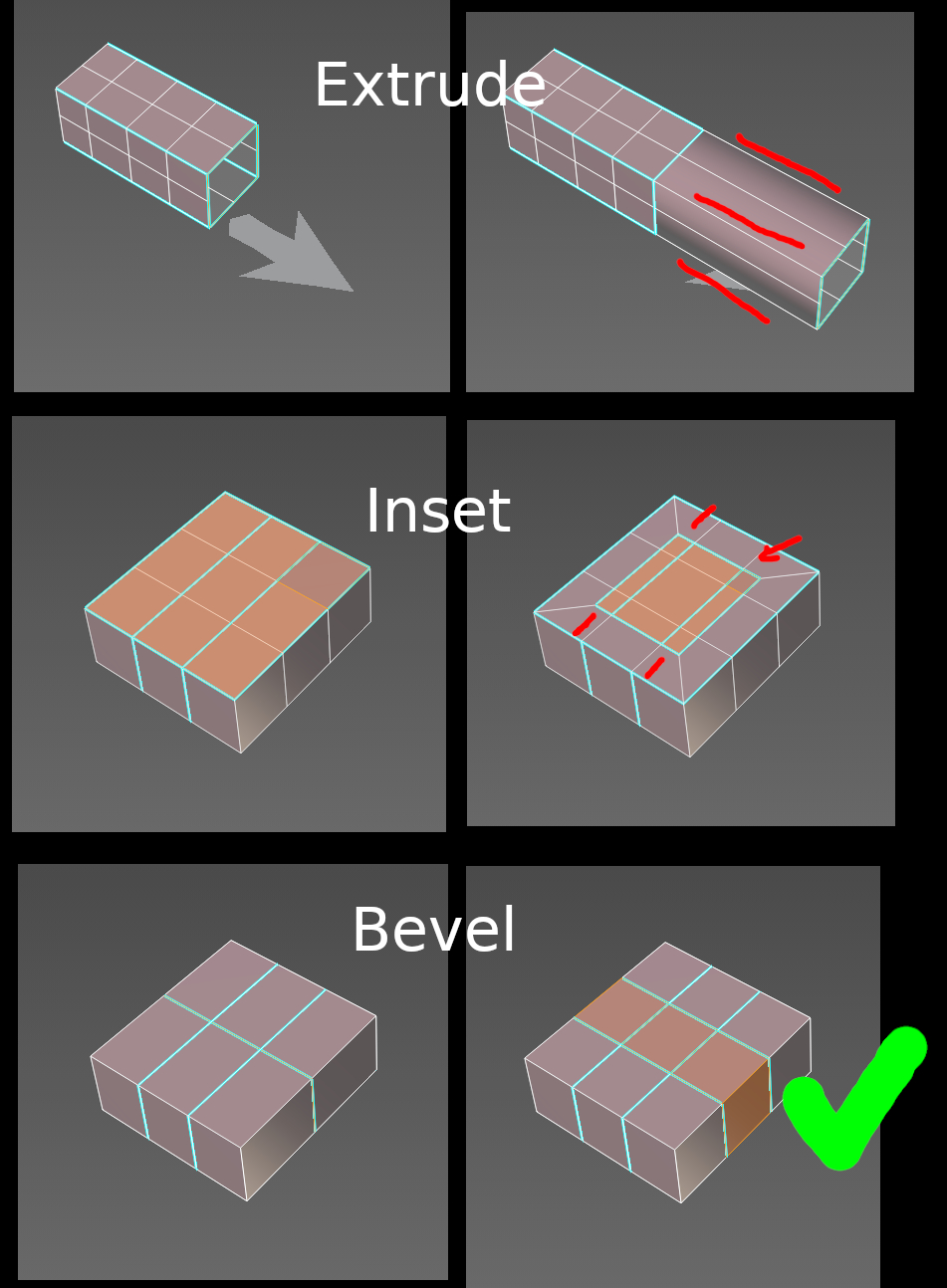
In my picture you can see how Extrude compares to Inset (which has the same problem) and Bevel. There are two cases: marked edges on the border and marked edges along edge loops.
Extrude and Inset are breaking the marked edge loops, you have the trouble to correct the missing parts. Bevel on the other hand preserves both cases, not only on the border but also along loops.
Its convenient and makes sense for modelling. I suggest to follow the existing Bevel method and enhance the behaviour of generated faces for Extrude and maybe similar tools.
7 Comments
is this really justified, because they create new vertices and according to your logic they should come up with values for them? mesh analysis? with what? do it yourself. It's enough to look for an algorithm for everything, you need a neural network to understand your idea and do everything right. otherwise in most cases it will either interfere or simply not be used
***@mod moder *** sometimes solution so simple, that blender could do it by itself. For complex solutions any constant decision enough. If other softwares can do it without ai this way why blender doesn't?
* @IIIFGIII * Bevel says no.
* @IIIFGIII * for such complex shapes hard edge marking will be good solution as max does
It might be tricky to know which edges to mark sharp/mark based on your top image/example. Since the entire boundary is marked to begin with.
To get what you have highlighted in red/only the outter edges, we might also need an angle threshold then, to say, based on initial edges marked, extrude, then only keep marked, if within this threshold (edges only 45deg or higher). If that makes sense. Otherwise in your top example, I'd expect ALL of those middle edges to get marked then, instead of only the outter ones. So yeah, maybe some threshold for middle edges created for marking. Or maybe I'm thinking about this in the wrong way.
* @Matt L * At first I created an image without the boundary marks, but then I wanted to show what is kept by Extrude at current state. Tbh I wish it would rather not mark anything at all in this case because I hate those duplicated border marks, haha.
I imagine the decision if there should be marked edges here is easier if you think about the process as if you create an edge loop first around the existing geometry and then move the border away.