
Fix Blender's broken baking process (animation)
This may be a problem that crosses all 3d software, but here is proof that Blender's process for baking keys is broken.
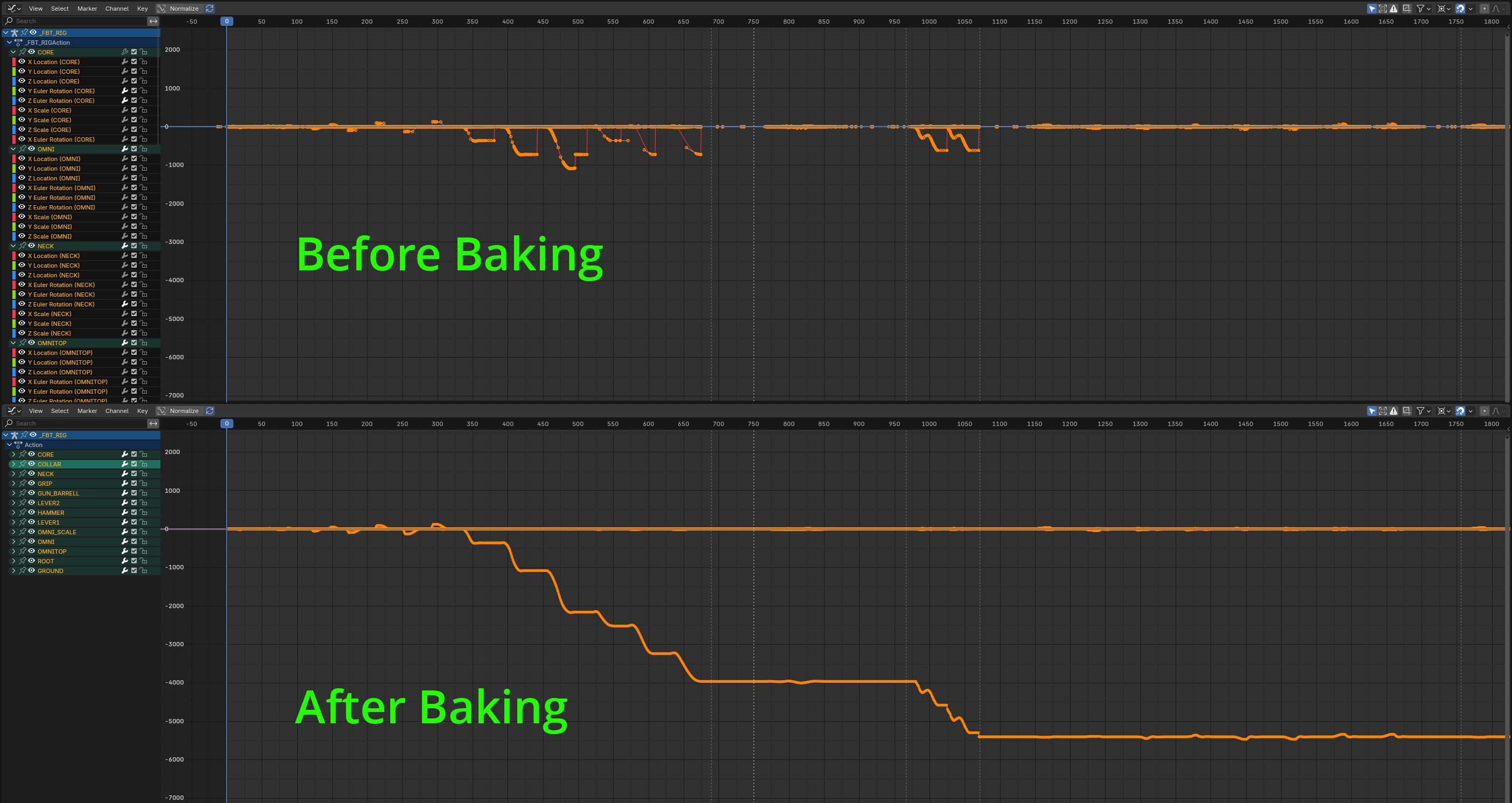
It seems to be specifically with Euler rotations. Another example:
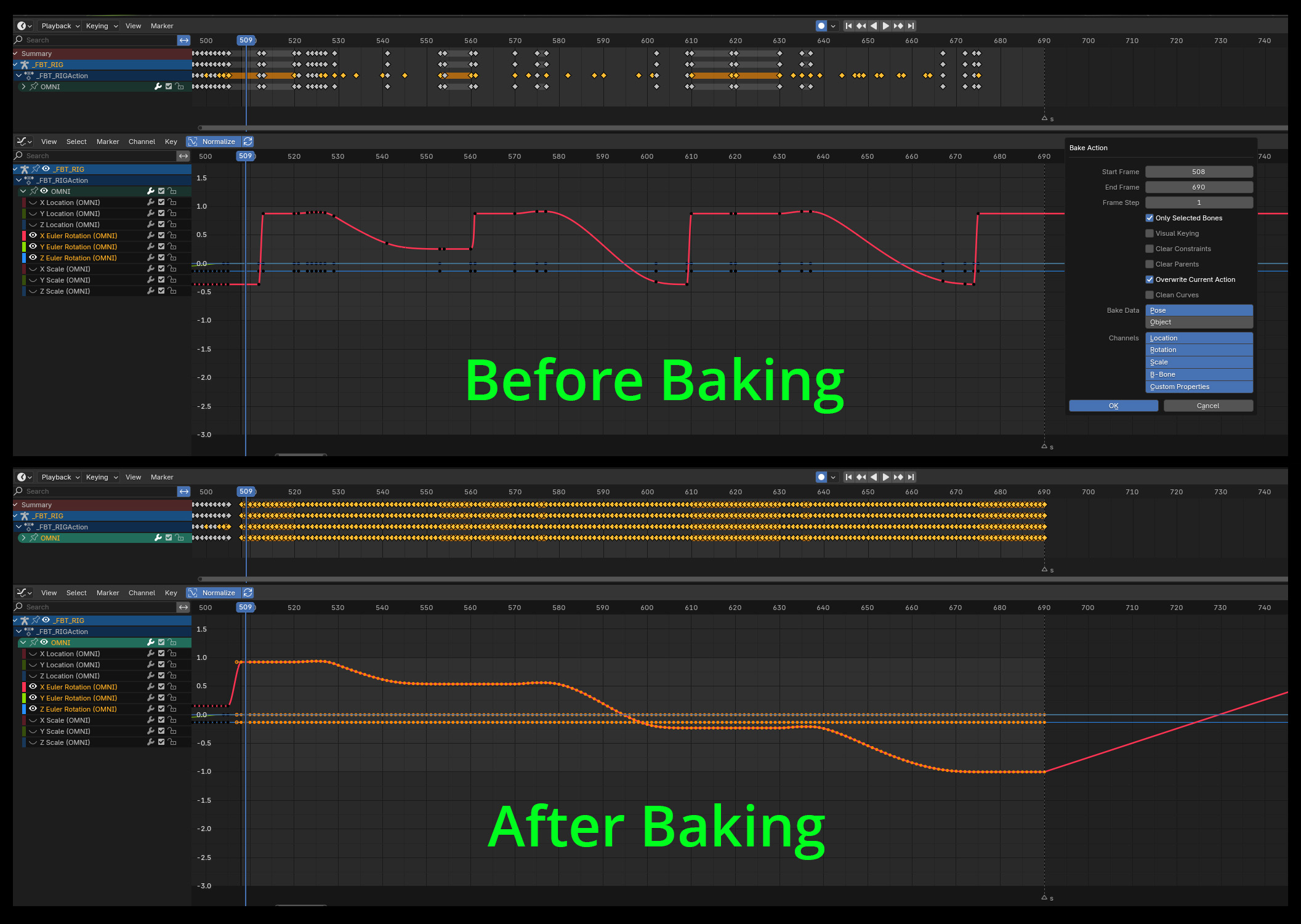
As a professional animator, I need to have clear rotation values, so I'm reliant on Euler as a rotation method. It is impossible to animate properly with Quaternian rotations because animating along one axis keys ALL axes, and that's problematic for animating with any kind of control.
So, when baking keys is problematic for Euler rotations, that's an ACTUAL problem.
There are rough workarounds for this, namely using Rigify to convert rotations to Quaternian, but this only works half the time.
This is important because once the animations are done, the keys will be baked during the FBX Export process, which I assume uses the same baking method as the main program. If the keys aren't already baked the FBX Exporter will convert all the Euler rotations to Quaternian and then bake these.
What's worse is that the larger the animations get (in terms of frame range) the more corrupted these rotations get also.
My hope is that there is someone out there who will give this a go and try to solve this issue, namely because this is a vital part of game dev. Animators will pour all of their love into their animations only to have the FBX process ruin part of their work. Not fair.
I absolutely love Blender, but what's to be done about the baking process that is, to me at least, clearly broken?
7 Comments
I assume you are using the "Bake Action" operator.
Is the overall visual result the same after baking? If not this warrants a bug report.
Correct. Pose > Animation > Bake Action...
This result is because I'm using Euler rotations and it's interpreting them as Quaternian. (Or... applying Quaternian commands to Euler rotations).
I'm not sure what is exactly the issue here. You mention the euler rotations being converted to quaternions, but your screenshots show only euler. (If it was converted into quaternion, you would have 4 new rotation channels named quaternion, and data in them).
What I do see is what seems to be rotations that used to jump back, converted into ones that add to each other. Since your graph is normalized, we can't see the actual values of the keys, but I guess maybe the keys were jumping back 360⁰ and the baking "fixed" it?
Have you tried with and without visual keying?
Regardless, if you think you encounter a bug, please the menu Help > Report A Bug. It would also be nice of you to post the bug report link here, so that we can follow up. And unless the devs tell you it's not a bug (I.E. if it's an expected behavior from the current design), please come back here to detail the issue. Otherwise, bugs are off-topic here.
Hi Lauloque, thanks for your response.
You are correct, I'm using Euler rotations. The problem comes when I apply Bake Action to bake the keys I get skewed results.
This is because baking will apply a Quaternian process to the bake and will screw up the Euler curves. That's the result you see in the above images. That's the issue I'm having with it.
If it applied a Euler process to the bake the curves would be 1:1, and there would be no issue.
Thanks for the info. I'll report it as a bug and see what the devs say. Will follow-up with their response. Cheers.
The newly created bug report is here: projects.blender.org/blender/blender/issues/126976
I think it would help to include the screenshots in the bug report instead of requiring to click an external link. It's also better for archival purposes.
Hi Lauloque, thanks for the suggestion. A screenshot has now been added to the bug report. Cheers!