
Scripting Node Editor
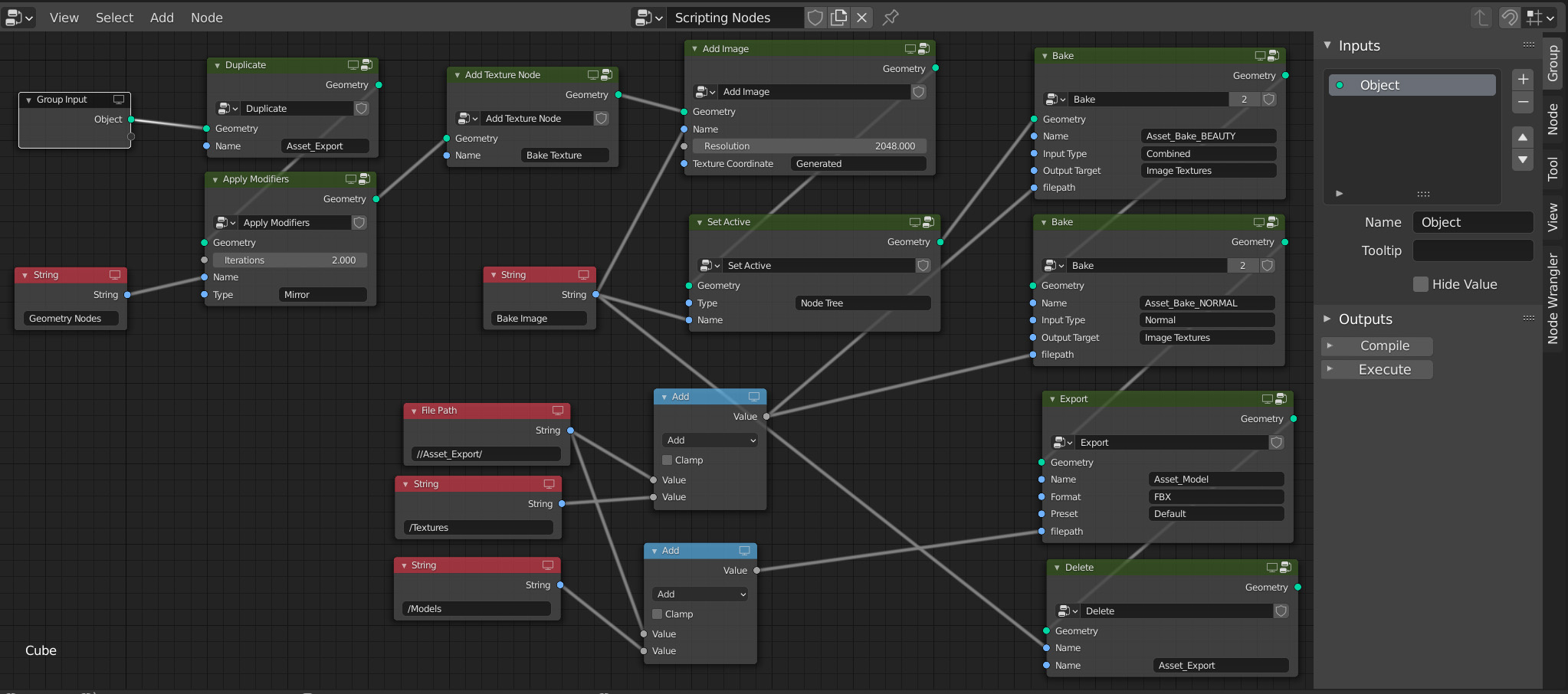 This is inspired by a previous post here, but I cannot add images to comments, so I guess I have to start a new thread... sorry about that.
It would be great to be able to simply create buttons that automate tasks in Blender. I do this for large projects that require repetitive tasks for exporting assets for example :
- Duplicate active object
- Apply geometry nodes
- Add a new texture to the material to bake into
- bake diffuse and save externaly
- bake normal and save externally
- Export
- Delete the texture from the node tree otherwise it gets messy
- Finally delete the duplicate that was just created for export.
For many assets this is tedious if you don't want to "freeze" the procudural possibilities. However making a script when not familiar with it takes a lot of trial and error, finding the appropriate code, often times simply copying the output of the Info editor won't work mostly because of the fact that via a python addon, selecting an object is not the same as making it active. In my shallow experience with scripts this is what complicates things the most because you have to go through some for loops that shouldn't be all that necessary.
1 Comment
See Serpens Addon .