
Two Python Console UX Improvements
1.
In
Python Console
, clicking on a tab recommendation ("Line Info") should type in the text - e.g. I click on
show_expanded
from the list, it pastes it at the end of the active line.
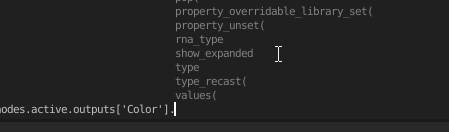
Some points to consider when performing the check (my naive expectation):
- Based on number of last "Line Info" items, see if the cursor is in range.
- Based on # of characters, perhaps trim sides so only clicking on the text works?
- You might have to consider font size etc., I don't know.
Maybe features like this aren't part of regular consoles, but I think it would make a nice quality of life improvement.
2.
Often, when tabbing and nothing new shows up (it's not a list like
nodes
,
inputs
, etc.), the only logical thing is to type a dot (or enter). So when pressing
tab
and there are no "recommendations", maybe see if after dot there would be something "new", and if yes, type in the dot and show the new recommendations.
1 Comment
not related to console but autocomplete in text editor github.com/tin2tin/Intellisense_for_Blender_Text_Editor
and here ( blenderartists.org/t/essential-text-editor-add-ons-for-coders/1163857 ) you can find many useful things