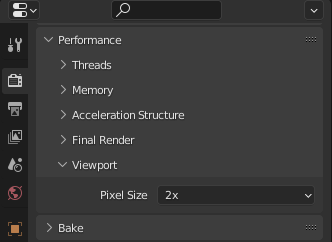
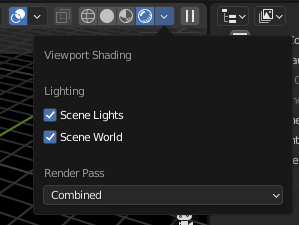
Add Performance Viewport Pixel Size to the Viewport Shading overlay menu
Put this
in this
100%
Development Status:
Open
Upvote5Downvote0
t
thinsoldier
30 Dec 2021
9 Comments
L
Lauloque
Well that wouldn't be a "viewport shading" popover. Isn't it?
And by that I mean: If we add this to the popover, people will want to add every Performance setting from every render engine to this popover. And then, any other settings as well. So where do we draw the line so to not have a popover that's twice your monitor's height?
Right now the BF chose to use that popover for viewport specific shading options.
2
k
kei000000000001
There is no line, viewport settings MUST be in the viewport! that is where the user expect all viewport related stuff to be, not "somewhere else".
1
L
Lauloque
You think it must be? Then I wonder why most softwares don't. But hey, how about a mockup of all the viewport related settings in that popup, just to see how it fits?
F
FreeMind
There aren't that many viewport-specific settings. How many can you find?
The line is this: If there's a setting for the viewport, that has an equivalent for the final render, then it doesn't go there. They have to be together, so they could be found intuitively.
If it's only relevant to the viewport, and not the final render, it goes there. Clear enough?
For example, there is no such thing as "Pixel size" for the final render.
However, there is for sampling, denoising, simplifying, so they shouldn't be separated.
1
L
Lauloque
Viewport-specific could be a good line.
In Eevee that would only add the viewport denoising checkbox, and in Cycles only the pixel size.
Remains the viewport subsections of sampling and simplify, but IMHO they should stay like the second face of the same coin with they render counterparts.
d
dino107
sounds nice how will it benefit a person
t
thinsoldierAuthor
on slower computers when you want faster viewport rendering (usually when you are almost done with a scene and are focusing on lighting/color mood more than specific details) it renders at half the resolution so you get faster renders.
d
dino107
awesome
F
FreeMind
To be specific, if you set the pixel size to 2X, you get a 4 times faster render preview. 4X setting will get you a 16X faster render preview... Though, it will start looking really pixelated. Though, for a preview, being crispy is not always necessary and speed is far more important.
If someone has a high resolution monitor, the render preview gets really slow, as it have to render a lot of pixels. This setting helps a lot on 4K or 8K monitors.
It's not just for slower computers. Faster previews benefit everyone.

9 Comments
Well that wouldn't be a "viewport shading" popover. Isn't it?
And by that I mean: If we add this to the popover, people will want to add every Performance setting from every render engine to this popover. And then, any other settings as well. So where do we draw the line so to not have a popover that's twice your monitor's height?
Right now the BF chose to use that popover for viewport specific shading options.
There is no line, viewport settings MUST be in the viewport! that is where the user expect all viewport related stuff to be, not "somewhere else".
You think it must be? Then I wonder why most softwares don't. But hey, how about a mockup of all the viewport related settings in that popup, just to see how it fits?
There aren't that many viewport-specific settings. How many can you find?
The line is this: If there's a setting for the viewport, that has an equivalent for the final render, then it doesn't go there. They have to be together, so they could be found intuitively. If it's only relevant to the viewport, and not the final render, it goes there. Clear enough?
For example, there is no such thing as "Pixel size" for the final render. However, there is for sampling, denoising, simplifying, so they shouldn't be separated.
Viewport-specific could be a good line. In Eevee that would only add the viewport denoising checkbox, and in Cycles only the pixel size.
Remains the viewport subsections of sampling and simplify, but IMHO they should stay like the second face of the same coin with they render counterparts.
sounds nice how will it benefit a person
on slower computers when you want faster viewport rendering (usually when you are almost done with a scene and are focusing on lighting/color mood more than specific details) it renders at half the resolution so you get faster renders.
awesome
To be specific, if you set the pixel size to 2X, you get a 4 times faster render preview. 4X setting will get you a 16X faster render preview... Though, it will start looking really pixelated. Though, for a preview, being crispy is not always necessary and speed is far more important.
If someone has a high resolution monitor, the render preview gets really slow, as it have to render a lot of pixels. This setting helps a lot on 4K or 8K monitors.
It's not just for slower computers. Faster previews benefit everyone.