
← All ideas

Request: Exporting large geometry node network out as an image

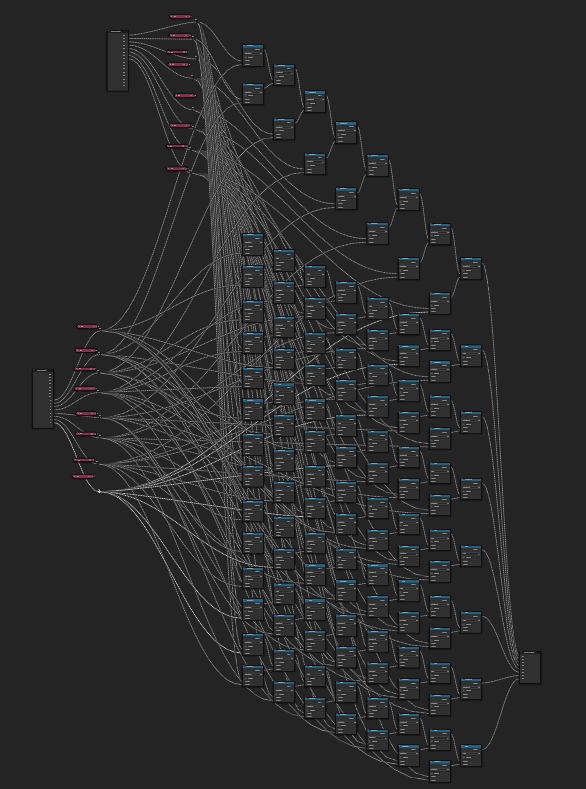
Request: Exporting large geometry node network out as an image / SVG. I can make a screenshot but it's not really readable. Maybe an option to export / render node groups out as a large image so it can be viewed fully like PureRef does. pureref.com/ or AnimRef github.com/lettucegoblin/AnimRef screenshot-November-25-2024-01-36-53.png
88.9%

Development Status: Open

Upvote 8 Downvote 1
stillpointx
25 Nov 2024

6 Comments

v.imran2018

There is such an addon , but it works on python 3.10, that is on blender 3.5-4.1.

stillpointx Author

I use Blender 4.3 on Linux, but they require a custom build of Blender because the official builds do not work. The new nodes are not available in the older custom builds, which are about two years old.

v.imran2018

Create PrintNodes.py and copy the code from below into it. This is a reworked version of PrintNodes that uses OpenImageIO, this library comes with Blender, unlike Pillow, which fails every time you update python.

And it should probably run a bit faster. I'll probably rework this addon so that I don't have to reproduce unnecessary actions, and so much empty space is not saved, plus I'll add the ability to save images to the clipboard, and I'll probably post it on Blender Extension.

# SPDX-FileCopyrightText: 2024 Oxicid
# SPDX-License-Identifier: GPL-3.0-or-later


bl_info = {
    "name" : "PrintNodes",
    "author" : "Binit, Oxicid",
    "description" : "Takes high quality screenshot of a node tree",
    "blender" : (3, 0, 0),
    "version" : (2, 0, 0),
    "location" : "Node Editor > Context Menu (Right Click)",
    "warning" : "",
    "category" : "Node"
}

import bpy
from bpy.types import Operator, AddonPreferences, Menu
from bpy.props import StringProperty, BoolProperty, IntProperty, FloatVectorProperty

import time
import os
import sys

import OpenImageIO as oiio

def MakeDirectory(): # Manage Directory for saving screenshots

    if bpy.data.filepath and bpy.context.preferences.addons[__name__].preferences.force_secondary_dir == False: 
        # save image in the place where the blendfile is saved, in a newly created subfolder (if saved and force_default_directory is set to false)
        Directory = os.path.join(os.path.split(bpy.data.filepath)[0], 'NodesShots')

        if os.path.isdir(Directory) == False:
            os.mkdir(Directory)

    else:  
        # just use the secondary directory otherwise
        Directory = bpy.context.preferences.addons[__name__].preferences.secondary_save_dir

    return Directory


class PRTND_PT_Preferences(AddonPreferences): # setting up perferences
    bl_idname = __name__

    secondary_save_dir: StringProperty(
        name = "Secondary Directory",
        subtype = 'DIR_PATH',
        default = bpy.context.preferences.filepaths.temporary_directory,
        )

    force_secondary_dir: BoolProperty(
        name = "Always Use Secondary Directory",
        default = False,
        )

    # padding_amount: IntProperty(
        # name = "Padding Amount (in px)",
        # default = 30,
        # )

    node_outline_color: FloatVectorProperty(
        name="Node Outline Color",
        description="Set this to outline of a node in non active/selected state.",
        size=3,
        subtype='COLOR',
        default=[0.0,0.0,0.0],
        soft_max=1.0,
        soft_min=0.0,
    )

    # disable_auto_crop: BoolProperty(
        # name = 'Disable Auto Cropping',
        # description = 'Check this if something is not working properly',
        # default = False,
        # )

    def draw(self, context):
        layout = self.layout
        layout.label(text = "A subfolder in the same directory as the blend file will be used to save the images.")
        layout.label(text = "Unless the file is unsaved or 'Always Use Secondary Directory' is checked.")
        layout.label(text = "In which case, the Secondary Directory will be used")
        layout.prop(self, "secondary_save_dir")
        layout.prop(self, "force_secondary_dir")
        layout.separator()
        layout.prop(self, "node_outline_color")
        layout.separator()
        # layout.prop(self, "padding_amount")
        # layout.prop(self, "disable_auto_crop")


class PRTND_MT_ContextMenu(Menu): 
    """Context Menu For Print Nodes"""
    bl_idname = "PRTND_MT_context_menu"
    bl_label = "PrintNodes"

    def draw(self, context):
        layout = self.layout
        layout.operator(PRTND_OT_ModalScreenshotTimer.bl_idname, text = "Take Screenshot Of Whole Tree", icon = "NODETREE")
        layout.operator(PRTND_OT_ModalScreenshotTimer.bl_idname, text = "Take Screenshot Of Selected Nodes", icon = "SELECT_SET").selection_only = True


def PrintNodesPopUp(message = "", title = "PrintNodes PopUp", icon = ""): # function to display popup message on command

    def draw(self, context):
        self.layout.label(text = message)

    bpy.context.window_manager.popup_menu(draw, title = title, icon = icon)

def select_nodes(nodes,select = True):
    for current_node in nodes:
        current_node.select = select

class PRTND_OT_ModalScreenshotTimer(Operator): # modal operator to take parts of the whole shot every at every set interval, while not interrupting the rest of blender's functioning (for the most part)
    """Take screenshot of active node tree. Press RightClick or Esc to cancel during process."""
    bl_idname = "prtnd.modal_ss_timer"
    bl_label = "Take Tree Screenshot"

    selection_only: BoolProperty(default = False)

    _timer:bpy.types.Timer = None
    Xmin = Ymin = Xmax = Ymax = 0
    ix = iy = 0
    current_grid_level:int = 0
    forced_cancel:bool = False
    current_header:bool
    current_ui:bool
    current_overlay:bool
    current_wire_select_color:tuple
    currnet_node_selected:tuple
    currnet_node_active:tuple

    def store_current_settings(self, context):
        theme = context.preferences.themes[0]
        self.current_grid_level = theme.node_editor.grid_levels
        self.current_scroll_color = tuple(theme.user_interface.wcol_scroll.item)
        self.current_wire_select_color = tuple(theme.node_editor.wire_select)
        self.currnet_node_selected = tuple(theme.node_editor.node_selected)
        self.currnet_node_active = tuple(theme.node_editor.node_active)

        self.current_header = context.space_data.show_region_header
        self.current_toolbar = context.space_data.show_region_toolbar
        self.current_ui = context.space_data.show_region_ui
        self.current_overlay = context.space_data.overlay.show_context_path

    def restore_settings(self, context):
        theme = context.preferences.themes[0]
        theme.node_editor.grid_levels = self.current_grid_level
        theme.user_interface.wcol_scroll.item = self.current_scroll_color
        theme.node_editor.wire_select = self.current_wire_select_color
        theme.node_editor.node_selected = self.currnet_node_selected
        theme.node_editor.node_active = self.currnet_node_active

        context.space_data.show_region_header = self.current_header
        context.space_data.show_region_ui = self.current_ui
        context.space_data.overlay.show_context_path = self.current_overlay

    def set_settings_for_screenshot(self, context):
        pref = bpy.context.preferences.addons[__name__].preferences

        theme = context.preferences.themes[0]
        theme.node_editor.grid_levels = 0 # turn gridlines off, trimming empty space doesn't work otherwise
        theme.user_interface.wcol_scroll.item = (0, 0, 0, 0)
        theme.node_editor.wire_select = (0, 0, 0, 0)
        theme.node_editor.node_selected = pref.node_outline_color
        theme.node_editor.node_active = pref.node_outline_color

        context.space_data.overlay.show_context_path = False
        context.space_data.show_region_header = False
        context.space_data.show_region_ui = False

    def find_min_max_coords(self, nodes)->tuple[float]:
        '''find the min and max coordinates of given nodes.
        Returns: Xmin, Ymin, Xmax, Ymax'''
        Xmin:float
        Xmax:float
        Ymin:float
        Ymax:float
        Xmin = Xmax = nodes[0].location[0]
        Ymin = Ymax = nodes[0].location[1]


        for node in nodes:
            loc = node.location
            locX = loc[0]
            locY = loc[1]

            if locX < Xmin:
                Xmin = locX
            if locY < Ymin:
                Ymin = locY

            if locX > Xmax:
                Xmax = locX
            if locY > Ymax:
                Ymax = locY

        return Xmin, Ymin, Xmax, Ymax

    def modal(self, context, event):
        context.window.cursor_set("STOP")
        if event.type in {'RIGHTMOUSE', 'ESC'}: # force cancel
            self.forced_cancel = True
            self.cancel(context)
            return {'CANCELLED'}

        if event.type == 'TIMER':
            tree = context.space_data.edit_tree
            view = context.region.view2d
            area = bpy.context.area
            dx = area.width - 1
            dy = area.height - 1

            path = os.path.join(MakeDirectory(), f'Prt_y{self.iy}_x{self.ix}.png')
            bpy.ops.screen.screenshot_area(filepath=path) # take screenshot of current view as a 'tile' to be further stitched and processed

            if tree.view_center[1] > self.Ymax and tree.view_center[0] > self.Xmax: # check if already at the other corner of the tree, if yes, sucessfully terminate
                self.cancel(context)
                return {'CANCELLED'}

            if tree.view_center[0] > self.Xmax: # if exceeded rightmost edge, pan all the way back to leftmost edge and pan y up once to prepare for the next 'layer' of tiles
                bpy.ops.view2d.pan(deltax = -(self.ix*dx), deltay=dy)
                self.ix = 0
                self.iy += 1

            else: # just pan to the right if no other condition applies (i.e. we're somewhere in the middle of the tile strip)
                bpy.ops.view2d.pan(deltax = dx, deltay = 0)
                self.ix += 1

        return {'PASS_THROUGH'} # pass for next iteration

    def execute(self, context):
        context.window.cursor_set("STOP")
        self.store_current_settings(context)
        self.set_settings_for_screenshot(context)

        if self.selection_only:
            nodes = context.selected_nodes # perform within the selected nodes only
        else:  
            nodes = context.space_data.edit_tree.nodes # perform within the whole tree


        self.Xmin, self.Ymin, self.Xmax, self.Ymax = self.find_min_max_coords(nodes)
        tree = context.space_data.edit_tree

        # co-ords from node.location and tree.view_center are apparently not the same (you could say they don't co-ordinate, haha ha...) so I have to make sure I'm using the right ones 
        node = tree.nodes.new("NodeReroute")
        node.location = self.Xmax, self.Ymax
        select_nodes(nodes,select=False)
        node.select = True
        bpy.ops.wm.redraw_timer(iterations=1)
        bpy.ops.node.view_selected()
        bpy.ops.wm.redraw_timer(iterations=1)
        self.Xmax, self.Ymax = tree.view_center
        # Remove reroute node from graph, so that it does not appear in the final image
        tree.nodes.remove(node)

        node = tree.nodes.new("NodeReroute")
        node.location = self.Xmin, self.Ymin
        select_nodes(nodes,select=False) # This deselect operation might be redundant because of above operation. Need to check futher.
        node.select = True
        bpy.ops.wm.redraw_timer(iterations=1)
        bpy.ops.node.view_selected() # also align view to the (bottom-left) corner node. As an initial point for the screenshotting process
        bpy.ops.wm.redraw_timer(iterations=1)
        self.Xmin, self.Ymin = tree.view_center
        # Remove reroute node from graph, so that it does not appear in the final image
        tree.nodes.remove(node)

        # Selecting nodes to avoid the noodle dimming.
        select_nodes(nodes,select=True)
        wm = context.window_manager
        self._timer = wm.event_timer_add(0.02, window=context.window) # add timer to begin with, for the `modal` process
        wm.modal_handler_add(self)

        return {'RUNNING_MODAL'}

    def cancel(self, context):

        if self.forced_cancel: 
            PrintNodesPopUp(message = "Process Force Cancelled", icon = "CANCEL")

        else:
            area = bpy.context.area
            StitchTiles(area.width, area.height, self.ix + 1, self.iy + 1) # being the stitching and processing process of the tiles
            PrintNodesPopUp(message = "Screenshot Saved Successfully", icon = "CHECKMARK")

        # revert all the temporary settings back to original
        self.restore_settings(context)

        wm = context.window_manager
        wm.event_timer_remove(self._timer)
        context.window.cursor_set("DEFAULT")


def StitchTiles(tile_width, tile_height, num_x, num_y):
    '''Function to stitch multiple tiles into one single image using OpenImageIO'''
    folder_path = MakeDirectory()

    out_width = tile_width * num_x
    out_height = tile_height * num_y
    spec = oiio.ImageSpec(out_width, out_height, 3, "uint8")
    out_canvas = oiio.ImageBuf(spec)

    for y in range(num_y):
        for x in range(num_x):
            tile_path = os.path.join(folder_path, f'Prt_y{y}_x{x}.png')

            current_tile = oiio.ImageBuf(tile_path)  # Load the current tile

            # Calculate the position of the tile on the canvas
            x_offset = x * tile_width
            y_offset = (num_y - (y + 1)) * tile_height  # Invert vertically

            # Paste the tile onto the canvas
            oiio.ImageBufAlgo.paste(out_canvas, x_offset, y_offset, 0, 0, current_tile)
            os.remove(tile_path)

    timestamp = time.strftime("%y%m%d-%H%M%S")
    out_path = os.path.join(folder_path, f'NodeTreeShot{timestamp}.jpg')

    print('Output Path:', out_path)

    # Save the stitched canvas to a file
    out_canvas.write(out_path)


# menu function(s)
def PrintNodes_menu_func(self, context):
    self.layout.menu(PRTND_MT_ContextMenu.bl_idname, icon="FCURVE_SNAPSHOT")

classes = (PRTND_OT_ModalScreenshotTimer, PRTND_PT_Preferences, PRTND_MT_ContextMenu, )


def register():

    for current in classes:
        bpy.utils.register_class(current)

    bpy.types.NODE_MT_context_menu.append(PrintNodes_menu_func)


def unregister():

    for current in classes:
        bpy.utils.unregister_class(current)

    bpy.types.NODE_MT_context_menu.remove(PrintNodes_menu_func)
4
stillpointx Author

Thanks this is excellent!!!! Please post this to the Blender extension website more people need to know about this.

stillpointx Author

I was wondering if you converted this to an extension and if so what did you call it?

v.imran2018

And did not forget to create an addon from this, I'm just busy developing another addon, called UniV . Soon there will be a release, and I will take care of this expansion, especially since I had a very interesting additional idea for this addon.

2