← All ideas13 Mar 2021irvanQOpenGeneralModelingirvanQ19840584613diBlenderheadXYZBranskugelDangryGlacialClawGloriousAlpacaGluhachev.designIIIFGIIIImportantLookingPirateKdafKostasKLillyaMidalaxTopeichVikainex.nikitaandreasus97andycuccaroantoinebagabedrossianbestelixcamplowellckohl_artcorvoredalekzedaniellapalmedariomoreddueonezeez2104gadas_greendayz74johnpdelacruz26juliotuxjustastatuekolovedlacina.vojtechmortas_maynuhuyuochabrandonfilmsebbosebbo267slowk1dstillpointxsulyok.zstoxo
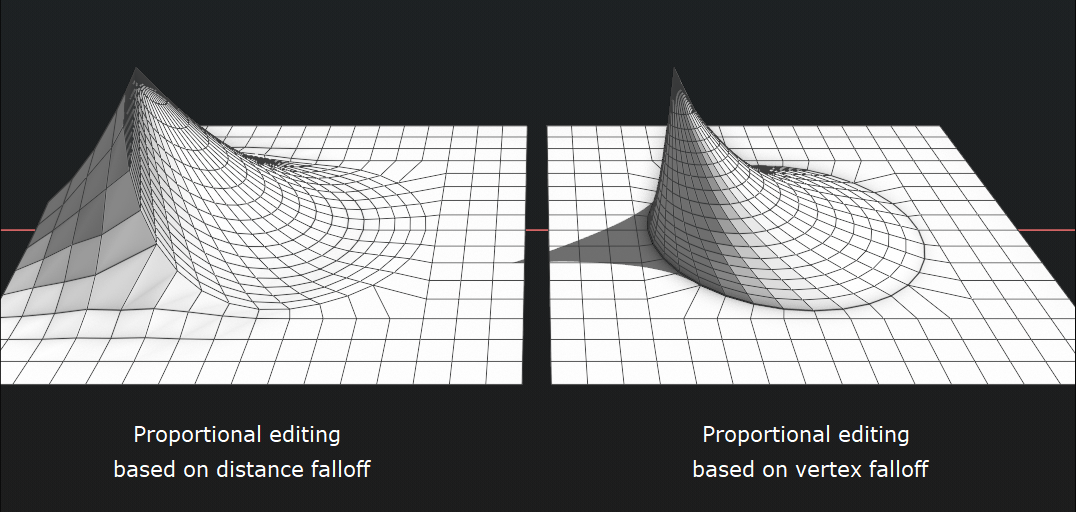
Insted using radius as falloff, using weight of surrounding vertex as falloff
97.9%
Development Status:
Open
Upvote46Downvote1
i
irvanQ
13 Mar 2021
6 Comments
T
Topeich
I like the idea but as an option.
4
i
irvanQAuthor
*
@Ignasi Vidal
* yes, I would also suggest option for proportional edit for selected only (like a masking) but I think it's too impractical
m
mrajendra2150
*
@iqpenggambaramatir
* temporary solution: you can press "Shift+H" to hide other parts and when done proportional editing press "Alt+H" to unhide
3
3di
yep this is known as edge distance falloff whereas the current solution is visual falloff only. I suggested this a while back actually....and therefore it's a great idea :D
2
b
bestelix
Yes please, this works well in sculpt mode with Grab brush and Auto-masking\Topology on. But will be helpfull to have it in edit mode too.
1
m
mrajendra2150
After moving press F9 and Try the option "Projected 2D" from front side or try different view as per your requirement, it will work something useful.

6 Comments
I like the idea but as an option.
* @Ignasi Vidal * yes, I would also suggest option for proportional edit for selected only (like a masking) but I think it's too impractical
* @iqpenggambaramatir * temporary solution: you can press "Shift+H" to hide other parts and when done proportional editing press "Alt+H" to unhide
yep this is known as edge distance falloff whereas the current solution is visual falloff only. I suggested this a while back actually....and therefore it's a great idea :D
Yes please, this works well in sculpt mode with Grab brush and Auto-masking\Topology on. But will be helpfull to have it in edit mode too.
After moving press F9 and Try the option "Projected 2D" from front side or try different view as per your requirement, it will work something useful.