
Enhanced visibility toggles in outliner
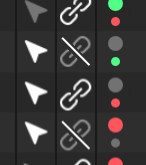
Hiding objects in viewport and render could be much easier. We would save space in the outliner, and it is super intuitive. Additionally, the color makes the reading much clearer. This way we don't have to click two icons per object, to hide it in render and viewport.
There are three states
grey (neutral) = visible but can be overridden by parrent
green = visible, cant be overridden by parrent
red = invisible, makes children invisible too

Alt + click toggles both at the same time.
Ctrl + click inherits through the hierarchy.
Ctrl + Alt + click toggles all and also the hierarchy.
11 Comments
As a new Blender 2.80 user slowly being weaned away from Cinema 4D I like the familiarity of this proposal. This is exactly how Cinema 4D handles viewport and render visibility. Only the size variation between the two toggle dots is different, and that is a nice improvement.
also how would you go about handling this with drivers?
* @Luciano Muñoz * Very good question! The visibillity toggles should be available in the objectdata tab too i think. Or give this specific context menu (right click) two entries for drivers.
The best way for drivers in general would be to drive them also by node editor (everything nodes maybe) in the future. Would be much more clear/overseeable. Imagine all drivers of a charakter rig in one clear tree, not so hidden like it is at the moment.
I use animationnodes for driving visibility at the moment.
In my opinion, it's somewhat confusing with two clickable icons on top of each other or different icon states. Plus the icons doesn't feel like a visibility icon, because now-a-days it feels closer to an Animate Property icon. Shrinking the current icons, eye and screen, may work but still might be confusing.
That's just my thoughts on it.
hmm. I see the idea, but think it is too complex. Collections and instances and visibility layers are made for making visibility groups too. So you can make visibility groups just by adding different objects into collections {attachment 030249jpg}
* @ Vyacheslav * There are already three states for visibility. (alt + click on the eye icon) Its the same complexity only with a faster interaction.
* @danielpaulus90 * Alt+click and screen icon means «hard hide» so it can
t be unhided by Alt+H. Visibility of object cant be ovverrided by initial collection. But instance visibility can (the same for rendering). Visibility of children should always be inherited by parents IMO. Visibility of object, instanced by collection can be spreaded to all by Alt-Click.The solution may be fast, but it's difficult to understand at first glance.
Also, how would you adjust your design of this feature to accommodate people with red/green colorblindness?
* @Jason van Gumster * I think that it is really easy to understand, top toggle is render bottom is viewport. It's almost like a traffic light only that it wont harm you if don't know how to use it. In blender are much more complex and less intuitive things that are accepted. Allocating materials for example
There could be a toggle in the settings to change it to blue and yellow.
* @danielpaulus90 * Why not just start with blue and yellow... or any color variation that's not subject to color blindness?
* @Jason van Gumster * Yes, why not :D