
NEW: Property Switch Tool: make (Bone) Custom Property Channels immediately Keyframable from Main Region
Hello, Blenderfolks!
So, here is what I believe would a cool thing for making Rigging & 3D Animation much more spontaneous and agile in Blender --in other words, this is an attempt to provide a closer experience to "Ephemeral Rigging" for 3D Animation in Blender.
PRESENTATION:
We should all known that, if we start Posing-Keyframing a Bone on Pose Mode, with all of its typical Transforms (Location, Rotation, Scale), the Bone will end up having 9 Channels (or even 10 Channels due to W Rotation) in the Dope Sheet Editor.
Note that, each one of those 9 Channels, are READILY accessible from a Tool (i.e., Grab, Rotate, Scale) on the Toolshelf, or even a direct Shortcut.
This means that we can IMMEDIATELY update the Keyframe Data of EACH ONE of those 9 Channels, directly on the Main Region of the 3D Viewport Editor, by using such Tools or Shorcuts.
Now, please realise that additional Channels for a Bone can be created on-demand. Those would be (Bone) Custom Properties Channels.
However, realise also that, those Custom Property Channels, if they exist, are, by default, 'isolated' FROM the Main Region; they do not have have a Tool which represents them on Pose Mode; consequently, they also do not have a Shortcut (such as G/R/S); they certainly can be manipulated from the Sidebar Region (Rig UI, Drivers, Item > Properties, etc.) but the fact is that they are, by default, READILY-INACCESSIBLE by design... even though they've actually got their own Bone Channels.
I believe this reality can be changed, and that Blender can make Custom Properties for Bones (Rigging & Animation) MUCH more intuitive and closer to what might be considered closer to an "Ephemeral Rigging" experience (it's all about changing, changing the Rig behaviors, with more spontaneity on Pose Mode; but for that, smarter, but not necessarily harder, Rigging & Animation developments need to be addressed for Blender).
Wouldn't that be much better, if we could just rapidly toggle/switch on|off/slide/edit them' Custom Properties with a Tool (and even a Shortcut), instead of addressing Rig UIs and such? A system that can help bridge the gap between the Custom Properties and their respective Channels?
THE TOOL
[please, see screenshot] [these is the plain idea; feel free to improve]
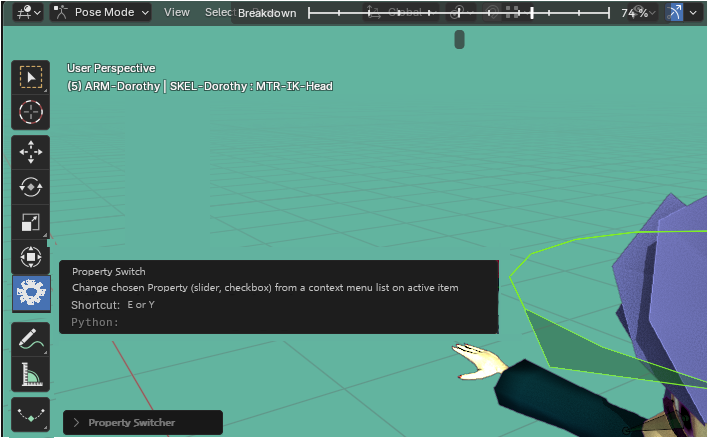
Name: Property Switch Tool Shortcut: E or Y Behavior: Currently, I'm confused about Multi-Selection of Bones for the use of this feature, but maybe it's usable that way too? So, currently, it just operates on the Active element in the Selection (just the 1 Active Bone). If the Bone has just got 1 Custom Property (Note: it must has been created as its own Bone Data), there won't be a popping Context Menu, and the unique Custom Property will appear in the UI: I've conceived it, in the case it might be a Float-type Property (like a Slider Button, typical for Custom Properties of Rig UIs), it might reuse the Breakdowner Tool already-existing features (see that bar on top of the Header in the screenshot?); in the case of Boolean-type (Toggle Checkbox On|Off), I'm not entirely sure what would be best, but should have a different appearance for sure. For me, its clear how this Property Switch Tool would work alongside (Enabled) Auto Keying Option, but if the latter is not Enabled, I'm not entirely sure how we can later Keyframe (the adjusted Custom Property on Current Frame (I guess it's just a matter of Pressing "I" while including Custom Property Channel Keyframing? something like that).
And, essentially, that's it!
CURRENT CONTEXTUAL PROBLEMS IN BLENDER:
Why I'm asking for that feature?
Well, I've been attempting a more dyanmic/spontaneous/intuitive way of addressing Custom Properties than Rig UI.
This proposition emerged, as I've realised (as other Riggers in Blender also have in the past; I believe bro Dikko for instance) that, we want to operate a "Switcher" directly from a special way of 'Posing' a Control Bone through one of its MAIN Transforms (Location/Rotation/Scale), we might soon realise that this is often not very good, because then, even if we attempt the Scale (e.g., isolate the Y Scale Channel for that Switcher), we might be having to sacrifice other things in the Rig, because Scaling Control Bones can be dangerous. This is when, I've realised that, if we just had 'free' extra Channels (and we can have them: through Custom Properties!), well, we could easily achieve a '4th dimension' Main Transform (beyond Grab/Rotate/Scale)......... provided we had a TOOL (and a SHORTCUT) for that Channel 'Transform'! That is precisely why this proposition, of the Property Switch Tool.
Here is a video demonstration of how cool a more dynamic Posing (closer to "Ephemeral Rigging") can be in vanilla Blender. It would be MUCH more consistent, with the Tool I'm proposing. That clip is but a Joint Pinning Setup (ignore, in this case, the Drivers set on the Custom Properties seen at the Properties Panel; that was just to show that something is changing over time). This Rig in this clip actually doesn't need the Custom Property (because it's borrowing the isolated Y Axis Scaling), but if it COULD free that 'Main' Transform with precisely a Custom Property which would respond to a proper Tool, then that would be great.
Thanks!
2 Comments
making a tool for custom properties is going to be hard since there can be an arbitrary amount of those on a bone and they can be of different types.
How would Blender know which one to affect. Also maybe not all of them should be affected, so it needs to be controlled by the rigger.
Yes, I'm aware, I've written a bit about that, temporary solutions (e.g., only the Active Bone in the Selection is triggered by the Property Switch Tool; if the Active Bone in the Selection has got more than 1 Custom Property, a Context Menu pops up).
It's probably a bit limiting, and need better desinging ideas. But let's remember new features in Blender do not need to start complete; actually, various great features, they start limited, and keep improving over time, thanks also to community feedback.
Currently, I'm not familiar with ALL of the Custom Property types, so right now I cannot dive entirely in the conceptualization; so I've just mentioned the ones I know how to employ in Rigs (Float and Boolean; that is, Slider and Checkbox to put it simple).
But we can breakdown some of the issues:
i) Should the 'Property Switch' Tool trigger only the Active Bone in the Selection? or should it trigger whichever Bones present in the Selection?
ii) I've just got an idea: through the 'Property Switch' Tool, we might be able to dynamically set up the type or types of Custom Property we want to Control, with the system that is already in place for Tools, which is, for example, Axes: XYZ, Transform Orientations: global/normal/etc., and others. We can have, virtually, any kind of added Shortcuts to pick from (referenced on the 'Footer', at the bottom of Blender window); the important thing, is that these Shortcuts would be easily interchangeable, and that they should be able to pick, either a single type of Custom Property, or a 'valid' group of types of Custom Properties (several types of Slider Buttons might just work the same in practice for instance, even if they correspond to different types). I'm mostly concerned about the user being able to trigger ALL types at once, that sounds crazy, but maybe in practice it's simpler and more acceptable than it looks here?
iii) What if the same Bone has got multiple Custom Properties? well, IF that happens, then it goes back to "ii)", where we can might have a Shortcut command for that: WHICH ONE YOU WANT TO TRIGGER IN ACTIVE BONE? single [Custom Property] on Active only? all [Custom Properties] on Active only? if single, toggle previous/next in a list (by just pressing Up/Down Arrow).
What needs to be noted, logically, is that, one of the main reasons we tend stack lots of Custom Properties in a single Bone (or a few Bones) currently (often Bone wearing a gear Widget), that's precisely because it doesn't really matter much in which Bone they will be present, since we won't be able to 'Control' the Custom Properties anyways from the Bone itself as we get a more developed Rig UI; it's more for organization that we tend to stack the Custom Properties in specialized 'Properties' Bone(s). But if we were actually using the Custom Properties FOR Control Bones that we actually Pose and Keyframe (like in the clip I've made), in various cases, we would benefit from a larger 'distribution' of the Custom Properties throughout the whole Control Rig, and then, even this conceptual requirement, that the Tool MUST be developed in order to operate dozens of Custom Properties in a single Bone (the way we are used to because we lack the actual Tool), might not be of worth developing [well, at least not right now].
I'll still be looking for improvements in the proposition; but thanks for pointing out.