
True RGB Value Color Selection
I would appreciate it if Blender could have the true RGB values in the slider/selection boxes. No point having an industry standard if we cant input in directly.
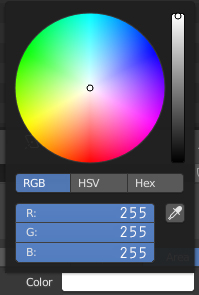
I would appreciate it if Blender could have the true RGB values in the slider/selection boxes. No point having an industry standard if we cant input in directly.
6 Comments
Using 256 based values doesn't make sense here. Blender doesn't use 8bit depth colors as input. It can support way more colors than that. It's up to you to only input colors available in 8bits, but limiting Blender to that would be, well, limiting. Especially when rendering with a raytracer engine like Cycles which cares about what light does in a physical perspective rather than computer picture formats limitations.
easy workaround: input your 256 based value and add "/256". The input field will do the math and set the equivalent in 0-1 range
Limiting color values to 8 bits per channel is not "true RGB". It's limited RGB. Blender provides the ability to enter these limited color values by entering the hexidecimal RGB value, but I don't think it's helpful at all to limit color choices to 8 bits per channel.
All the programs I use are handled with percentages. It is more comfortable and allows you to use more than 16 bit of color. the only program that has the option of percentage and 256 is the krita. They could put a box to check if you want to use percentages. to pass a color from one program to another it is easier to copy and paste the value "hex"
* @Dante Leoncini * I am on the other side, most of my programs and colors are in RGB, so i need to convert to hex for matching. So yes a check boxs option to use the 255 color range vale could also work
* @andries_niekerk * most of my programs have hex, rgb, and cmyk values right next to each other.