
Basic boolean operations for curves

It's the most basic thing someone might need to go to another program for.
EDIT
I wouldn't care if it's implemented in a manner similar to the "path finder" feature in Adobe Illustrator (and other vector apps) or if it follows the existing pattern of how Blender's boolean modifier works.
11 Comments
Yes I have been trying to do this, Coming from Max it was a godsend having this ability. I have included a quick mockup of what i mean
in fact how max does it with shape booleans is a perfect example of how it works. knowledge.autodesk.com/support/3ds-max/learn-explore/caas/CloudHelp/cloudhelp/2019/ENU/3DSMax-Modeling/files/GUID-3D27C203-FB9C-4944-80F0-574B15573D98-htm.html
You can combine curves as long as they are inside one object. So they have a kind of boolean operation. :) The requirement is that your curves overlap each other exactly and lie in one object. Use 2D in the Object Data Properties --> Shape and increase the resolution a little for better results.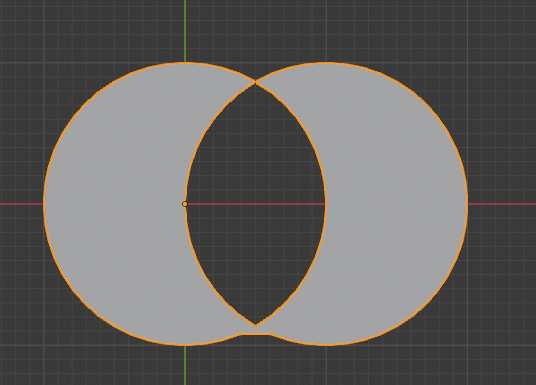
This feature already exists, at least partialy, as a plugin that is part of Blender. docs.blender.org/manual/en/dev/addons/add_curve/curve_tools.html I think it would be better to expand it there.
* @jtxt * I have been using this quite a bit but sadly it's not fully what we are after. I have troubles after the second boolean.
* @jaylukeherbert * You didn't mention this plugin before. Yes, it seems to work for combining two curves in a union operation. It would work on your example below. just select the two you want to combine, not the circles. (Boolean is for two shapes at a time anyway.) With some work it could probably do difference operations too.
* @jtxt * Trust me the tool is nowhere near as good as what Max offers natively with its shape booleans, you can achieve some decent results however but A native Blender ability like the op of this thread wants is what is needed, with easy simple functionality as per example Op posted
Please delete my reply
As a work around, it may still be possible to export to svg, ( blender.stackexchange.com/questions/6675/can-blender-export-2d-curves-to-svg ) use something like Inkscape to do the boolean operation, then import the svg back into blender.
* @jtxt * That's a handy little workaround but just a pain if you want to freestyle some shapes and experiment - means you have to export and import all the time. Hopefully, this request gets some traction because it's such a cool feature
* @jaylukeherbert * I just found this: This feature already exists, at least partially. docs.blender.org/manual/en/dev/addons/add_curve/curve_tools.html I would think it would be better to expand it there.