
Annoying matcap selection :u
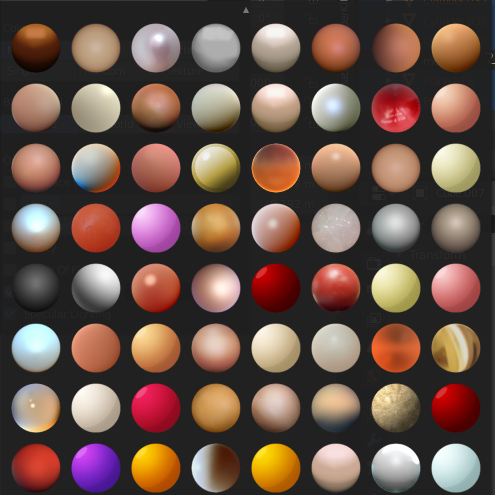
So, I just installed, about a million matcaps and I am now going through them, trying to see what looks good and what doesnt, but every time I select a matcap, the selection window closes and puts me back to the top (which is pwwwetty annoying). Surely there's a better solution for this menu like an actual scroll bar and maybe even a "next/previous matcap" button.
Also, I've installed 1024x1024px matcaps and they slowly started eating at my RAM. Its not Blenders fault, I suppose, but I had to manually remove each of the billion matcaps. My fingers hurt y'all. Wouldnt it work better if you could use the standart Blender shortcuts like "A" to select all matcaps and delete them with "X"?
11 Comments
" So, I just installed, about a million matcaps and I am now going through them " Good luck! :)
* @IIIFGIII * this sentence doesn't invalidate his point.
It should show the matcap on the scene as you hover through them...
Open folder, select, delete.
I did the same...
Hm how instead to have an option in cycles/evee to export the peview sphere as a matcap, so you can create what you like instead of having to search for them
* @peter.boos * you could do that by rendering that sphere with an ortho cam. Wanted to do that, but kinda forgot ;'y
By the way there is 3d modeling software - rocket3f it has cool feature - separate matcaps for different objects in viewport. I think it's useful option..
.
But yes, it will be nice to autoscroll to current matcap and highlight it
* @ Vyacheslav * I think I'd have to rename every file to be sequential in order for it to work as an image sequence.
Modal windows should close on outside click i suppose..