
Shape-Based masking system
There are very few things After Effects does better than Blender, masking (or more specifically, track-matting) is one of them.
Since Blender isn’t layer-based (and thank f*** for that), it’s much more complex to create shape-driven masking of objects, which is essential for making motion graphics.
A tutorial by Ahmad.Animations where it took him over 7 mins to use an object to clip another object’s visibility. It works, but takes too many steps!
I use Blender for After-Effects-style motion graphics because its animation tools are genuinely delightful. The lack of a proper layering system (which is what I like about Blender), makes controlling object's visibility harder than it should be for motion graphics making.
Other node-based tools have solved this differently. In Blackmagic Fusion for example, masks are accepted as node inputs. They can take either a vector shape node or a 0–100 value:
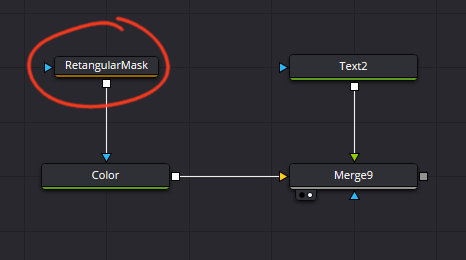
Fusion is more purely node-based than Blender, so its approach might not directly translate, but it’s good inspiration.
Currently, I sometimes use Boolean operations in GeoNodes, using a shape to crop or cut objects, but that’s also clunky and unintuitive. And it's essential to be able to control the masking shape directly in 3D space (as a Gizmo perhaps).
This raises another question: how should a mask be represented in the View Layer panel?
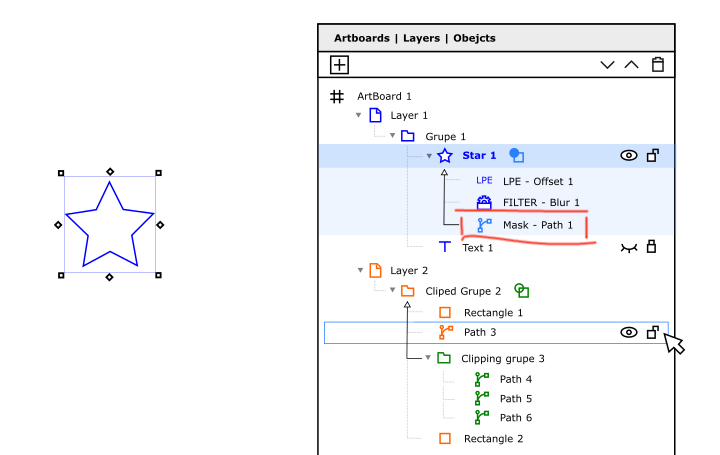
This concept (from Inkscape’s UX repo) makes the mask a child of the object it’s affecting (I believe this is inspired by C4D’s but I’m not sure). This approach isn't ideal either, since it limits reusability. In Fusion’s, as a node a mask can be reused procedurally throughout the project.
In AE (and other software: Illustrator, Inkscape...), masks work at a “vector” level. Essentially as 0–100 matte information. Blender currently has a Mask modifier, which hides a shape's polygons directly, which looks bad without enabling smoothing. In motion graphics, masking should behave more like the Holdout feature, which forms a clean visibility hole without affecting geometry.
But Holdout affects the whole scene, unless you start faffing with View Layers and the Compositor. Too many clicks for something that should be trivial. Also, it cannot be inverted, if I want an object to only be visible within and not outside the shape.
Another question is what can be a mask. In After Effects and Inkscape, it can be a bitmap (B&W image) or a vector shape (which can also be a spline). How should that work in Blender? Must mask shapes be always 3D objects or can they also be 2D curves? Can any object be a mask? Could you also use a projected bitmap image as a mask?
I’m curious how we can imagine a more intuitive track-matte-like masking system for Blender. Applying a mask to an object should take no more than three operations. Anything more distracts the artist from creating their artwork :)
2 Comments
I don't know how this would work, but, if we are talking about the 3D view, I would probably expand the Mask modifier so it accepts another Object as the mask. That way, you can reuse the "Mask" as many times as you want on any object you need. And you could even parent it to the masked object and even take its ID to make som comp work. Heck, it should work with Curve Objects too.
Something like this:
Mask Modifier Mockup
P.S
Blender began as a 3D animation and film tool, but more and more motion designers are now turning to it as an alternative to AE and C4D. The challenge is that Blender is still fundamentally built around a traditional 3D animation workflow, following classic animation principles.
I’m not suggesting Blender should change its purpose, but it could expand its usability to better support more typical motion design needs. Right now, C4D is the only 3D package that openly markets itself as a motion design tool, even though Blender is far more capable, modern, and accessible to use.