
Outline active elements.
The default selection is orange, and the active object is white. The active object is often perceived by context rather than by its correct appearance. On white objects, reference drawings, or white backgrounds (for drawing), it is barely noticeable.
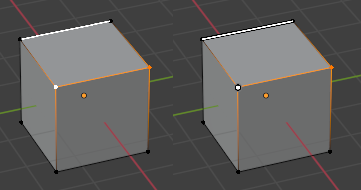
For this reason, I suggest highlighting only the active element with a black outline.
There can only be one active element, although I've highlighted two in the image. This is why I think it stands out the active element without overpowering.
2 Comments
You are free to change the color in Preferences->Themes->3D Viewport, Active Vertex/Edge/Face.
Sounds like this already should solve the issue you're having.
I can also darken the reference images, use a different MatCap, or a different background color... the theme doesn't always solve the problem. The same thing happens to curves, when editing them on a white background, the point disappears. Any vector program contour the points, there's no problem, especially when there can only be one active point.