
Toggle to automatically hide channels not in active keying set
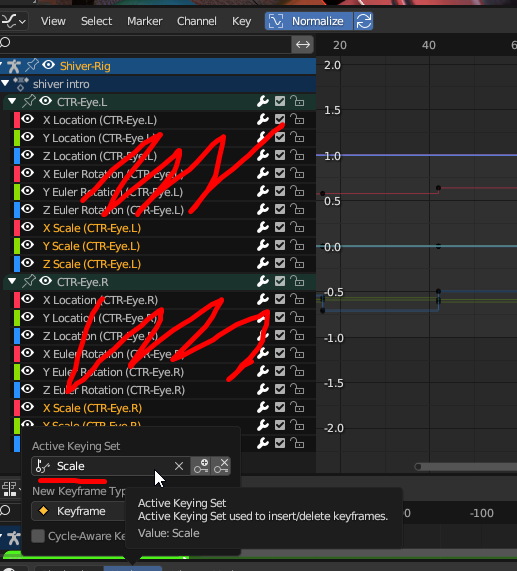 Keying sets are great so you don't make unnecesary keyframes. With that it would be great if you could hide the channels that aren't in it. So you select and move around only the channels you are working on without affecting the others.
Right now you would need to manually hide/lock everything else first, this addition would speed up animation just a little bit more.
It should just be another button like "only show selected" Or a toggle when you open the Keying dropdown.
In my last project, i have a character rigs with some eyes, where i can rotate the eye bones, to rotate the eyes, and scale the bones to dilate the pupil, automatically hiding irrelevant channels would have been great here.
3 Comments
That's a great idea! In my opinion it would be even better if they could add another option on the top of that where you can pick what channel from whatever object you want to see and isolate them, so you only see those channels.
Similar behaviour we have in object mode where we can select different objects and press"/" to isolate them. Same, but with channels.
That way I could focus in for example, the Z location of 10 different objects without having to deal with a huge dopesheet.
I don't know if there is any addon that does that but it would be great to know.
Good idea
Ameb! It would be nice to have something similiar in Maya where you click on the Transform box and click on a certain channel and it shows that particular channel in the dopesheet or graph editor. It's something I really miss and I also don't want keep on expanding the graph editor all the time.