
Viewport Display Axes - better look
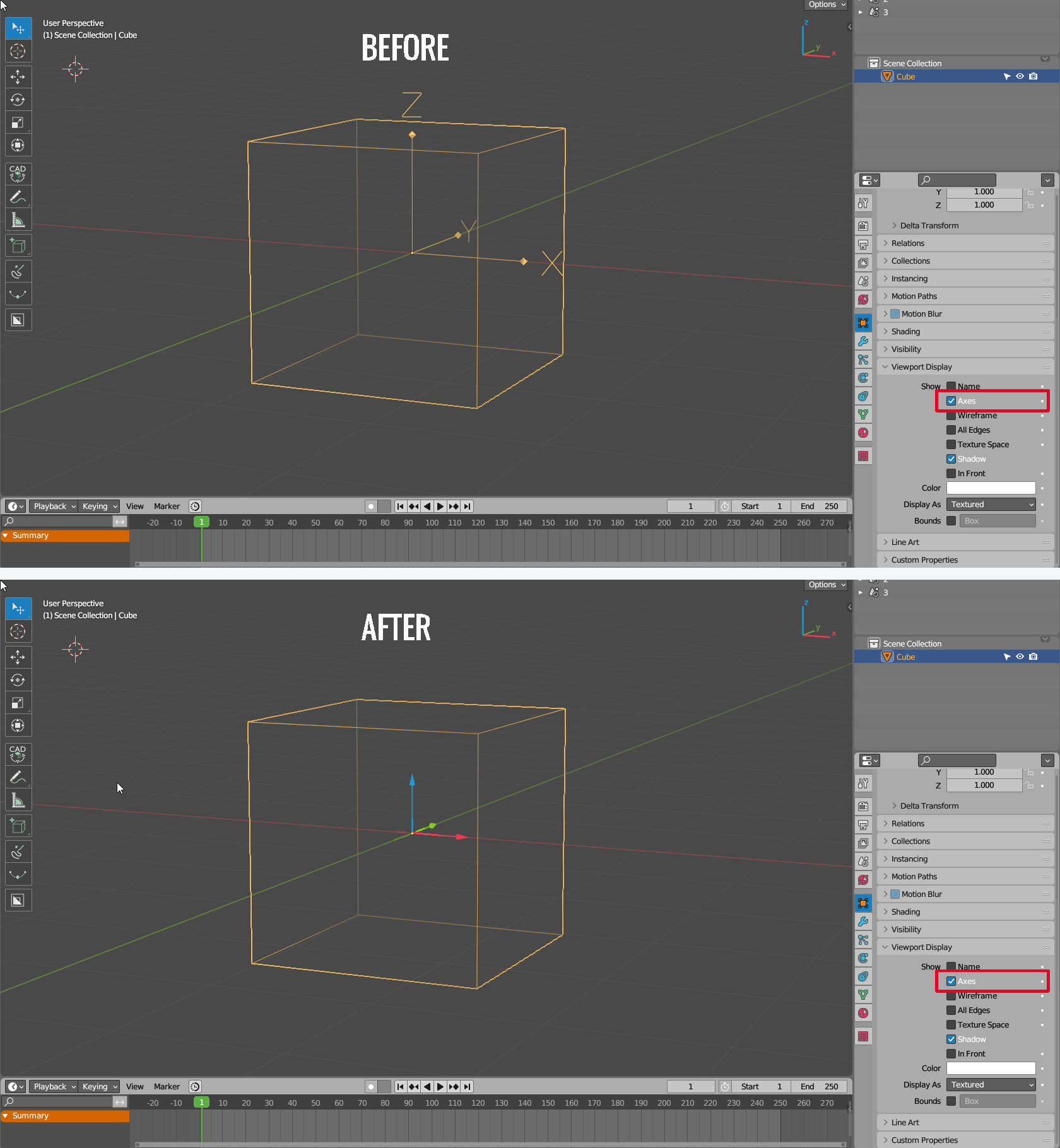
Hello. I would like to propose a display change for "Viewport Display Axes". The current appearance of local axes has problems:
- If the scale value of the object is equal to 1, then the axes are one meter long, which makes them practically useless when working on small objects such as screws.
- Outside of "Wireframe" the axes are obscured by the object itself and should be visible as "In Front".
- Depending on the scale of the object, they are deformed along with it
- No standard XYZ colors
Therefore, I think it would be a good idea to replace the current look as shown below, which is identical to the "Move" tool, but without the extra rectangles and white circle. Of course, this view should be independent of the scale of the object. Thx.
3 Comments
It looks too similar to the interactive gizmo IMHO. Without arrow heads and just colors would do just fine.
For reference this is "transform origins" overlay:
Same as axis viewport display, but coloured.
The scale should be a setting the user can pick, like how it is currently for empties.