
Collections vs Object Manager
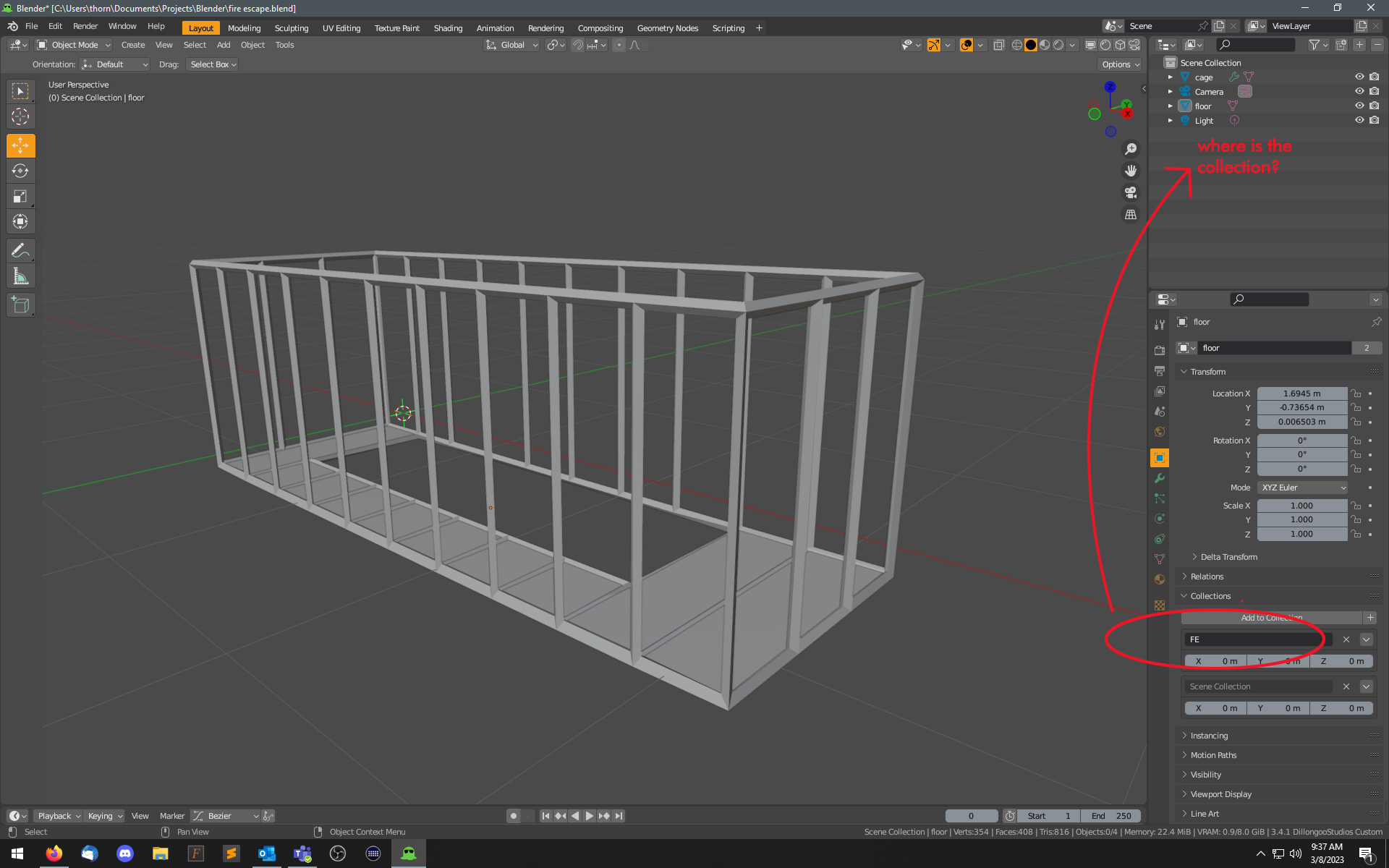
Two objects selected, then Cntl-G.
A "collection" is created in object properties, but oddly missing from the Outliner. (mistakenly called object manager, in thread title).
So... do we have a collection now, or not?
Cntl-G behavior needs to correspond to what the menu name/command is actually named: it needs to create a collection, not... whatever this is.
6 Comments
This is ridiculous. Can you please post your bugreport here? I'd like to read it.
I just tested it ( I had to turn OFF Quick Instances addon for this which BTW actually does fix groups in Blender) and you are right. Collection is made and it's invisible. The only way I could make it show up in the Scene collection was to go to Outliner display mode: Blender file, there it shows up under Collections. So there a right click / Link to Scene worked and it appeared in the Scene. (But with linked objects... they were still visible separately too - OMG how much I hate this feature)
Just to make things juicier, I tried to test the opposite too. Can I make a Collection not visible in the Scene?! So I put 2 different objects into a normally made collection and used the opposite functionality, Right Click / Unlink. It instantly shut down Blender :D
This is definitely something the devs should look into. And for God's sake don't say "It's intended" to a horrible design choice. (BF doesn't even have software designers...)
What you call the "Object Manager" is the Outliner.
The collection should be there. But I suspect your issue here is that you have filtered it out one way or another. Make sure you haven't filtered out the collections display in your Outliner:
If you do have this enabled and it's still not showing a collection, then maybe it's a bug that you should report via the menu Help > Report A Bug.
Completely my mistake; I'm falling back into "mental muscle memory" with other application naming conventions. My apologies for the incorrect term, certainly doesn't help things...
The screenshot I posted shows a collection in the Outliner (Scene Collection), so certainly not an issue of filtering.
Bug report filed.
Update: Not a bug. This weird behavior is completely intentional. (?!?)
I wouldn't be able to say without looking at your .blend, but it's possible to have Collections that are not in the current scene, and simultaneously put the same objects into a different collection in a different scene. this is a very important Blender feature, though one that is hard to stumble across unintentionally. I'm curious if you somehow added your collection to a different scene.
Did you create the collection with a native blender operator, or was it created by an addon?
The scene was created as "new". The two objects you see (cage & floor) were modeled with no add-ons. Selected both, Cntl G.
I've just now repeated the process in Blender 3.4.1 launched in "factory mode", using the default cube, adding a sphere, and doing it again. Same result.
And that's all there is to it. Blender creates a new collection, that is not linked to the scene, and is not shown in the outliner with the other default collection.
Filed as bug report, and was informed that this is not a bug because "older blender used data blocks because collections are basically groups". (Paraphrasing, but you get the idea.) I was directed back to RCS (funny, right where this started) and given a copy of "what is not a bug" to refer to...
that's.... huh?