
Motion Blur: UI description, shutter angle, and shutter speed
Hello all, I hope I got this right and posted this in the correct places, I was pointed in this direction by some fine Blender folks on Twitter.
I'm a post-production professional just starting out with Blender and I've run into a few hitches with the Motion Blur settings. I'm going to sheepishly admit that I spent quite a while staring at the controls before I figured out what they were trying to say. I think it would be valuable both for Blender artists and also for people coming in from other disciplines to conform with photographic terminology since motion blur is trying to simulate photographic phenomena.
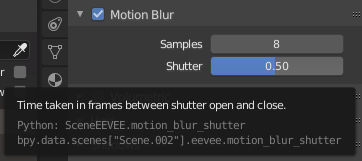
First the hover-over tooltip reads "time taken in frames between shutter open and close" which, while not wrong, is very confusing being that it's trying to express shutter speed as frames-per-frame. The minimal change would be to add two commas "time taken, in frames, between shutter open and close" but it'd probably be better to change this wording entirely because it's not actually expressing a direct time value but the percent, as a decimal, of each frame where the shutter is open. So "Portion of each frame between shutter opening and closing"?
A bigger change would be to rewrite the controller to have a drop down menu selecting units: shutter angle, shutter speed, or decimal.
Shutter angle is the standard for motion picture and is the easiest to convert back and forth to Blender's existing decimal system because they're expressing the same thing: proportional frame interval. A 180° shutter angle is the same as a 0.5 frames-per-frame Blender shutter, 360° is 1 and 0° is 0. Any given shutter angle can be easily converted into a 0-1 proportional value by dividing by 360. There's a direct value here in that it allows post production working on CG composites to simply copy production's camera settings.
Shutter speed, the standard for still photography, typically notated in fractions of a second, is a little more complicated because it would require referencing the frame rate of the project to determine the actual decimal proportion, but I suspect a lot of people coming at Blender have a better learned understanding of how sharp or blurry a frame ought to be with a shutter speed of 1/48s versus 0.5 (equivalent values in a 24fps project).
Decimal is, of course, the raw decimal value as it currently exists, and what the others would ultimately be converting to.
Cheers!
0 Comments