
Preview audio waveforms in the File Browser
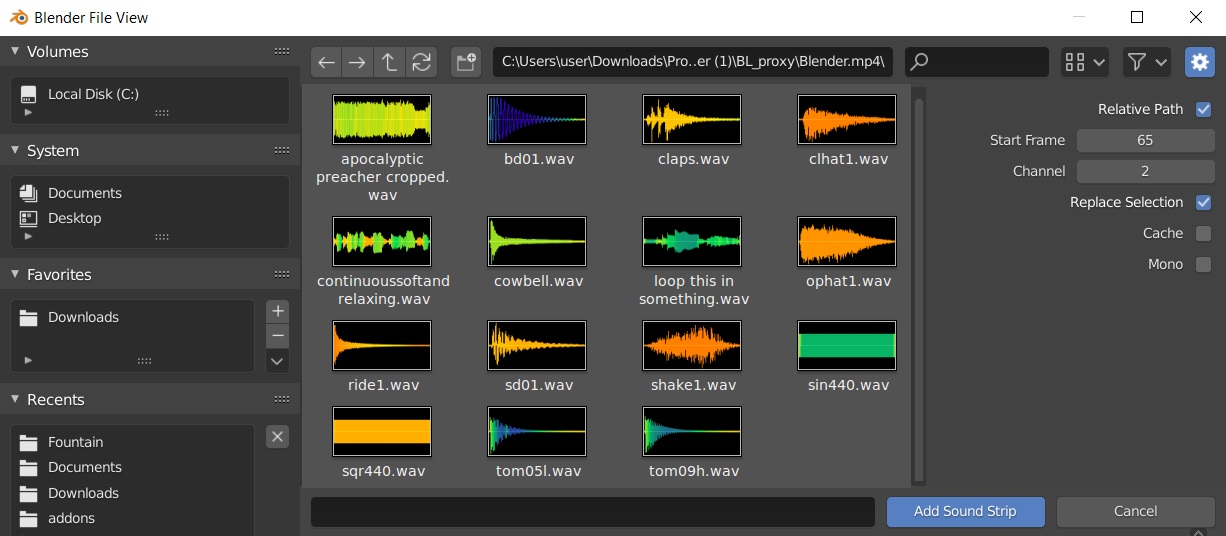
To ease working with audio files, the File Browser should have a waveform thumbnail view:

Looks like ffmpeg can be used for the waveform drawing: trac.ffmpeg.org/wiki/Waveform
And album art can be retrieved like this: stackoverflow.com/questions/13592709/retrieve-album-art-using-ffmpeg
And exporting audio from Blender could embed the waveform image as album art.
A simple implementation could be to just show the waveform of the selected file in the sidebar, so only one waveform would be to be rendered, if it is too slow all of them.
7 Comments
Hi Gang,
I came across this post while trying to find a similar feature for the preview pane in Windows Explorer. I thought I'd add a little info that might be helpful in implementing a similar feature in Blender.
In my experience with video and audio editing programs such as Adobe Premiere, Sony Vegas and Adobe Audition, these programs create "peak" files that are then used to display the waveform in the timeline. These files are given the .pkf file extension by Premiere and Audition, and the .sfk extension by Vegas, and they are used to quickly display the waveform without having to regenerate the waveform display every time the audio is displayed in the timeline.
There is a delay the first time the audio file needs to be displayed (so that the software can generate the peak file), but normally this is the only time this occurs. It may actually happen immediately when the file is imported, rather than when it's first put into a timeline (it's been a while since I used any of these programs). Either way, subsequent use of the audio should be able to use the peak file to display the waveform without delay.
I'm pretty sure Avid Media Composer does the same thing.
Hope that helps.
Addendum: As soon as I entered this comment, I thought that Blender could possibly read and use the peak files that have already been generated by another program (such as Adobe Premiere). That way, Blender wouldn't have to regenerate them.
It would also be nice to have something similar for videos. Maybe by playing the selected video in the thumbnail, or a diashow of it.
Not sure how Blender would achieve this without a long lag.
It would have to load each sound, render the waveform as a thumbnail and display it, then free up the memory used and move on to the next. If you have a folder full of long music clips, or a scene worth of dialogue it would take a long time just to open the file browser.
* @ammusionist * Apparently creating waveform thumbnails with ffmpeg is pretty fast: phabricator.kde.org/T1243
* @ tintwotin * But 50x faster is not a metric. If you have a lot of long clips it might still be too slow
* @David McSween * To avoid lag it could calculate the waveform thumbnail when you hover over the audio file thumbnail
* @David McSween * My Intel driver doesn't allow me to load Kdenlive UI properly, but it could be interesting to test how slow Kdenlive is at generating waveforms for audio files.