
Retain previous render while rendering with render border
I think it would be great if UV/Image editor's respective slot kept the previous render while rendering with a render border. Current behaviour is to delete the frame buffer.
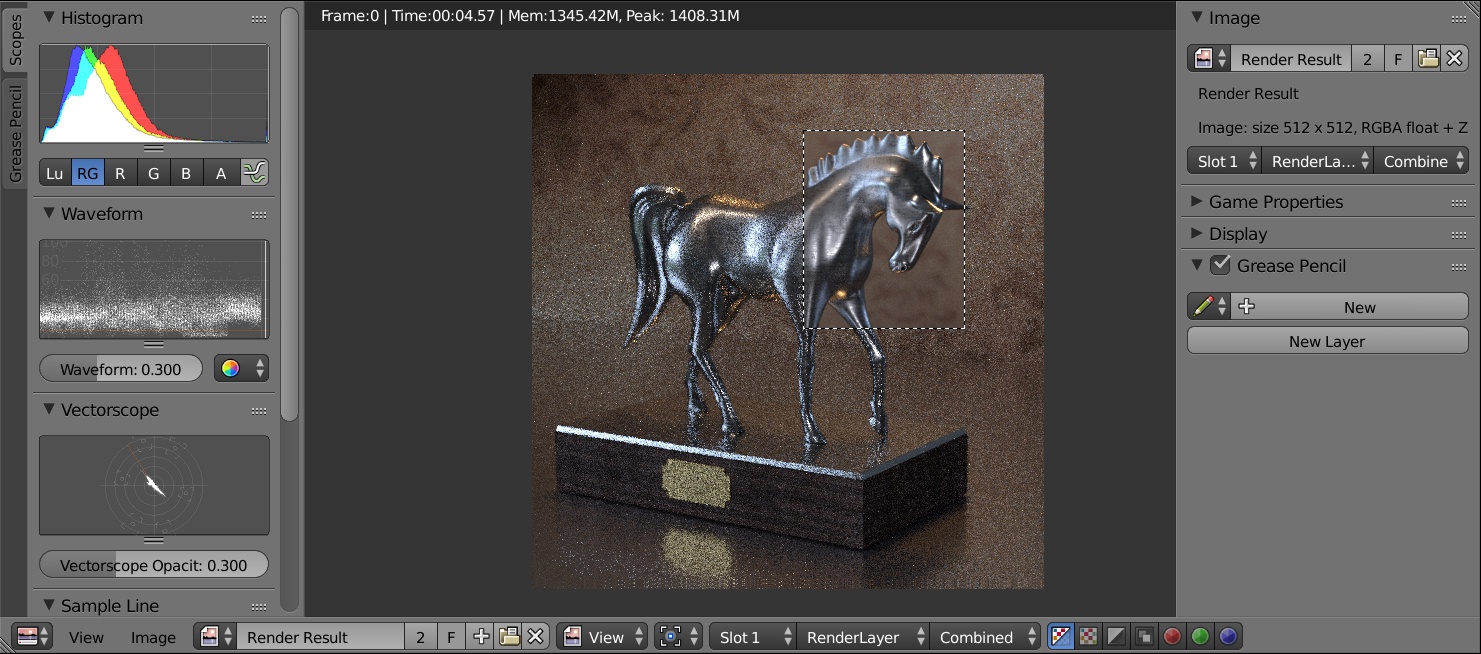
I made a mock-up screenshoot: the scenario is: I rendered the scene with lower samples and while I'm working on a particular detail, I rendered that part with higher samples. This helps me to see newly rendered region in the whole of the image.
This can be helpful while setting up materials, and light temperature and intensity. Also adjusting smoke, particles etc. will be easier. Just render neighbour regions and see them side by side.
Thanks!
33 Comments
imagine the same process used for animations. you just render the changing parts...and a kind of interpolation to find automatically what is changing or not between several frames. as in a video codec but before the compression...more possibilities about real time power...
Oooh yeah that would be dope
What about this?{attachment Clear_previous_framepng}
* @Rune Arleth * Is this still not possible to rerender a region?
Yeah, I did this a lot when I was using vray at work. With cycles I have a workaround: render the whole image once; render region I'm interested in; combine in photoshop. If suggested feature was supported I'd be using it all the time.
This is how it should be. I remember being annoyed by current behavior after switching from Maya and Max to Blender.
This is still super needed. I can get a pretty fast render of the overall image but I'd like if I could focus on areas that need a cleanup. Even in viewport render when using camera mode that would be super helpful.
Interesting and cool idea. I think it would need to be the sort of thing where you would actively tell blender to "hold" the previous outside border samples (e.g. a tick box, and opposed to a "clear buffer" button) instead of doing this by default. I definitely also like the ability we currently have with toggling between slots with j, but this adds a different kind of value and they are both useful.
agreed...how about having this in the user preferences as default with the ability to return to original behaviour by disabling this?
For Eevee, retaining the last render for sequence render is a must have!!! As eevee clears the image while calculating and shows only checkers. Whats the use to keep on staaaaaarrrrring at those beautiful checkers. We need to see progress (In case of Cycles) and at least last rendered image (In case for eevee)
this is a very much needed function for comparing rendered image.
this will be very helpful to compare the current render progress with the previous one.
Well i dont think this is that hard to code. You could make a panel in the render tab and make custom interface with actions which does some minor work before doing the render. So ie when youi hit your custom render button it saves the image and goes to a new slot. This all could be done by code. Than you can add some options like you said clear buffers etc etc.
This is indeed a great idea. But in addition to this and what @TheDuckCow has mentioned, it would also be nice to have like a "next" tile button in the render window—not sure if this goes for another post though. I'll probably just post it on another one. :)
I liked the way Maya handles this - with a slider. Easy to use and understand.
* @Karlis Stigis * What does the slider do? Please explain.
I like the concept, but how would you make a feature like this obvious in the interface? What if the user wants the current behavior? How would she clear the buffer without changing the current border selection?
A simple "Clear Framebuffer" button would do.
Makes sense. Perhaps your mock-up and proposal could be updated to include this.
I think that if we save the passes made in the blender file, we could not only display it in this case, but also to reopen the file. Without having to restart a rendering. (translated from French)
i usually use different slots in UV/Image editor to do this kind of thing. first slot contains the entire scene in low samples and the second one, just the head in high samples, and for comparison, quickly going through the slots using number keys above alphabets. usually does the job for me
This needs to happen, having to render the whole thing specially in viewport mode is time consuming
This gets complicated, I made a plugin that was meant to help here, had tremendous trouble accessing the render result as it's really hard to read from / write to, in the end got it working for still shots, but animations are a whole other deal.
You would need to cache entire animations in order to be able to rerender a specific region, that gets so much more complex if you add some post processing / compositing to it as well.
I made this app to overcome the problem github.com/gugenstudio/xComp cheers
Absolutely this would be excellent
I would still really like this one to happen. I've used quite a few that had features around this, and vray was probably what I liked the best. I like to have an option to darken, or otherwise change, the previous render as well. I'd like to see that as an on/off toggle though. Reasonably, this could be done as an addon by storing the previous render as an image to a temp location, then using that image as the background. But that'd be kind of a hack, and wouldn't be ideal.
Hello, sorry for my rudeness, but i want to ask about my problem, i checked the whole internet and i couldnt find an answer. (When i press on cycles render, blender stop working instantly and crash immediatly??) If anyone have a fix for my glitch/bug please contact me.
AFAIK composer can do it
great ideas for this area....if I would have the choice here, I would not reinvent the wheel (even though sounds very tempting.:) ) To keep it simple: we can take a look how renderman IT (e.g. renderman.pixar.com/resources/RenderMan_20/itUI.html ) is managing this matter, or gaffer/katana/etc. which they have similar approaches. All are tested methods with satisfactory results: catalog (we have this in blender) and the ability to compare(wipe, over,etc) between arbitrary rendered outputs.
Agreed on this one, such a handy tool for RE-rendering only parts that you need to adjust.
also the ability to copy the current render to another slot.
This would be better served as a separate proposal.
Very cool idea!