
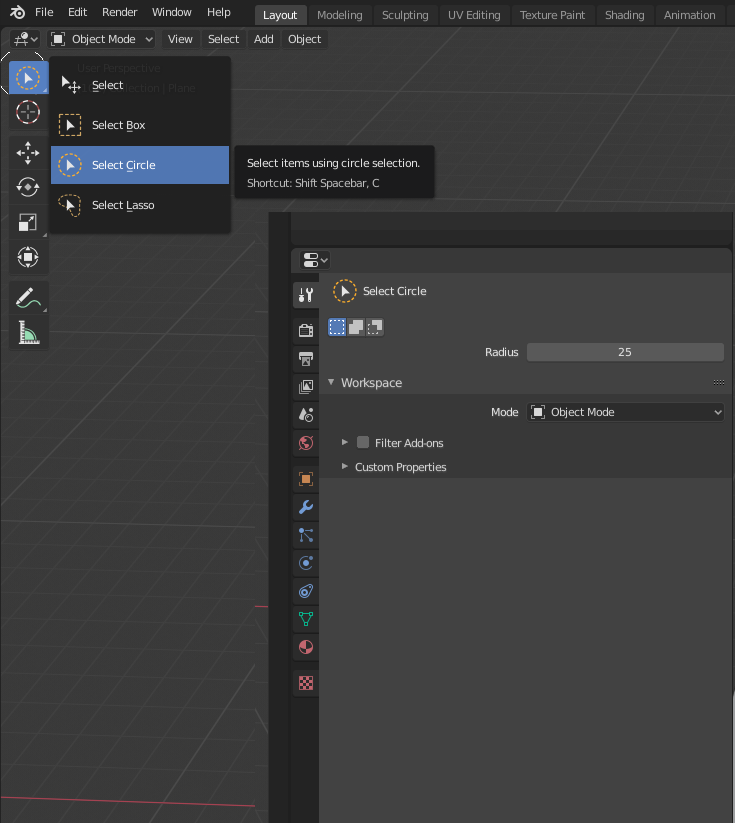
Add select mode switch in the properties tab
I pressed some button or miss-clicked something, I have no idea.
However, now I was stuck with circle select. I had no idea what I could do with it or - that was THE most important thing for me - how to get rid of it.
In the properties tab it tells me the select mode , but I can't change it there. I had to use the googles to get the click-select back again.
Can we get a select option in the properties tab as well, please?
3 Comments
H, you hit W, it change select mode.
Cheers, mib
* @mib2berlin * Yes, I already noticed. Old 2.7* habbits will die hard I guess :-/
The idea is just that you have the option in the properties tab as well similar to the objects view and render settings. You can change them in the outliner and under Properties > Object > Visibility
* @Delta * Hi, I forgot I am in a feature request forum and fall in this by myself several times. How can I upvote? Like?
Cheers, mib