
Some problems with asset library
Hello, I have a few qualms with the usability of the asset library that I'd like to share and suggest improvements for. I'm using Blender 4.1.
Blender is amazing, and I want to see it get better, so please take this feedback in that spirit. As a software engineer myself I know how hard it can be to build a good product :)
- Why do I need to specific 'current file" when creating a new category?
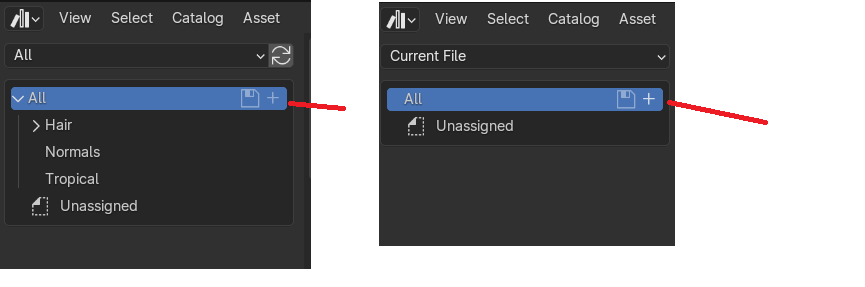
See picture: I need to select the current file, or the plus button for a new category is greyed out. There is no hover tooltip or anything to explain this. I had to watch a 7 minute youtube video to understand how to use this.
I also don't really understand the distinction between "all" and "current file"... why is this important to show to the user in the UI? It feels like it adds needless complexity.
Surely I should be able to modify my asset library from anywhere? That's how the filesystem works on a computer, from within the same window I can navigate anywhere I like and move things around. Seems like this should work the same way?
- Why do all asset library text files have the same name?
Say I want to have multiple .blend files with my assets. I have too many assets to have in one file, so I split them across a few. I can't have all of them in the same folder, because all of the "blender_assets.cats.txt" have the same name, regardless of the name of the blender file.
Now I have to put each blender file into its own folder, and go into "Edit > Preferences" and manually add every folder to my asset library. Why? This is just annoying and user unfriendly. Can the category text file have a hashed name of the file or something to differentiate it from others, so there can be more than one in the same folder?
- Why does making an empty parent object with children objects create a broken asset?
This is really annoying, why do I need to add all the children to a collection before they can be saved as an asset? It seems a bit inconsistent tbh, I bought an asset pack on the unity store, imported it into Blender, and some of the objects don't get added succesfully as assets. I had to manually go in and move these objects to a collection, then mark the collection as an asset.
Why is this necessary? I don't know if this is a bug or what. Let me know if you'd like I can provide a .fbx file that repros this issue.
--------- EDIT-----
Adding picture of broken asset
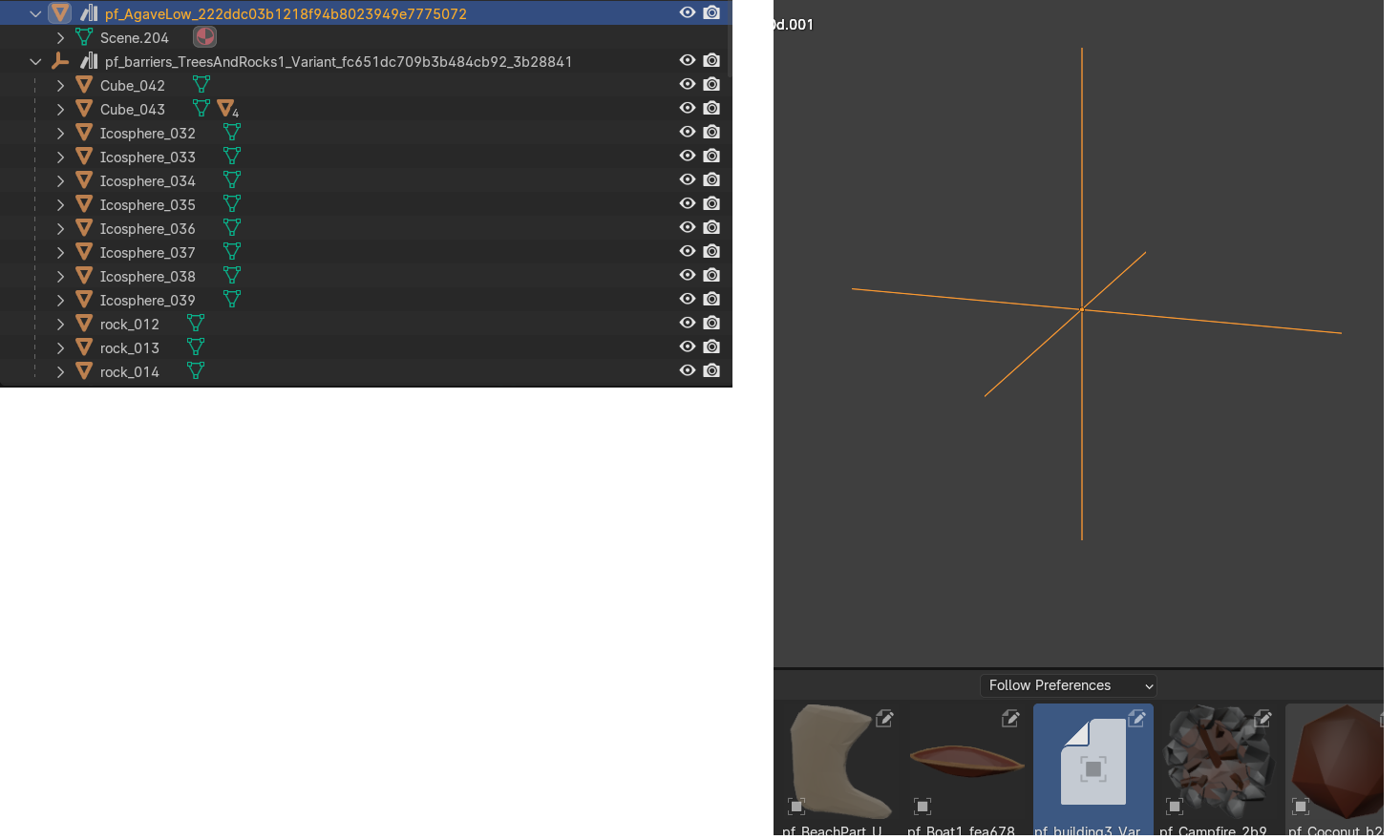
8 Comments
7 months later and I hope u figured it out but I still write my comment so I could find it later when I get confused again 🥹
I personally just wanted to have my models in different blend files and have them all inside a single Asset Library and this is how I went about it
In Blender 4.4 : Once u have an asset library (i call "Library 1") you can copy any .blend file anywhere inside the library folder (directly or within a sub directory).
Saveedit: fix misalignment 😬
They are catalog definition files. See:
It's a text representation of your library's catalogs. There shouldn't be any need to have multiple catalog definitions within the same library, because you are not supposed to make multiple libraries in one place.
You don't need to register every new folder to your library. You should especially not make one library per folder nor blend file. Instead, have one folder for your whole library, and split assets into different subfolders.
Personally, my main library looks like this:
The only folder registered as asset library in Blender is the top folder
library. Hence, only one cats.txt file, only one entry in Blender.And when I have a specific project with its own specific assets that need to be isolated from my main library, only then I make a new library folder with a new entry in Blender.
You can select any object and mark them as asset. But it's faster and more versatile to add them to a collection and mark that as asset instead.
In which way is it broken? Does it mark the empty object as asset, and is that empty object the only object imported when importing the asset made out of it? If yes, then it's not broken, it's exactly what you asked.
It makes more sense that a collection can be used to mark multiple objects as assets rather than an object would mark its children as assets. It allows precisely a perfect control of what is and isn't an asset. If parent relationship had to propagate asset state, then what would you do when you need to have a parent object marked as asset, but not its children? You can't unparent the object, since you need that relationship for other things.
Meanwhile, collections can be assigned to objects in however you please.
It sounds like you bought assets that aren't meant for Blender to begin with, so I'm not sure what you expect here.
Thanks for your reply.
To your point about having one library with the folder structure you mentioned, how do you manage the cats.txt file? Do you need to manually copy and paste the values into it? From my admittedly limited use of the marking assets, it seems the text file is created when I save the blender file. So does that mean you need to manually copy and paste from the individual cats.txt file created for each blender file into your top level cats.txt? That seems inconvenient doesn't it? What do the contents of your models/ folder look like?
I'm not really sure I agree with this. I can't seem to add new images to this reply so I will add a screenshot to the bottom of my post.
I have two examples shown here, one that works correctly and one that doesn't. Interestingly, the one that works together has just a single "scene" object, while the one below it is composed of many. In the rest of blender, if I grab the top level item
pf_barriers_TreesAndRocks...and move it around, all the items below it follow. Why then when I create an asset from the top level item, it makes a broken thumbnail and puts an empty into my scene when I try to instantiate it? This doesn't work consistently with the rest of blender.Sure maybe this asset pack was made in Maya or something, but why should that matter? I would expect to be able to make an asset from any top level object in blender and have it work correctly and include its children, instead of needing to make a collection out of it.
AFAIK you shouldn't do anything, Blender takes care of it.
You can use markdown:
Just to be sure that we are talking about the same things: the green-iconed element with 'scene' in its name, isn't an object, but it is the mesh data contained in the 'pf_Agave' object.
But I think it illustrates well what I wrote in my previous comment.
First object is a mesh object, with a mesh data and no children objects. You marked that object as asset. The second object is an empty object. It has no data (hence the name), but it has children (mesh) objects. You marked this empty object as asset. Children do not carry the asset state of a parent object.
In both cases, Blender does what you ask: you marked a mesh object as asset, so you get a mesh object as asset. You mark an empty object as asset, you get an empty object as asset. That isn't a broken asset, that is exactly the asset you made.
Then you would have issues when you need to mark a parent object as asset but not its children. Hence, the choice was made to rely on collections instead.
But if you want that to be a feature anyway, then you probably should make a feature proposal for it. You'd have to address the above issue, but at least it would make the votes and threads sorting mean something, and make the discussions easier too. Meta-posts are a pain for that x)
I guess I don't understand the use case of "Then you would have issues when you need to mark a parent object as asset but not its children". Maybe its just because I'm new to blender and not a 3d artist myself. But why would I want to make only an asset from the parent object and not include the children? That seems like a niche case?
Anyway, I was able to write a script to move things around and into collections if necessary, as well as resetting the random transforms that seem to be applied when importing fbx files
Would you mind sharing some more details about the contents of your "models" folder? Here's what I have (not sure how to make a nice graphic so bare with the ASCII art):
If I set
TopLevel/as an asset in my preferences, I can see all the assets from the various files, but they are all in the "uncategorize" category.If I set each individual folder
Tropical/,Desert/etc. then I see that they are all categorized as I would expect.How do you have it set up?
Aaah ok, I didn't understood you were trying to merge your libraries into one 😮 I just have one cats.txt file at the top library folder, but I built that entire library as one from the beginning so that's probably why I don't have your issue.
I don't think there are simple ways to do that, at least I couldn't find one. It's definitely worth a feature request!
In the meantime, I know you can make asset bundles , which while can be merged into an asset library. I made a few a while ago, but it was with just one .blend and it isn't documented whether it supports multiple files or even subfolders. But it's worth trying!
If you rename one of those library blende files with
_bundle.blendsuffix, open it, the asset browser and set it to show the current file's assets, should have a Copy Bundle to Asset Library button:Check here for more details. LMK how it goes, though maybe it would be better to be brought on blenderartists.org as support requests are out of topic on RCS.
I have really limited experience with the asset browser, but I also see myself keep going back to youtube to figure out how to use it if I haven't used it in a while.
this is a common problem I have with blender, the UI is very unintuitive to me. I can't seem to figure out how to do anything without having to find some tutorial for that specific thing. It's a complex program which will naturally come with a complex interface but I think a lot could be improved with usability to make it more approachable.