
A toggle / checkbox to disable a modifier
A simple toggle like in Photoshop layers to disable / mute the modifier completely (Yes I know what the icons on the right edge of the modifier header do, this is not the same thing). This one should make it so that when toggled off, it is the same as the modifier didn't even exist.
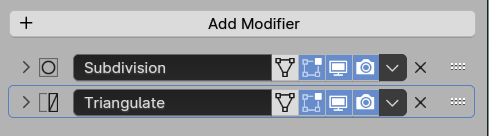
This is how it is now in 4.1:
This is what I would like to see:
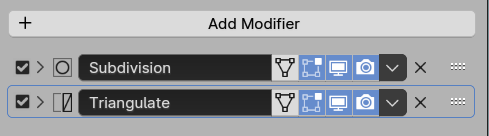
Placement is not so important, as long as the toggle would be near either edge of the header, so that finding it doesn't take much effort. Also, all the toggles should be in line, so it is possible to swipe over those (like in outliner) to toggle on/off several modifiers without unnecessary clicking. Icon too could be different (like an eye symbol), as long as it is easy to identify.
8 Comments
But what is the purpose?
Purpose is what I explained - single toggle that disables the modifier completely. In rendered image, and in the viewport.
Could turning off rendering also turn off viewport (this would apply to modifiers and also to the outliner, and maybe some other places in Blender). That would get the "one click to make it go away" effect people want. If they actually want it in the viewport with rendering off, they can click on the viewport control to turn it back on.
When you turn off the TV, the modifier is not calculated, it doesn't exist. When you turn off the camera it also does not exist at render time.
The "Modifier Tools" add-on that ship with Blender can be enabled and they give you a bit more control, but probably not the ones you need, but better than nothing
Don't talk about Photoshop. Blender itself has this structure with colections in the Outliner. You can hide it from viewport, disable and render, but you have an option to Exclude that Collection
But isn't that exactly what disabling visibility does? Except, you have control over viewport vs render visibility. I'm not sure that we need a third option.
No I don't think so. I'd need toggle that disables modifiers everywhere with a single click, if I don't see it in the viewport, I don't want to see it in rendered image either.