
Add 'Display As' in Quick Favorites
I would love to change the 'display as' of an object on the fly.
I mean the Object Properties> ViewPort Display > Display as Textured/Wire/Solid/Bounds.
Edit : Done by -L0Lock- Thanks a lot !
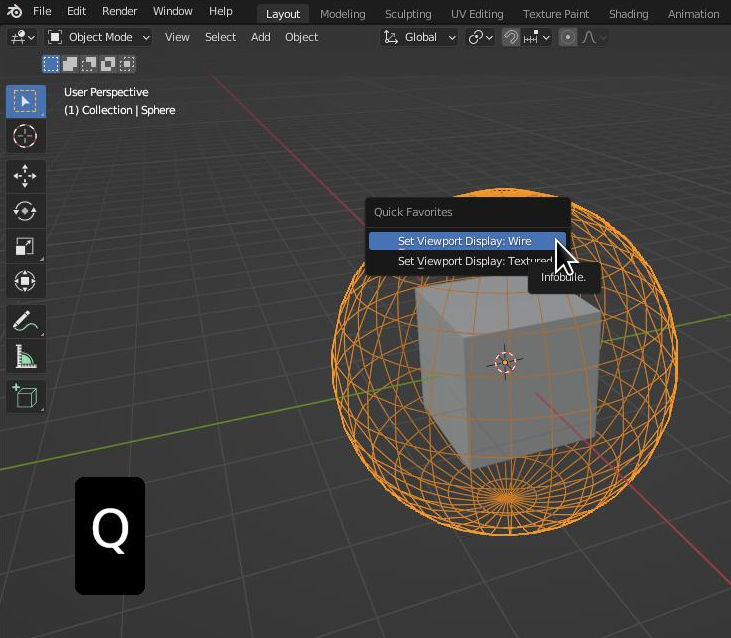
I would love to change the 'display as' of an object on the fly.
I mean the Object Properties> ViewPort Display > Display as Textured/Wire/Solid/Bounds.
Edit : Done by -L0Lock- Thanks a lot !
5 Comments
With the way things currenlty work, that would require to first create an operator for that 🤔
But that's a very specific use case...
In the meantime, you can make your own operator using this code:
Put it in the text editor and hit the run button. Then when you F3 search for the "Set Viewport Display: Wire" operator, you can add it to your favorites from there.
If you need this all the time, you could save the python file in your startup blend file.
Thanks a lot -L0Lock- for your script! Two things : it is not useful to use F3 and type Set v.. than use just Q. I want too toggle objects from different displays (wire, textured, ..) not just change to wire.
Woudn't making this as add addon (by just adding header) be better :p?
If you want something more complex and that you need often, then yes it would be better to make an addon for it.
I made an actual addon with a menu you can find under the Object menu, and it contains all the possible display.
github.com/L0Lock/setViewportDisplay
see the readme for more info