
Pop-up navigation menu
Hello all.
After a few issues with understand of some words and expressions that I've used in another post, I'll like to explain, that English is not my default language, so it maybe I can translate something in the wrong way, and this can cause some misunderstandings.
So, keep in mind that I'm just suggesting something, and it's not a radical deep change. Also, I just expect to help.
After sometime using blender with a tablet, I’ve had a idea to “optimize” the modeling, sculpting, workflows even with regular mouse usage.
For this time, the better idea I have for the name was “liquid” design, by the ability of water to be flexible and override challenges like rocks and etc.
So the idea is a redesign of some shortcuts in specifics work spaces and a new access point to tools and menus. And by redesign I don't mean delete things from blender, had in mind that this idea should be understood like a "maybe possible optimization in the navigation process" work flow.
My main idea is use the SPACE BAR like a customizable pop-up menu for really quick access to tools based on the current workspace.
In the image bellow, the menu can provide a quick access to a work space list, each work space load a collection of most basics and used tools and assets of that work space.
Like first example (gray background), I’ve put some basic stuff like vertex, edge, face selection, on / off proportional editing and snap, and also minor configurations of a tool, like switch the proportional editing options.
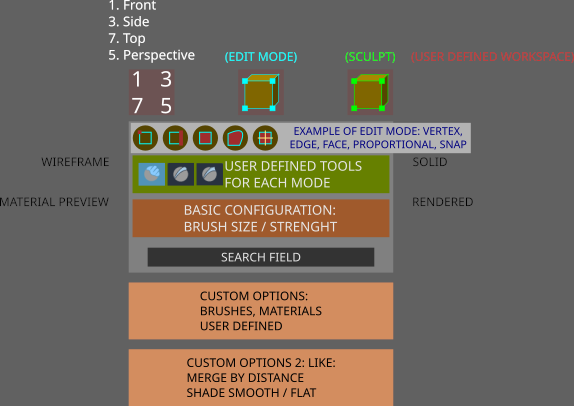
Just have in mind, to this really became useful and be a time saver, most of the options need to become iconic option instead of add a lot of menus, in proportional editing case, no menu should be attached to the menu, but it’s icons. And I don’t really figure out by myself if the best way to close the menu, is on-mouse-out, press again SPACE BAR, or define another custom behavior, the main “WHY” is something needs to avoid the problem of switch to a different work space after configure a tool.
Another time “saver” would be add a right click menu with the current work flow menus.
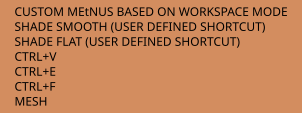
In editing mode, the most “useful” menus would be the vertex, edge, face, also some custom shortcuts. Thins should be flexible to add another options, like zoom to selected object ( , key) or frame all ( / key).
The concept if done right, can be allow the user to work with most of the design features in full screen for example, with almost no menu search or other keyboard shortcuts. It’s also permit the user to use only a tablet for a long modeling / sculpting sessions.
Navigation and other details:
SPACE BAR: PRESS: liquid menu HOLD + HOLD RMB + movement : positive X and Y = zoom in, negative X and Y = zoom out HOLD + HOLD LMB + movement : PAN
Some rearrange also can be done with more deep custom short cut keys, like hold space bar and set a 1 LMB click to do a edge loop selection.
All the shortcuts and menus should be completely customizable by user.
Materials also should be available in the menus, in editing mode, materals on the object list, in sculpting after switch to sculpt / rendered mode, the ability to select matcaps or regular materials in a fly would be nice too.
Again, English is not my default language, so if something is wrong or not clear, please be kind and fell free to ask, I would be pleased to try to explain more.
And sorry for my lame design, but I’m bad with 2D stuff anyway.
Off course, suggestions, ideas, complements are always welcome.
7 Comments
I cannot describe "how good it is" join a "community" where people just ignore the the discussion arround the core concept and reply a "develop a plugin by yourself, make it popular and maybe devs consider to include it into blender".
Well, That's Fantastic.
The core ideia is save time in the navigation process and make things faster than they are now. Avoiding menu clicks and the usual stops to use shortcuts like CTRL+F, V, E, M, read menus and etc, and not only a "personal stuff".
Just whatever.
First of all: yes its a pretty good definition of blender community. The second: you proposal are looking wierd indeed. Why: menu like that will become really bulky really quickly.
Ability to create menu/pie menu and customize them pretty nicely (but yes, with some restrictions) are already possible with Pie Menu Editor addon. Would it be nice to have it builtin in blender? I guess. But its really hard to imagine any real advantages of built-in versus addon.
I would be thanked if you just help to think a little bit better about the concept.
But, about the "bulky" part of the comment.
In my conception, considering that blender doesn't offer a to huge number of tools like Maya for example, the menu would be around 10-15 icons when we're working with sculpting for example and if we stick all the brushes to the menu, some users like me, uses around 5 of them and I'm considering 10 to 15 because sculpt has more brushes on the interface, than modeling has tools.
So, if the interface is organized by view port, how exactly in your opinion things will be bulky?
I mean, in the sculpt workspace, the only accessible tools, are the brushes, and brush c configuration, not, extrude and other stuff.
I'm just trying to join the dots, to make the concept more clear and "evolve" the idea for another day.
And another question, there is some "addon-community" to talk about this kind of stuff?
And thanks for the pie menu and talk about the idea.
Sorry, I didn't receive any notifications about your reply.
Why it will be bulky: Its already bulky in you mockups. As example, i dont need at all the buttons for change view and snapping. I want more "in deep" and separate from anything else menu for all snapping options. Putting vert/edge/face as a button to any menue? - im never get it at all. You have 1, 2 and 3 buttons for this on keyboard. No idea why someone want to press buttons on the screen for this. Its my personal opinion? Yes, kind of, but its doesnt make those big menue with tons of options clear and readable. Simply too many things in there.
How to solve that? Its really ease! Make it fully customizable. If i want - i can put a vert/edge/face buttons there. If i dont - i will put something else. In the end menu will look exactly how i want.
When whats the problem? We already have ability to solve that task. Its PieMenuEditor addon. Putting "PME" into blender as native built-in tool can have some benefits indeed. But as i already say in previous comment: those benefits wouldnt be really crucial at all.
Reading your answer and re-reading my post, I've notice that I really failed to make the original concept fully understandable, due to the lack of content, better organization of the ideas and off-course the poor presentation, so the benefits in time saving and accessibility in this kinda of navigation system, just passed away in the explanation. In the end I've posted it too soon, and I understand it now.
But believe, with this navigation fully developed (and reorganized), anyone, including people with one arm or people who use the legs to write, can have a real good accessibility and just a little difference in time in a finished project, considering that you can operate over 60~70% of all blender workflow with one hand using a tablet.
So, TY for the more deeper discussion about it, it really helps to notice my mistakes.
I'll think more about it, and like I've noticed, this is going nowhere in here, so maybe in a future, with a more mature version of it, I'll try to develop it by myself.
Once more TYVM.
These types of customization are very personal, your best option is to make it yourself using python. Or look into ($) PME addon for easier user menus creation or MachineTools for already made chunky menus. There are a lot of others free and paid ones.
There was project to make quick favourites (Q) menu more customizable but it wasn't finished.
This is so overflowing with different features that it only makes sense as an addon. I suggest making an addon and if people like it and it becomes popular it will appear in 90% of youtube tutorials and then the whole community around your addon can influence the blender devs to actually integrate it directly into blender.