
Local Position and Rotation Values Normalized when Aligned to 3D Cursor in Add Object Popup
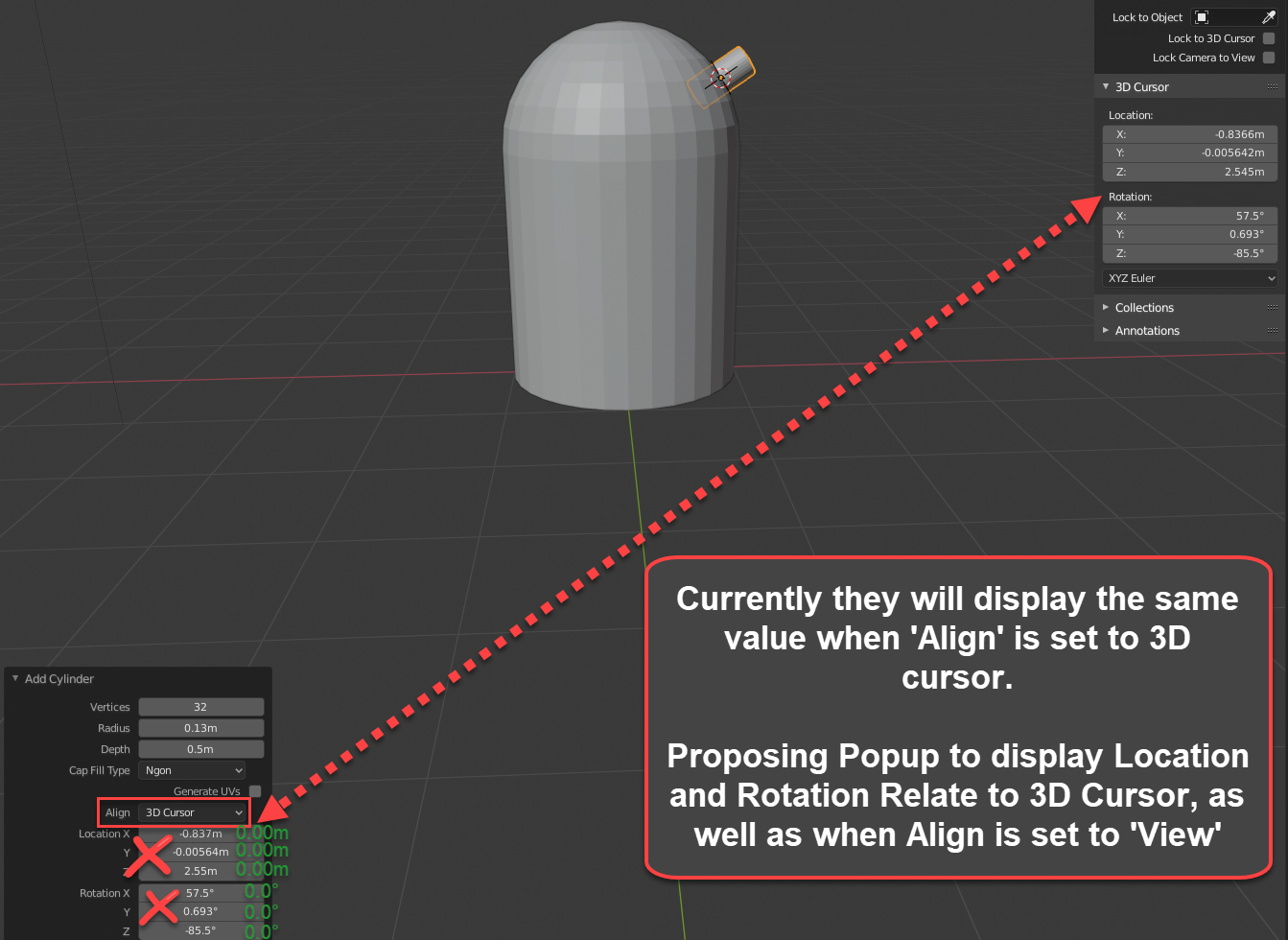
When adding an object, let's say a cylinder, to the scene, its world position and rotation is displayed in the 'Add Cylinder' popup. You can choose to align it to World, View or 3D Cursor. I like to suggest that if Align is set to be '3D Cursor' that the Location and Rotation XYZ values being displayed should be relative to the 3D cursor's position and position.
Thoughts on this?
2 Comments
If you generate an object aligned to View, does it display it's rotation relative to your current view, or to absolute values? If the latter, then I think current functionality is fine for consistency.
It might get more confusing if you generate an object at 1,0,0 (Because that's where the cursor is) but the display says it's at 0,0,0?
* @ammusionist * its the latter. Well yes I think consistency is important, and well I would think if you set to alight to the view it would also show 0,0,0 in relation to the view as well to be consistent with the proposed changes when set to Align with the 3D cursor as well.