
Dimension tool for blender 2.8 similar to fusion 360 (slightly similar to measureit but with constraint input function)
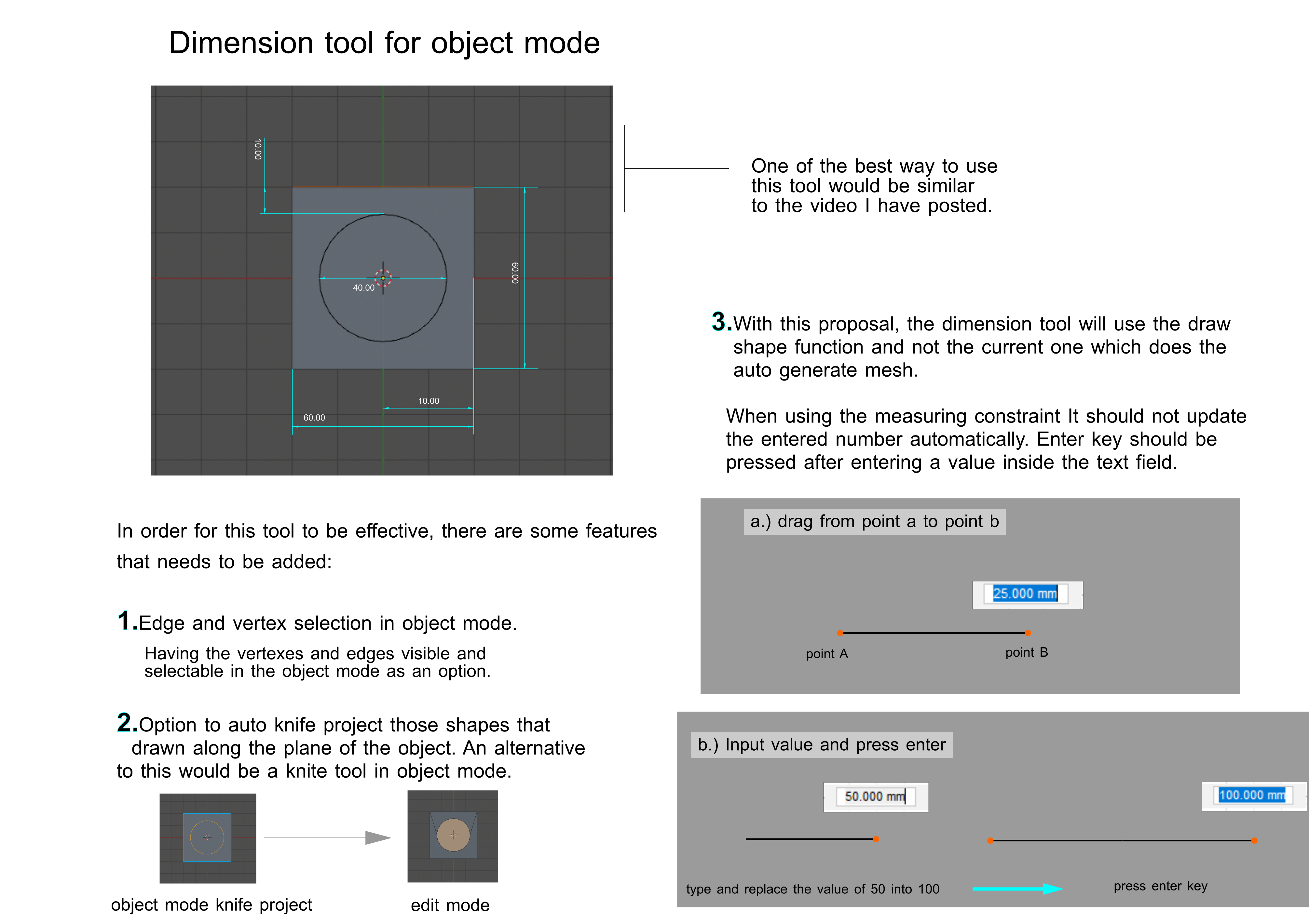
Hello guys. I would like to propose a feature similar to fusion 360's dimension constraint. This feature will not only be useful for people who are on the field of cad modelling but also in stylized art.
Some may think that this feature is already available with measureit addon and I would like to say that it is not. It may have some similarities to measureit's measuring tool but mainly the dimensions tool not only work for measuring but also a constraint and precision tool for modelling in cad. I cannot confirm the complexity of its coding but I hope this can be part of blender soon.
Here is a youtube link that demonstrates the use of dimension tool in fusion 360. youtu.be/tE8JGSifDwc
Thanks.
12 Comments
Cool. You mean like the "parametric" option? youtu.be/uKB9z41c2OQ
* @___11 * Yes. This is sort of possible already in blender but not entirely. It would be nice to have this though. For now I just use the CAD transform addon from time to time and it helps making dimensions a lot easier.
that would be great, but at the moment the fusion field input is broken.
* @othoap * What do you mean fusion field input is broken? Do you mean fusion is down right now?
On a side note I hope you can upvote this proposal. Thanks.
Correction in the last part of the proposal documentation.
It was meant to be "type in the value of 100" instead of 50. I hope this will remove some confusion regarding that part.
Hey John, I've been working on a version of the MeasureIt addon for Architectural (and other CAD) design tasks. It's still just static right now like you've said, but I've been thinking about ways to make it effect the geometry like you're suggesting. It wont be able to work exactly like fusion, but some of that functionality should be possible to add to the add-on (but will take some time). If you have any top priority features/use cases/suggestions let me know here or on the projects issue tracker and I'll keep it in mind as I'm working!
* @kevan.cress * Hey man. I appreciate the work your putting in to this addon. I have mentioned your addon in this topic because some might say that the feature I am currently requesting is already present in blender.
I have measureit in my addons. One thing that I am trying to find is more on dimension constraint functions. You can do those things already in blender but the workflow in my opinion is not that easy compared to how the cad softwares handle it. I am also requesting this feature as a part of object mode but if this is too complicated edit mode would also be a good option.
* @johnpdelacruz26 * Thanks, but most of the credit for MeasureIt should really go to Antonio Vazquez, I've just been adding a few features to this version! I think I should be able to add an operator to the add-on that gets called when you click on the measurement, prompts the user for a new value and then moves the referenced verticies or objects to reflect that... A constraint system might be more of a challenge though.
* @kevan.cress * CAD also has an ability to drag the dimension off the edge that is click-selected and dragged- that would be so much easier and really speed up workflow. Currently I tried to install Version 0.4 but it doesn't configure properly with Install Template for version 3.0- in the assets drop down on github there is no updated Template to install for version 4.0- an instancing update fix would really help my style of content creation using multiple scene objects from different blender save files
It's not sufficient to say "make it like this other program's feature". Be specific. What should it do? How users work with this feature in Blender? What would it look like in Blender's interface? Include mock-up images that show what you're envisioning.
The MeasureIt add on has been part of Blender for quite some time.
* @ammusionist * It has similarities to measureit but its feature is not limited to just showing the measurement. This tool is mainly for constraint and precision modeling.
I posted a link of a video that demonstrates its main function aside from just being a measuring tool.