
No Keyboard Shortcuts In Tooltips Of Icons For "Classical" Operations
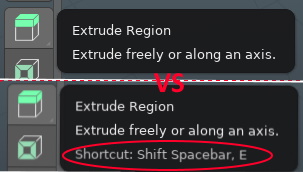
For Beginners it is really confusing that the "gizmo version" of some actions are not the same as the "classical" ones since they act similar. I came over this because if you set "search" as space-bar action no shortcuts are shown on tooltips of the gizmo version of an operation (like extrude region).
Many users have mentioned this on the bug tracker before. And the "bugs" where closed because from the view of developers, this are different actions.
(From developer.blender.org/T75417 ) "Move (shortcut G) is not the same operation as activating the move gizmo. The shortcut for the latter simply doesn't exist in the keymap when you set the space-bar action to search. Please note that gizmo doesn't appear when you use the G shortcut. Since the tooltip for the toolbar is supposed to show the shortcut for activating the gizmo and this shortcut doesn't exist in your configuration, it cannot display a shortcut in the tooltip."
This is not a good solution for beginners! (to put it diplomatically)
First of all, you don't expect that there are two different operations. But even if you know that, the problem stays for beginners: You know where the “gizmo version” of the operation is - but what are the keyboard shortcuts for ALL possible semantically same (or named the same) operations? You like to remember things at first via the icons. It's intuitive and easy to remember (at least I do).
The fact that the new shortcuts are not even available when searching with the space-bar makes the matter even more opaque, since if you do a new installation the consequences for the decision to be made (which action the space bar gets) cannot be aware of. (As a beginner)
It would be logical if the gizmo version and the "traditional" version were the same. (You could e.g. hide the gizmo with an option and thus get the old behavior )
But at least:
all shortcuts with which I can semantically achieve the same ( or very similar) functionality should be displayed within the tooltips!
If the keymap doesn't contain a shortcut I would like to see the semantically same action. ( E.g. the tooltip of the icon "Extrude Region" should display
e
if the space-bar action is set to search ) .
In my opinion this are the reasons why this behavior is so often reported as a bug !
E.g. in developer.blender.org/T66914 or in developer.blender.org/T75417 as well as in developer.blender.org/T81162 .
Closing these and referring to the community forums is easy, but fails to understand the scope! Or do I understand something completely wrong?
0 Comments