
Extend interactivity of Asset Browser
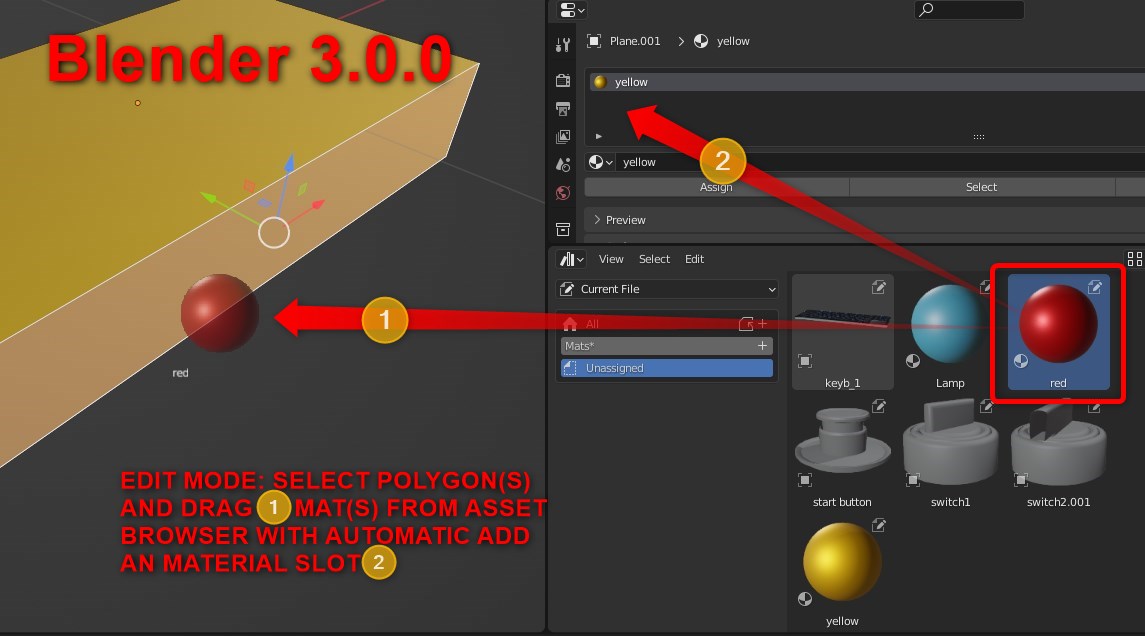
Add an ability to add multiple materials in one mesh from Asset Browser. by entering Edit mode and selecting Face(s) and assign a material to particular poly(s) by drag-and-drop action.
For now we can freely drop material only on whole mesh outside the Edit mode.
8 Comments
You can already. But you have to create and assign the different material slots first. So after selecting your mesh part, create a material slot (no need to assign a material) and click the
Assignbutton:oh
yeah that extra step is a huge pain in the ass
Yup, would be nice if we could create and assign a material slot to a selection in one click. I.E. if it could happend when we have a selection and clicking the
+button, that sounds reasonable to me.that is not how it should work, the proposal is a more direct way and how the user will expect it to be.
That's a good additional way, not the only one.
We need a real dedicated material managment window separate from the asset browser. 90% of my materials don't need to be assets.
i agree but addition of assets should also be easy instead us having to append every file mark it as asset and having to save it causes unnecessary use of space so it should be easier like us just going to preferences making a path for our asset library to a certian folder eg obj then we will be able import obj files just drag and drog without manually importing it