
Add RUN to Python Console, running visible Text Editor script
I would like better integration between Python Console and Text Editor views.
In the Python Console, there is no easy builtin way to run a script that is in a neighboring visible Text Editor. You need to be able to test individual functions as you build a script in the Text Editor. Development of more complicated scripts is built up from smaller pieces which you should be able to test thoroughly.
You can try to add print statements into a Text Editor text, but then anything you print in the Text Editor gets dumped to the (often invisible) OS-specific console stdout/stderr.
[In MacOS, this console is simply not available to the average user, and for those who know how to launch Blender the developers' way, it's still very non-MacOS-ish, and has functional complications with multiple screens, etc.]
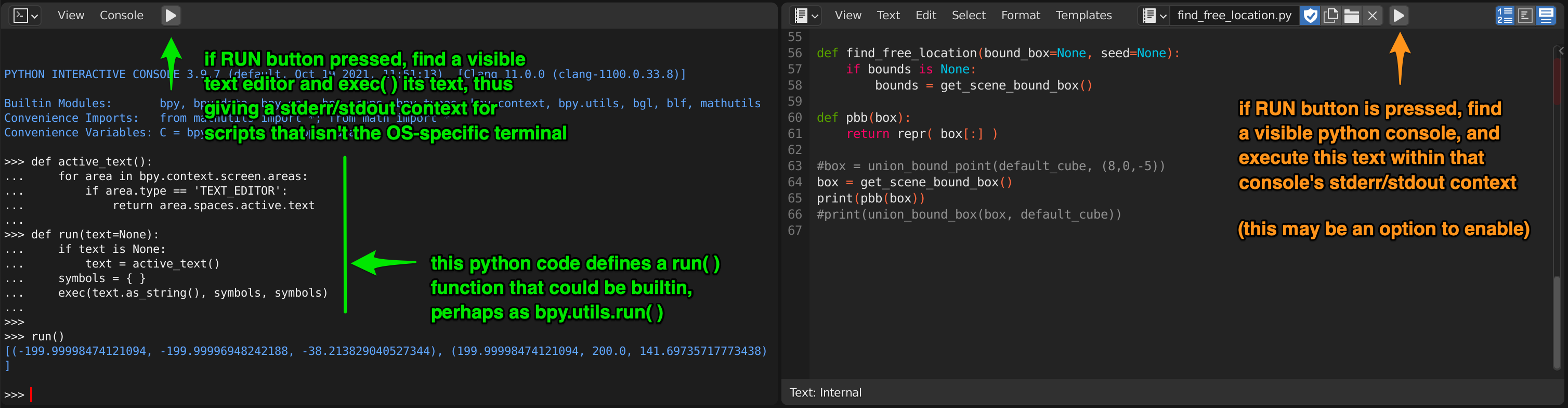
I suggest that the two views work with more cooperation. Running from either view type should be possible, and the stdout/stderr context for any print( ) functions should be targeted back to the Python Console where it is visible and useful.
I show here a short little snippet of Python code which I use currently, and paste into every Python Console that I use, so that I have this functionality. I think something like it could be built-in and exposed as a bpy.ops or bpy.utils symbol for convenience, and tied to the new RUN button pictured on the left toolbar.
This obviously has limitations; if there are two Text Editors visible, if there are two Python Consoles visible, etc., etc., but given the default Scripting screen definition and the typical use-case, I think that it is fine to punt those limitations or give a small error message.
0 Comments