
Outliner: Change 'Selectable' to 'Lock', change icon to padlock and add button by default
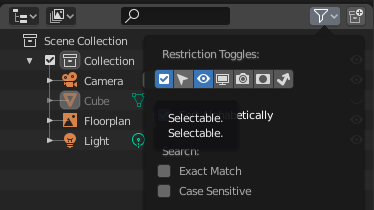
In the Outliner, recommend changing 'Selectable' to 'Lock', changing the icon to a padlock and displaying it by default.
We all accept apps work differently but this is a needless barrier to transitioning to Blender because: 1) 'Selectable' is non-standard across most apps, 2) Locking stuff is something we do all the time. 3) There's no obvious way to lock anything by default in Blender. 4) There's no lock button to add to the Outliner. 5) Searching 'lock', 'lock layer', or 'lock object' in the manual returns nothing obvious. 6) It confirms people's (often unfounded) fear that open source software is weird.
I hope this isn't taken as nasty etc, it's easy to forget the perspective of people switching to Blender (if it's a goal to have people switch that is).
Cheers
6 Comments
I've made several options that may fit. Yet I'm not sure the change is necessary.{attachment screenshot1565957612png}{attachment screenshot1565957627png}{attachment screenshot1565957675png}
Nope - "Selectable" is right form. Because if you switch it - you no longer can select it in viewport, but you can select it in outliner an change object parameters in Properties, etc. . So it's not "Locked" as it mean in other softwares ( locked like some complete lock which not allow do something ) it's just not "Selectable". Do not throw this word "standard" all around and explain anything by just because somewhere it was standard or because you think it was standard.
Maybe it need to change name to Selection Lock to allow peoples who looking for some "Locking" find that this thing can lock something?
You can't lock layer because it's no more layers.
Yes, probably it have sense to show it in outliner by default.
* @IIIFGIII * "Do not throw this word "standard" all around and explain anything by just because somewhere it was standard or because you think it was standard."
Almost all software handles this with lock/unlock so yes, it's very standard. Plus a lock function is a useful function. However, Blender can be different, there's no need for a 'telling off'. I now understand why Blender stubbornly kept right-click select for so long.
I think instead of trying to make blender same as other software or trying to reject other software behavior and adapting blender logic, we can have both, I also need a lock feature in viewport to grey out the object or anything to make its all properties locked, so new lock option can be added I think, ı also want to lock things so I cant mess the file or mistakenly change things in complex projects. So comprimising is best. So selectable name and icon is right in blender, however I also need another extra option with lock icon to lock it fully.
(Open source softwares have weird things sometimes but also sometimes it have better things like UI and no disturbing floating windows, portable use of software, lower and efficient file size for program, Viewport rendering instead of unnecessary IPR windows, more organized viewport and submenus,EEVEE.
Only problem is that they sometimes dont wanna do things in unitive practical way like light groups that once wasnt existed and people keep telling blender can do it with renderlayers or complicated time consuming methods or lack of material browser or problems with assetbrowser)
I also though that box selection should be the default selection mode inside the outliner editor, also because it´s the already default selecting mode for the 3D viewport, file browser and node editors, as well.
Good idea, I though about that too!