
Stay focused on Value box after hitting Enter for a value
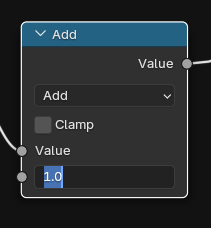
When inputting a value in any value box after hitting Enter stay focused on that box. It would let you fine tune values without clicking to the box every time (The slider sometimes can be too clunky even with shift + slide functionality).
An Extra click for every adjustment is a wasted step and a bit annoying to snipe for the box every adjustment.
This behavior can be observed in Unreal Engine and I believe if people tested the feature out they will see the benefits for easier fine tuning of values and removing an extra step (I don't recall last time where my first entered value was the final, it usually takes few tries to fine tune).
3 Comments
Is there a reason you down voted @Enord? Is there a setting I am missing and this can already be achieved or there is a workaround?
I downvoted your proposal for the simple reason that I personally don't want this feature by default in Blender. I use enter to exit input boxes more than I do my mouse, and I would find it incredibly disrupting if, after I input a value and confirm, I am still stuck in the input box. For instance, if I want to create a node tree that squares a value and then subtracts 2, I will add a power node, set the power value to 2, press enter and then press shift + a right afterwards to add the subtract node. That wouldn't work if I'm stuck in the input box. Or what if I change the render samples, press enter, and then try to scroll down to change the light bounces, but am stopped because you can't scroll while in an input box. Don't get me wrong, I can think of plenty of situations where it would be helpful to stay in the input box, like fine-tuning a shader or GN setup, but I think that there are more cases where enter is more useful as a confirm button than as a preview button.
I would not be opposed whatsoever to an option or separate keybind for this (and because I didn't think about it being an option before, I will retract my downvote from your idea), but as the default or only way to do it, I feel it would create a lot of inefficient hand movements from keyboard to mouse.
P.S. If you leave your mouse over the input, after pressing enter you can press enter again to reenter the input. Not quite as fast, but certainly faster than switching to a mouse and back.
First I want to say thank you for your response and writing a full explanation. Also the suggestion at the end about the mouse hover over I'll definitely try that out.
The way how I would imagine the focus on the value box would only stay if you enter numbers, a shift+a combination would automatically go to the next action or a click away, but you do point out a problem I wasn't considering, what about nodes that have "letter or symbol input" it would break the process there (that's something I didn't think about and it maybe a deal breaker).
I'll look at you solution of hovering over the value it might be the thing I was missing, and thank you again for taking time to write the response.