
CAD Transform addon Integration with blender
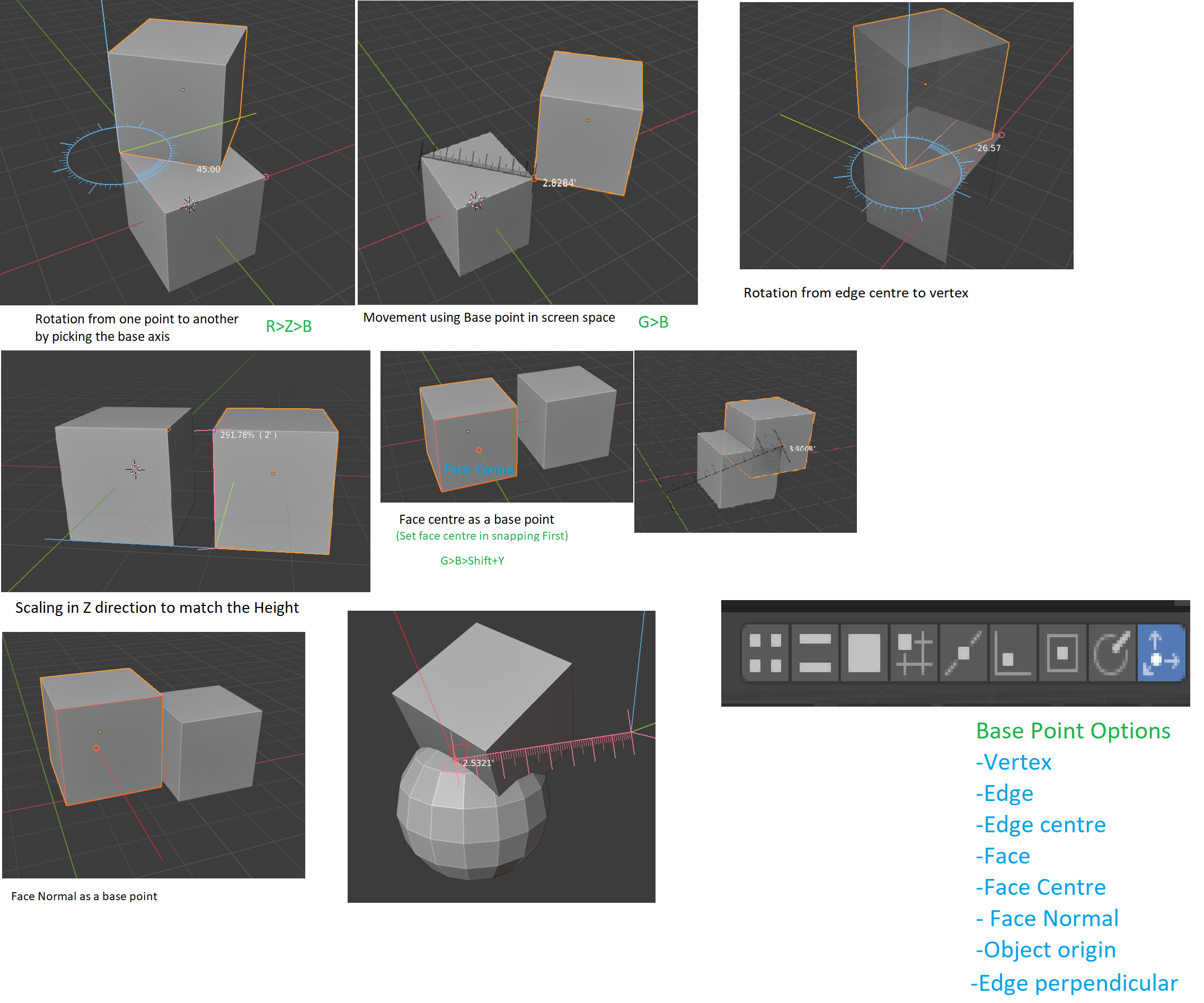
Sometimes, we have to move the object by using base point, in order to achieve that blender should integrate the functionality of CAD transform addon by default. For example: If we press 'G' then 'B'(Base Point) then blender should ask for the base point to move. more combination may be
- G>B>Z to move in Z direction with the base point
- R>B>Z to Rotate along Z-axis with Basepoint
- S>Z>B to Scale in Z-axis with base Point.
the order of key may be different, This suggestion will be helpful specially for Precision modelling, Other users will also find this very helpful,
8 Comments
Addon CAD Transform takes Blender to a whole new level! It's perfect for architects, 3D printing, and making precise models. It works smoothly with Blender, giving artists incredible accuracy. Let's make it a default feature so everyone can create amazing designs easily and beautifully!" 🏗️🖨️📐 Unleash your creativity! 💥
Well said :)
This is truly the best add-on for Blender, I used. I signed up here to bring up this topic for discussions and saw, that here is already such a proposal.
Thank you very much for this add-on, I hope that over time more people will understand what a great tool is actually available to them for free. I would be very happy to have this add-on as a default tool.
Great addon!
Hopefully we will see this add-on in future in default blender tools :)
thanyou for this great
When will Blender 4+ support be available?