
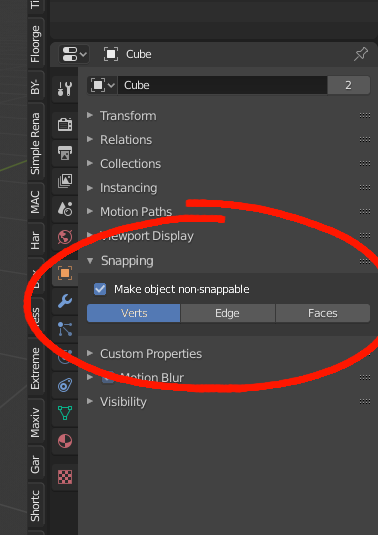
Make object non-snappable option
This proposal would allow to have vertex snapping highlighting for retopology in Blender, here is why this is not possible at the moment, and how to solve this problem.
Currently, here is how we generally configure retopology in Blender: We use a mirror modifier and a shrink wrap modifier on the low poly mesh, with "on cage" option checked for both modifiers. We check "in front" for the low poly mesh, we check backface culling and we can also change the viewport color of the low poly mesh for more clarity. We also use snapping in face mode and auto merge editing.
However, auto merge editing is often quite frustrating to use because it does not highlight the points to merge:

To solve this problem, we can activate vertex snapping in addition to face snapping. Vertex snapping and auto merge editing is a duo that works realy well, that way we can have vertex snapping highlighting as in everything other retopology software.

However, the geometry will also snap on the high poly mesh, which is not wanted.

To solve this problem, a solution would be to make an object non-snappable in the object options, with the possibility to choose if you want to make vertices, points or edges non-snappable :
5 Comments
Try to turn off face snapping and add shrinkwrap modifier instead
* @slayerdude93 * You can't just use only a shrinkwrap modifier to do retopology, otherwise it behaves very strangely. It is necessary to use face snapping in addition to the shrinkwrap modifier so that the mesh sticks correctly to the surface.
I really don't see a problem in using auto merge Or in extruding verteces with snap active instead of closest
 Or just change your mind, in blender it is possible you know :)

* @slayerdude93 * You're right, there are other ways to achieve the same result, but this proposal would allow you to have vertex snapping hilighting when you do retopology, which I find really handy.
* @nejefole * Vertex highlighting and highlighting in general for tons of things would be useful for blender.