
Sound Strips adjust to subframes in VSE
Being able to adjust VSE sound strips to subframes would solve many tedious problems with sound adjustment in video editing.
It is understandable that the image strips and effects are limited to the frames, but the sound works differently and is currently very limited to the defined fps. There is no easy way to fit sounds or music on the timeline precisely.
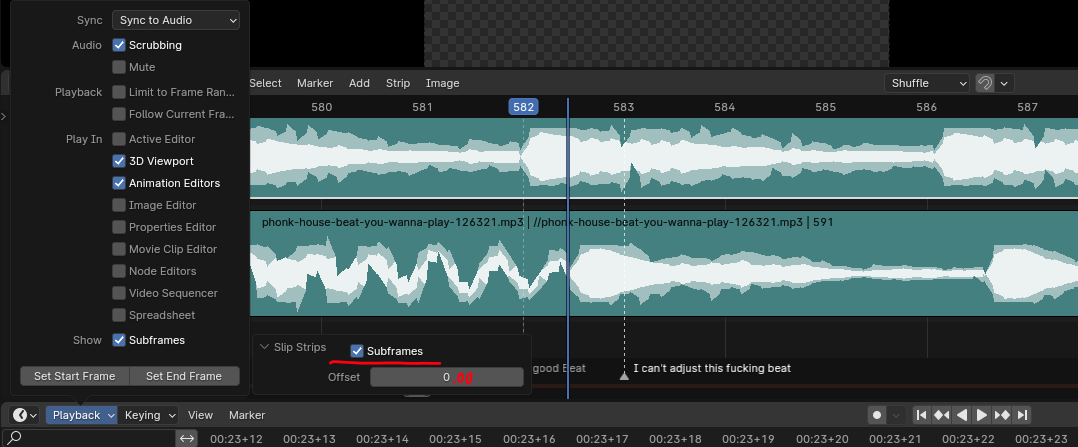
My proposal is that the sound strips are not limited to frames, but that by activating the "Show Subframes" function of the Timeline, the audio strips can be adjusted more precisely.
Other proposals are:
- an option in the sound strip properties to snap to subframes.
- the Retiming Keys can be adjust to subframes.
-
that the "Slip Strip Contents" option can be set to subframes.
5 Comments
Agreed.
I'm normally against most further development of VSE, but being able to adjust sound clips on a sub-frame level is crucial at times to be able to visually sync animation to a soundtrack.
At present, all you can do is get the beat-per-minute as close as you can to FPS, hope it's ok, then render everything, take it into another application, re-add the soundtrack, and see if you were right.
why on earth are you against vse? damn
Because blender should dedicate their attention on 3d, not waste resources on video editing.
This was fixed in the last revision and several versions ago; it can be marked as done. Many thanks to the developers and the community!
yep, and here's how!
imgur.com/a/4XnqpNu