
Option to duplicate shapekeys
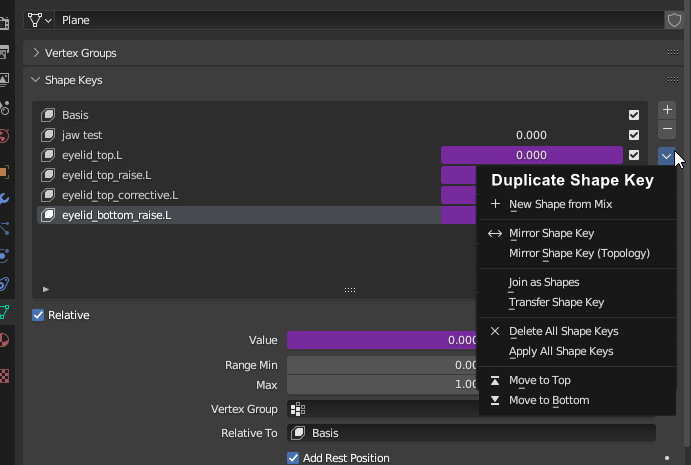 To duplicate a shapekey right now. You need to set the shapekey you want's value to 1, and everything else to 0.
And then press new shape from mix.
To duplicate a shapekey right now. You need to set the shapekey you want's value to 1, and everything else to 0.
And then press new shape from mix.
This is very innefecient if you need to duplicate a lot of stuff. For example you did shapekeys for one side of the face and need to duplicate and mirror them to the other side.
4 Comments
Also why not just be able to interact with the elements of the list directly? Why can't we just click and drag them to arrange in the list, use the RMB contextual menu to do operations on selected elements such as deletion and whatnot, ...
because blender is only after the latest hottest hype, old stuff is rarely fixed or upgraded though (3ds max suffers from the same syndrome ).. if you dont fix it yourself , dont expect anybody else to do it. drag and drop handling exists in blender and could be implemented, but you have to do it yourself.
Done in 4.5: #136785 - Shape Keys: Add "Duplicate Shape Key" operator - blender - Blender Projects
I will add, it's a little easier than i first thought. If you enable shapekey lock. Then you don't have to drag the sliders up and down for every element over and over again.
But a duplicate button as well as a duplicate & mirror button would still be very welcome and more intuitive