
Gimbal problem
Hi, moving a control with Gimbal mode not only moves the axis I want, but the other axes move as well, even if their movement is minimal.
For an animator it can get a little messy.
Greetings
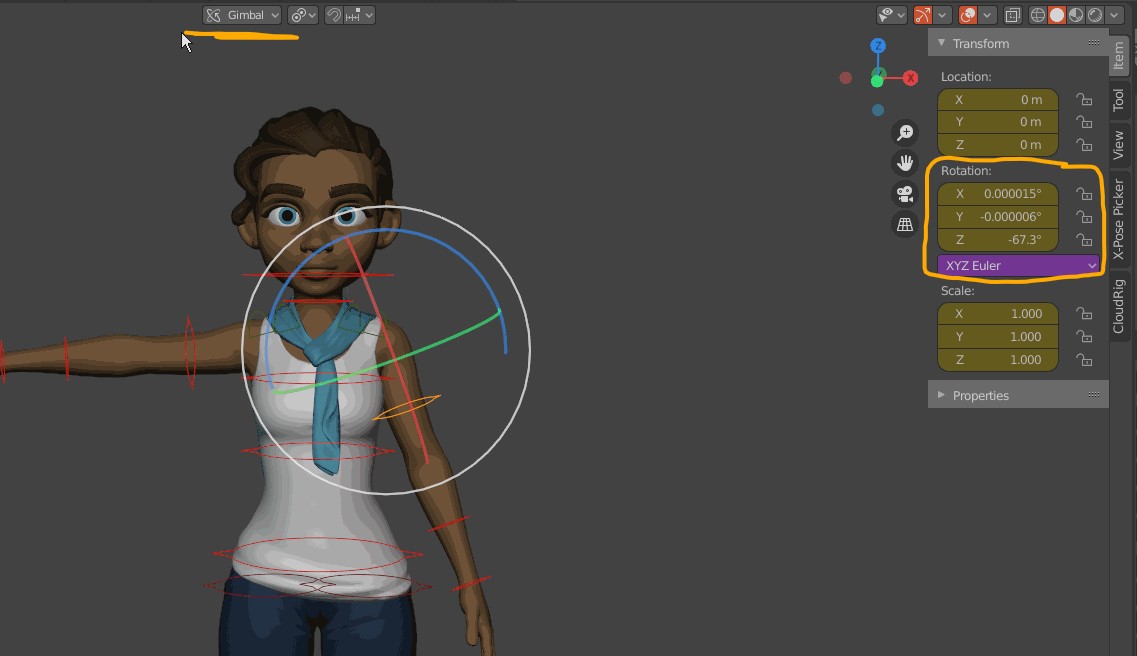
Hi, moving a control with Gimbal mode not only moves the axis I want, but the other axes move as well, even if their movement is minimal.
For an animator it can get a little messy.
Greetings
5 Comments
Not sure it's a feature request, but a bug. At least an abnormal behavior. You should probzbly report this as a bug using the menu Help > Report a bug.
If you do, please keep us updated on the devs answers or give us the ticket link here.
* @-L0Lock- * OK
developer.blender.org/T78209
Thanks
It's not a problem with the gimbal, I think it's with the Blender manipulator. It always happens to me too.
I recommend not using the manipulator, when you are going to animate or make any changes use the transform panel.
have u tried locking other 2 axis and move.
* @dhruvinpatel743 * The rig won't let me lock the axles, it wouldn't be the best solution anyway