
Preset Management (import/export of presets for sharing)
I'm slowly making inroads convincing game teams I work with to adopt blender more and more. But an important part of that is having a consistnt workflow for various tasks. In particular, correct fbx settings for asset exports are critical!
Right now, the only two options i know of are: a) take screenshots of your fbx exporter settings b) navigate deep into blender's preferences folders (different on each system) to copy and paste files manually
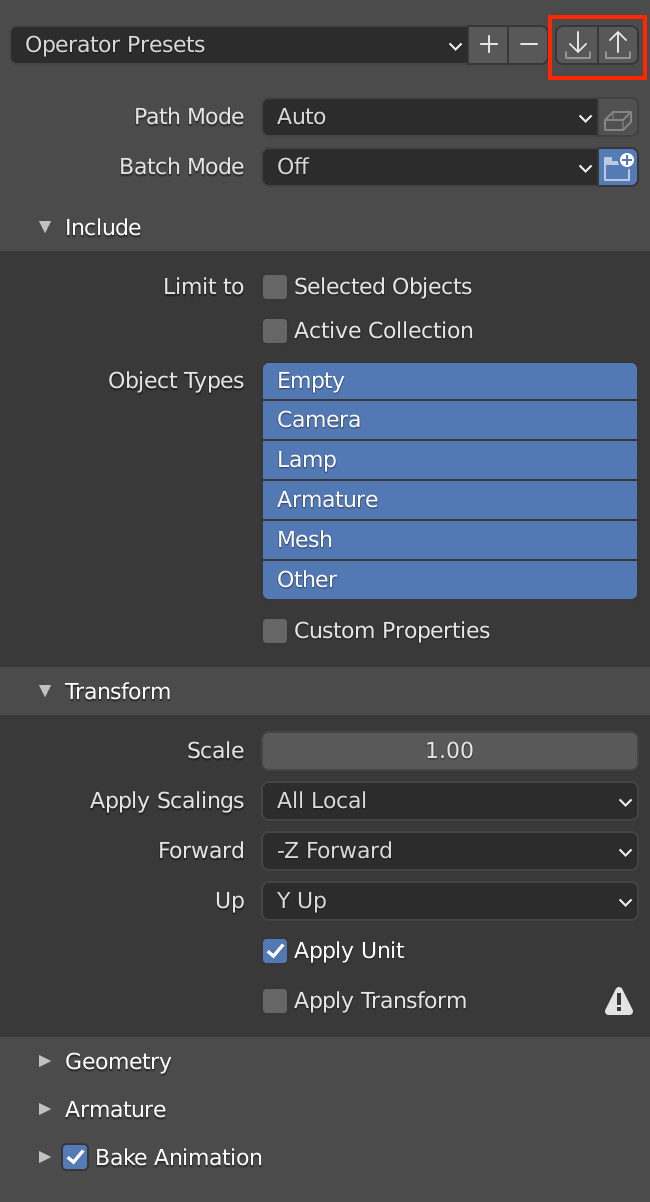
Both of these are pretty clunky for my taste, and my proposal would be to add import/export options to presets.
The export button would launch a file selector dialog allowing the user to save these preset files to easy accessible locations that they can then share with others.
Likewise the import button would then allow another user to select a shared preset file from a file selector dialog and have it copied into the preset folder. This would be an easy to learn process for users that would be be similar to installing add-ons.
I would say the only other complication to this system beyond implementing these simple filesystem copy operations would be some sort of validation check to prevent users from trying to import incorrect files, or presets for the wrong operator (ie fbx import preset for fbx export operator).
Also worth noting, my example is with FBX Import/Export, but this should likely be a global system for anything that uses presets (like cloth/smoke sims etc)
1 Comment
Hi.
You could maybe ask @dpdp to add this possibility in the "PresetterProfessional" add-on: blenderartists.org/t/presetterprofessional/1164735
I think that it would be cool to extend the scope of his add-on to allow to save presets of other settings or of other drop-down menus and panels.