
Provide more professional and easy-to-use nodes for Cycles
It would be wonderful to see Cycles incorporate more specialized nodes, drawing inspiration from features in other renderers—such as the intuitive cutout-style nodes in Arnold, or Octane’s practical distance and edge detection nodes. For photorealistic projects, Cycles still has room to grow in matching the lifelike quality of renderers like Arnold; achieving comparable results often requires extra effort to refine.
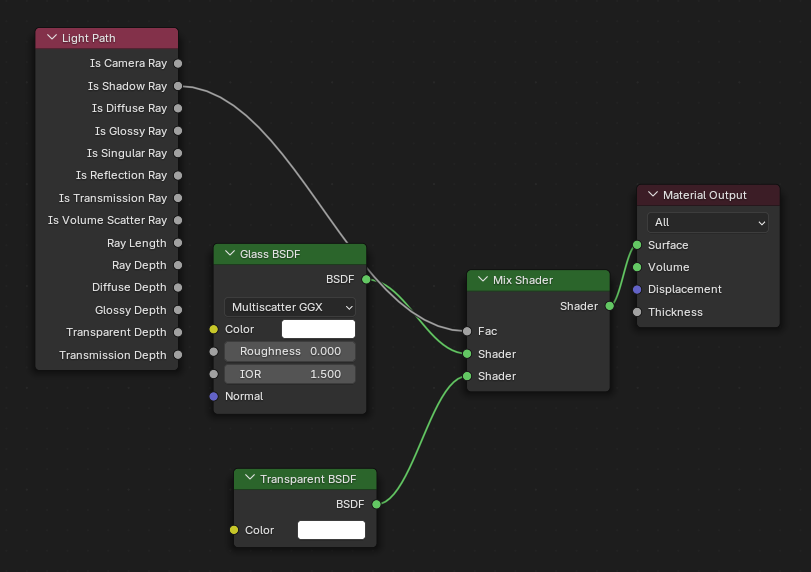
On the topic of glass materials, the current common workflow involves blending glass and transparency nodes (similar to Octane’s convenient fake shadow option for glass). While effective, this setup needs to be reconfigured for each project due to its frequent use. Additionally, Blender offers a rich variety of glass variants, which, while versatile, can make it tricky to identify a go-to solution—posing a learning curve for newcomers.
Expanding the range of nodes for VFX work would also be valuable, with distance nodes being a key example. At present, Cycles faces challenges in keeping pace with commercial renderers in terms of rendering quality: finer adjustment parameters are sometimes missing, and achieving true realism can feel elusive. Even with high-quality textures, the process tends to be less streamlined than in tools like Arnold.
If Cycles can continue to refine these areas—alongside advancements in physics simulation—and build on the ongoing improvements to geometry nodes, it could unlock even more high-caliber commercial projects. This would also help integrate Blender more seamlessly into professional industry pipelines.
6 Comments
I would love to have more shader nodes in blender, but I would like to discuss a few points of your proposal.
Firstly I don't agree with you about these being for Cycles. I hope that, if possible, all future shader nodes should be implemented in both Cycles and EEVEE. I also really hope that the some of current exclusives that are possible to port (like anisotropy which was even in the old PBR branch but never made it to EEVEE formal) will be ported soon.
Regarding Arnold, Blender's principled BSDF is based on OpenPBR and should be practically identical to the Arnold standard surface. From looking at the docs, most other shaders seem similar to the blender equivalent, or else are approximatable in blender (except that awesome looking toon shader or the cutouts that you mentioned). I've never personally used Arnold however, so maybe there are some other features that I don't know about that you could tell me about or could be split off into separate feature requests?
About glass, I don't understand what you mean about there being many options. As far as I know, there is only the glass bsdf and the principled bsdf with transmission. In my experience, the best glass shader is just a glass shader (especially if my pr gets merged), but if you need to reuse your custom one you can just mark it as a asset and reuse it wherever you want to.
Distance nodes will probably not be added to shaders because of how easy it is to do in geometry nodes (just a proximity node), and edge detection is pretty easy with a bevel node dot producted to a normal node, or in geometry nodes outputting the unsigned edge angle.
It would be awesome for shading to be expanded in blender, so if I misunderstood you at all, or if you want to elaborate or explain something, please comment and tell me.
Let me explain. In daily work, we often handle interior rendering scenes. If we use regular glass materials, HDRI light can’t actually penetrate smoothly. So basically, every time we have to use the "Is Shadow" option in the Light Path node to mix glass and transparency. This situation also occurs in some product renderings: when applying glass nodes to products, the black edges are often very severe, making the glass look dull. The solution here is similar to the one mentioned above. For some specific glass objects, like glass blocks, if the shading along the Z-axis is correct, the XY-axis often tends to have black edges. However, real glass would appear white when the normal faces the XY-axis, so this feels inconsistent. My usual approach is to separate the areas where normals face the XY-axis and handle them individually. What I’m really getting at is that Blender’s Glass BSDF could actually have built-in options for common light penetration scenarios, because this need is extremely frequent. Even when using an asset library, it still feels cumbersome—especially for beginners. Having to mix various light path options to achieve relatively realistic glass transparency creates a somewhat high barrier to use. Additionally, while it’s possible to create effects similar to a distance node using Geometry Nodes (and I do use this method), there’s an issue: the distance output from Geometry Nodes is stored as a value attribute in point, edge, or face domains. When used in shaders, this results in grayscale values based on points, lines, or faces. For example, if I have two intersecting cubes and want to identify the intersecting boundary domain, the number of points on a cube is very small. So after being transferred via Geometry Nodes, the output grayscale map is actually not smooth, since only a few points store the data. In Octane, the distance node is very smooth, which makes it very easy to create laser scanning effects. But in Blender, even with Geometry Nodes, we can only achieve a relatively approximate result.
The cause of the black spots in your glass is that when a light ray reaches the maximum number of glossy or transmission bounces that you set in the light path settings, it just returns black. I won't even pretend I understand how your fix works, it's much simpler to just increase glossy and/or transmission bounces, or switch to a transparent shader on the last bounce (see picture below).
A per pixel distance shader would look a lot better, but I suppose for it to work shaders would then have to have object info nodes inside them (which would also be great for AO and similar effects), so there probably isn't much chance of getting it soon. If only there were a way to upsample mesh attributes in the shader editor, or even just change the interpolation mode to cubic.
I have never seen the method you showed me before, and I will try the approach you suggested. In fact, what I proposed is based on this idea. Currently, with shaders, you can achieve the desired effect if you can "correctly" blend various nodes. However, if someone has never seen the "correct" way to handle it, they can easily feel frustrated, thinking that even creating a simple glass material is very difficult. This is not just my personal opinion—quite a few designers I know have also reported this issue. That’s why we usually adopt methods like this. I wonder if we might all still be using the wrong approaches. I mentioned Arnold Renderer earlier because, among all the renderers I have worked with so far, Arnold basically offers the best user experience for creating sufficiently realistic works. With simple settings, you can achieve realistic and aesthetically pleasing results. Octane is another option; although it doesn’t match Arnold in terms of realism, it is simple and easy to use. I apologize if this request sounds too demanding—wanting both powerful functionality and user-friendliness. Refractive materials like glass have troubled me for many years. Even after watching numerous YouTube tutorials, I only learned a variety of methods for handling glass materials, but I’m not really sure if any of them are "correct." That’s why I mentioned earlier that I have created many glass variant assets.
I have attached the settings of our commonly used glass shader to the idea.
Let me add something. In my job duties, for the sake of visual aesthetics, I need to separately adjust the reflection color, reflection weight, reflection roughness, refraction color, refraction weight, refraction roughness, reflection light bounce count, and refraction light bounce count of a certain glass. This requires a highly flexible glass BSDF. I did create a glass BSDF node group myself, but it wasn't perfect and was quite complicated. I think the current glass shader in Cycles is sufficient in terms of visual effects, but it lags behind other mainstream renderers in terms of functionality and flexibility.
@lii, @摩尼穹, yeah, Blender's design of having almost exclusively basic building block nodes does give it a steep learning curve, although awesome things can be created if you know how. Luckily built in node group assets and online assets on the extensions platform are being developed, so someday soon normal people won't have to learn such a difficult system and will just have to drag and drop, or they might even just have this kind of thing in default Blender.