
Real Time background preview for vector mapping (Image Textures Adjustment)
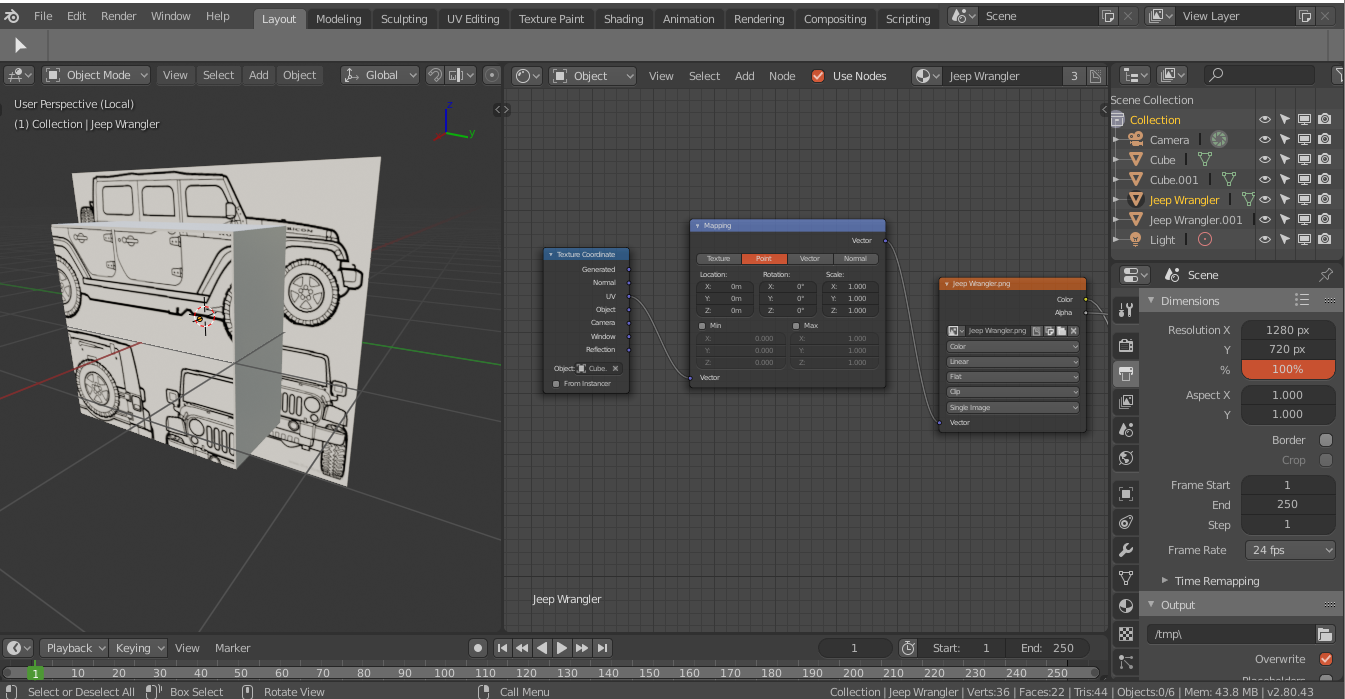
Hello. I would like to request a feature where you can actually see what is going on with the image texture that you are applying to an object when you are resizing or editing its vector properties.
Sometimes it is hard to see what is going on with the image because it is either too stretched or what not.
This is just a rough Idea of what feature I was thinking but maybe the developers can think a better way to do it.
Thanks.
4 Comments
This should already be possible. What specifically isn't working for you?
* @Jason van Gumster * Just a slight improvement where the texture preview is not only available in the object which is the cube and the plane somewhat represents the extended preview. In this situation the plane is not an object but a feature.
* @johnpdelacruz26 * Ah. I think I follow. You're looking to have some kind of "overscan" (to borrow an old TV production term) visualization for textures.
Would that not be useful in all situations... not just when there's a mapping node involved? How would users toggle this visualization on and off?
* @Jason van Gumster * A great start would be, being a part of a node like the mapping node where you just enable/disable it.
Another Idea would be like a small preview good enough to see what's happening like the normal node is doing but with a slightly larger dimension. This will likely result of not needing the viewport as a preview tool anymore.