
Add "remove surface” option to the Boolean Modifier
It would be useful to have a feature to remove the parts of a mesh that are inside of another mesh. The boolean modifier can remove intersected volume of two meshes but has no option to leave the new volume open (removing the surfaces at the intersection of the two meshes). If the boolean modifier is not the best place to add such feature perhaps a different modifier that can do partitioning of one mesh by means of another mesh (e.g. cutting a mesh in two meshes via plane etc)
7 Comments
This feature would be super easy to implement, and I often need this kind of operation.
Two simple & non obstructive ways to implement it without causing UI confusion
Maybe there is a better naming convention than "original" and "cutting" mesh, but the placement of the toggles or vertex group outputs fits in line with existing modifiers.
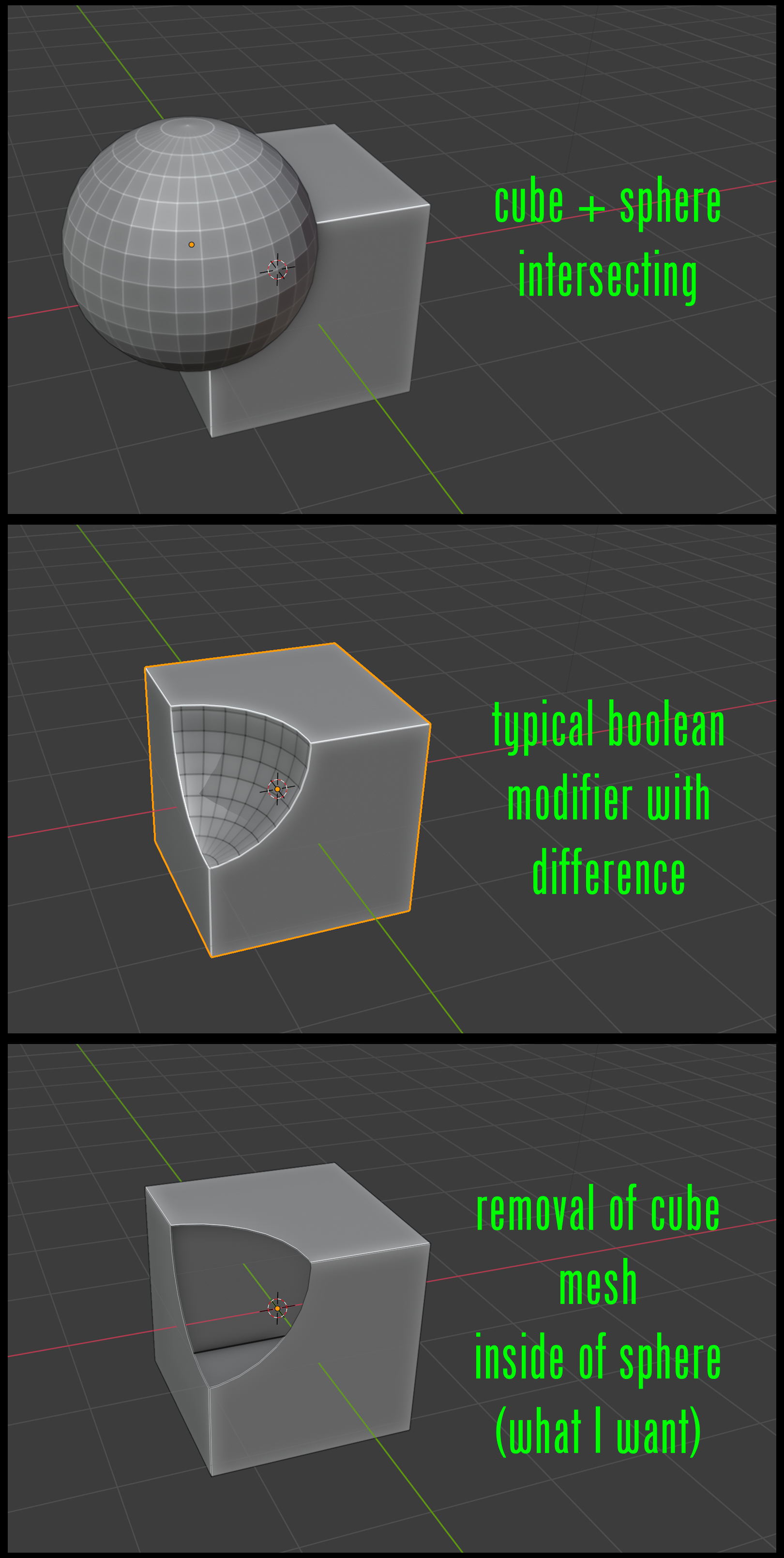
Thanks, the picture makes it clear. It would be easy to add such an option. As ever, a challenge is the pull and tug between the two opposing desires (1) give as much choice in functionality as users wants, vs (2) Avoid a proliferation of options that can lead to a confusing, hard-to-use interface. Yes, this one option is fine, but there are other requests like it too, such as providing more of the knife-like-boolean options that are available in edit mode in the modifier. I will keep your request in mind however.
Similar options are available in the solidify modifier (output vertex groups for separate shell/rim), so this would more or less bring boolean output options in-line with things seen elsewhere in the UI
The Boolean modifier really deserves more love.
I still can't stand having to open Houdini Educational just to do Boolean operations between surface and volumetric meshes (or vice versa or any combination of the two)...
Hello Marius! Did you find finally a way to make this??? Thank you. I need this feature
I don't understand what you are getting at here. What does "removing the surfaces at the intersection of the two meshes" mean? The intersection is generally a set of edges, not a surface. Maybe a picture would help.
* @Howard Trickey * what I want is: if two meshes intersect, remove the part of one mesh that is inside of the other mesh. (see my added illustration). What the typical boolean modifier does is: it finds the edge intersection between the two meshes and removes the part of the mesh1 that is inside of the mesh2 and then adds the part of the mesh2 that is inside of the mesh1 (the spherical part of the intersection shown in my illustration). My suggestion was to have an option added to the boolean modifier to NOT add the mesh2 mesh to the final result.. thus leaving mesh1 open.