
Toggle Function for Output(Camera、Compositor、VSE)
I noticed in the new feature 5.2 that there is a checkbox for the output path.
When it is turned off, the 3D camera rendering results will not be output while the final Compositing result is generated if there is File Output Node.
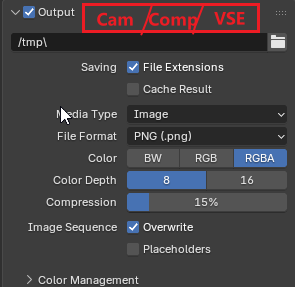
This is great and also made me notice that Blender's rendering output includes three aspects: camera rendering, composite output, and video editing output.
The Issue of the first two have been solved, but I found that it is necessary to test to clearly distinguish between camera rendering and video editing output. That is, if there are any strips in the sequence editor, then the editing result will be output, not 3D Camera Renders.
This can cause some misunderstandings. When some users are processing 3D camera rendering and video editing results Together, confusion will arise. Although Blender Provide a new Scene for Edit,but Issue will arise if some user put strips in vse while Doing Animation with Video Ref(I Prefer VSE Edit as Animation Ref Rather than Camera BG Image as Reference)
Therefore, I suggest adding a Check Box or a status toggle bar in the Output panel to select whether to output the camera or the video editing result.
If the camera is selected, then even if there are materials in the VSE, the video editing result will not be output. If the video editing result is selected, then the camera rendering result will not be output. This operation logic is very intuitive and solves the problem I mentioned.
If There are No Strips in VSE ,but it turn to VSE output,There will be a notice“There are No Strips In Vse,you Can Render 3D Camera Instand”
1 Comment
There is the 'Post Processing' panel right below, where you can disable compositing or sequencer. Is that the same functionality you're looking for?