
Improve Bezier Curve Display
Suggestions on how to improve the
Blender Bezier Curve Display
.
Purely cosmetic changes
that improve the
polish level
and the
user experience
only.

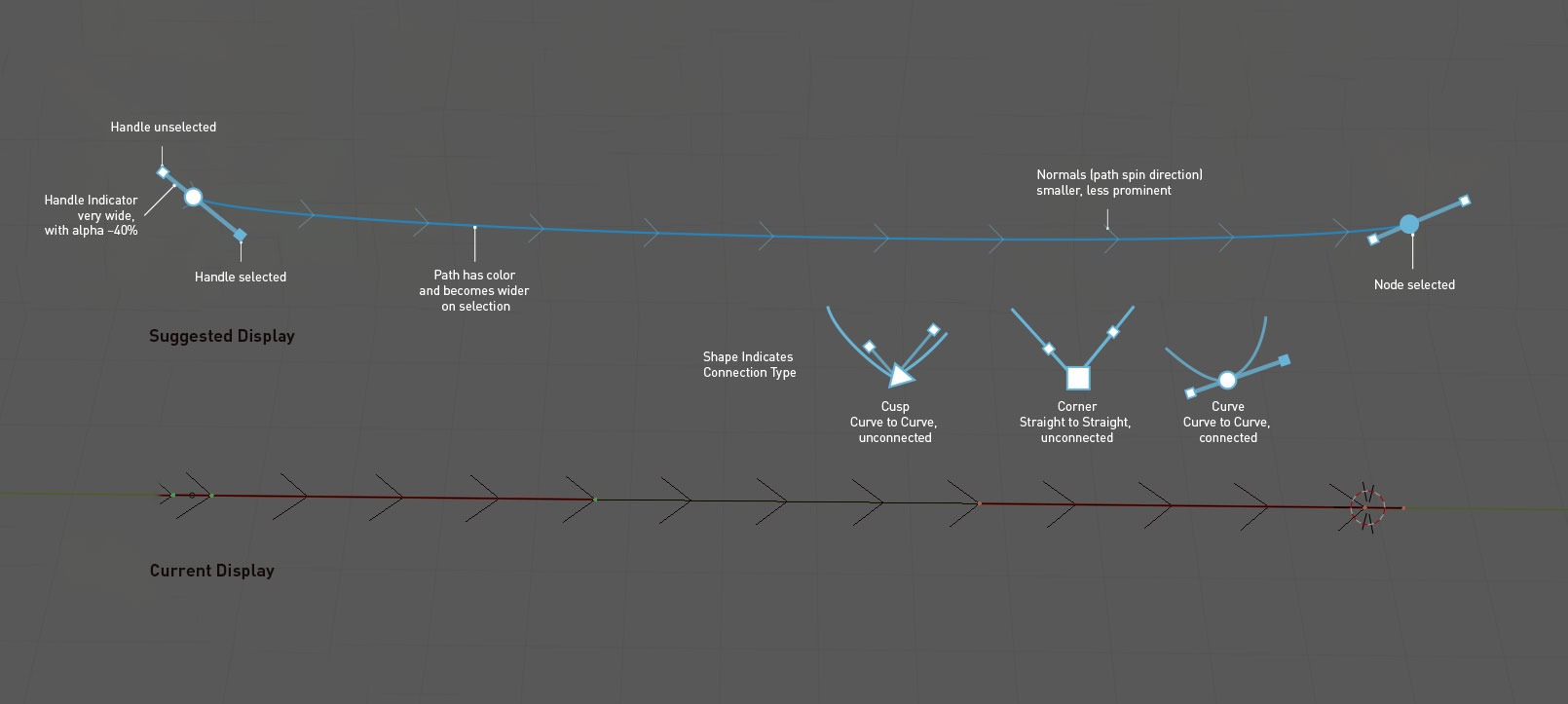
- Increase the width of the Bezier Paths . They are way too thin and hard to see at the moment.
- Tone down the "Normals" (aka path spin direction), at the moment they are drawn with the same weight as the path, that is just too much importance.
- Make Handles wider than Path and give them a 50% alpha value, so they never obscure the Path
- Make the Nodes a different size from the Handles , so they cannot easily be confused.
- Use Point Shape to communicate Handle Types (Aligned, Free, Vector, etc.)
- Increase contrast between selected and unselected Nodes .
15 Comments
Looks very nice, but I would remove the normals completely (or at least by default), they are just ugly and the direction could be also shown with a gradient.
* @danielpaulus90 * Please don't use a gradient. It's not nearly as clear as an arrow. It's easy to forget which way is the positive direction on an arbitrary gradient.
* @danielpaulus90 * youtube.com/watch
Having a color change to represent depth would be also great. If you're working with a curve around an object you can't know which part is which without testing.
If you take a look at the way you can make a difference between handles and points in the Graph-editor, you can see that some of the code is already somewhere in a way :)
Under Preferences - Themes - Graph editor you can find "Vertex size" en "Handle Vertex size". It already helps alot to change the size there.
Unfortunatly, this setting is not to be found in the Viewport settings. It would be a start already if we also could have those settings from Graph editor in the Viewport settings.
But the example you gave here would really be a big improvement on this subject. I'm all for this!
this guy is doing wonderful work with curves. watch this youtube.com/watch
An easyer way to find and select curve when there is a high density polygon. Different color, visible on top or thicker curves.
* @fgosselin * If you can give me an example screenshot, I can attach it to the proposal. Can send you a workfile too, if you want to do your own mockup.
* @der.blindfisch * yes I'll find some time to do something for sure
Hi @der.blindisch Have you tried the Bezier Utilities addon ?
blenderartists.org/t/flexi-bezier-tool/1168179
github.com/Shriinivas/blenderbezierutils
* @ xan2622 * I saw it and it is a good addon, I still wished the options for styling the beziers were just part of the regular UI customization set.
Great suggestions, as some have noted, it is really a struggle for me, working with highly dense curves especially when, there is no indication of which control point is behind the mesh.
I reported this. some devs see no problems with curve visibility...^^ but thanks to show it better. with an object behind it becomes very very difficult to see.
Oh, man I wish! That's a good example you posted.
This would be great.