
Chunk based rendering for low-VRAM GPU and super-resolution rendering
I think this feature is very important to render it in high resolution with less of GPU Memory in the GPU (low VRAM GPUs like RTX 3050 laptop, and even the worse is GT 1030) AND super-resolution rendering (RTX 5090 8K rendering) without buying more high end GPU that can costly, but I want to keep GPU rendering usable whereas the render tiles will be subdivided, so it means:
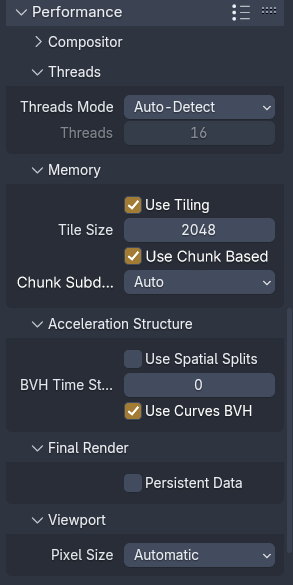
Options: Auto, 1:1, 2:2, 4:4, 8:8
And yeah this is will make it possible to render high resolution in Cycles with low-VRAM GPU (like complex scene in 4K rendering but GPU only has 4GB of VRAM) which is important.
Not only that, it will make it possible to render at 8K in super complex scene with high-end GPU without crashes and it will make render faster for some GPU with lack of GPU Memory.
How this is works?
- Defined by user or auto in Performance > Memory
- Press render
- If Blender detects the scene is outside of GPU Memory (like CUDA Error: Out of GPU Memory), then the render will be subdivided
- Then it will render with chunk based without compromising of quality. Inside chunk based rendering, tile rendering still works.
- Once this chunk has render completedly, then it will denoise, then it will freed-up the VRAM and the next chunk will be rendered, VRAM reallocation happen.
Why this is important? Since tiling can help, but it will not much help due to VRAM constraint. So chunked rendering is like super changer since it can allocate and reallocate the VRAM but smaller and per sequence.
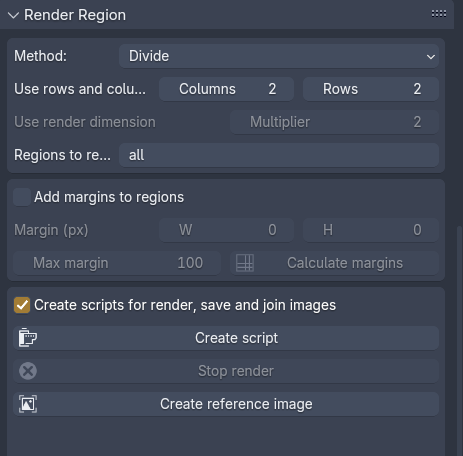
And this is example (from addon): extensions.blender.org/add-ons/control-render-regions/
5 Comments
I've had issues rendering things with absurbly high resolutions and getting crashes from low VRAM too, I ended up doing this manually using camera shift and stitching the images together in post so having this built in would be great
also breaking the world into chunks on the XY axis for really large scenes and having it automatically merged would be good for both VRAM and avoiding floating point errors.
I'm not very clear on what, if any, difference there is between a "chunk" and a "tile".
The optimization you may be thinking of is having the final full render image buffer be preserved in CPU RAM, while the GPU only has a small tile to render onto. I assume Blender does this already, because my machine seems to be very able to render a 12000x12000 image with a GPU that has only 8GB VRAM, but only if I enable tiling and don't set the tile size too big. In a system monitor, VRAM usage doesn't even go above 100MB if I keep tile size to something like 128 while rendering the 12000x12000 image.
Usually the biggest use of VRAM when rendering a scene, unfortunately, is the scene itself. And you can't really chunk that.
Something like this would be cool, but it can't be done without some kind of a significant rework to how Cycles works, and even then there might be snags that make it impossible.
Even light paths for a singular pixel would need to have full knowledge of the scene, essentially. In that one pixel, the paths could go through a volume, get scattered in a random direction, hit an entirely different far off surface within the scene, get reflected off of that onto a background prop that's behind the camera and 4 miles away.
This essentially means that the background prop behind the camera 4 miles away must be loaded into VRAM for the GPU to be able to account for it while rendering.
Each trace in such a pixel would have an entirely different path. Some would pass through the volume and hit a surface with a diffuse component, and scatter from that too.
So yeah, you need to know the whole scene even if you're doing a 1x1 render.
Have you tried optimizing your scene instead? One thing you could try, if available to you, is to put the far away background elements into a different view layer and compositing it in below a view layer for your main scene. View layers are treated as separate renders, and so stuff not visible from the current layer is not loaded.
Yhea, the image tiling is just spliting the GPU allocation for the final raster, but each texture is allocated with it's full size (a sub 1pixel triangle with a 16k texture will still allow 16k texture to vram mike you said) what is really needed is a mip-map system
well a per bvh sampling of the texture (just like what is already done by raster engine when loading mips, but on a ram level here (instead of vram).
One thing that could be done is also per amount of sampling, compute a texel size to deload/reload from the bvh atlas on a virtual memory bus.
A mipmap system would still need to have the original full texture in memory, plus all the mipmap levels. Unless you mean just downsampling input textures to not exceed a specified size, which can be done by setting a texture limit in the "Simplify" render settings.
Selectively loading only downsampled versions of textures based on their closest appearance to the camera could be a usable compromise approach, but could still run into issues. For example, a scene may contain a bent mirror or a refracting lens that magnifies something tiny/faraway to occupy half the view in the final big image, and you'd need to either have a complex system that tries to account for these kinds of scenarios, or have the user pick and choose which textures should be allowed to be downsampled or something.